M

Michael A Putra

2
Workflows

Workflows by Michael A Putra

Workflow preview: Personalize resumes & cover letters with AI, GitHub Pages and Google Drive
Free advanced

Personalize resumes & cover letters with AI, GitHub Pages and Google Drive

# 🧠 Automated Resume & Cover Letter Generator This project is an **automation workflow** that generates a **personalized resume and cover letter** for each job listing. --- ## 🚀 Features ### **Automated Resume Crafting** - Generates an **HTML resume** from your data. - Hosts it live on **GitHub Pages**. - Converts it to **PDF** using **Gotenberg** and saves it to **Google Drive**. ### **Automated Cover Letter Generation** - Uses an **LLM** to create a **tailored cover letter** for each job listing. ### **Simple Input Database Agent** - Stores your experience in an **n8n Data Table** with the following fields: `role`, `summary`, `task`, `skills`, `tools`, `industry`. - The main agent pulls this data using **RAG (Retrieval-Augmented Generation)** to personalize the outputs. ### **One-Time GitHub Setup** - Initializes a **blank GitHub repository** to host HTML files online, allowing **Gotenberg** to access and convert them. ## 🧩 Tech Stack - **Gotenberg** – Converts HTML to PDF - **GitHub Pages** – Hosts live HTML files - **n8n** – Handles data tables and workflow automation - **LLM (OpenAI / Cohere / etc.)** – Generates cover letters - **Google Drive** – Stores the final PDFs --- ## ⚙️ Installation & Setup ### 1. Create a GitHub Repository - This repo will host your HTML resume through **GitHub Pages**. ### 2. Set the Webhook URL - In the `notify-n8n.yml` file, replace: role | summary | task | skills | tools | industry ### 3. Create the n8n Data Table Add the following columns: role | summary | task | skills | tools | industry ### 4. Create a Google Spreadsheet - Add these columns: company | cover_letter | resume ## 5. Install Gotenberg - Follow the installation instructions on the **Gotenberg GitHub repository**: [https://github.com/thecodingmachine/gotenberg](https://github.com/thecodingmachine/gotenberg) ### 6. Customize the HTML Template - Modify the HTML resume to your liking. - You can use an **LLM** to locate and edit specific sections. ### 7. Add Authentication and Link Your GitHub Repo - Ensure your workflow has permission to **push updates** to your GitHub Pages branch. ### 8. Run the Workflow - Once everything is connected, trigger the workflow to automatically generate and save **personalized resumes and cover letters**. ## 📝 How to Use 1. **Copy and paste the job listing description** into the Telegram bot. 2. **Wait for the "Done" notification** before submitting another job. - Do **not** use the bot again until the notification appears. - The process usually takes a few minutes to complete. --- ## ✅ Notes This workflow is designed to **save time and personalize your job applications** efficiently. By combining n8n automation, LLMs, and open-source tools like Gotenberg, you can maintain full control over your data while generating high-quality resumes and cover letters for every job opportunity.

M
Michael A Putra
Document Extraction
28 Oct 2025
3708
0
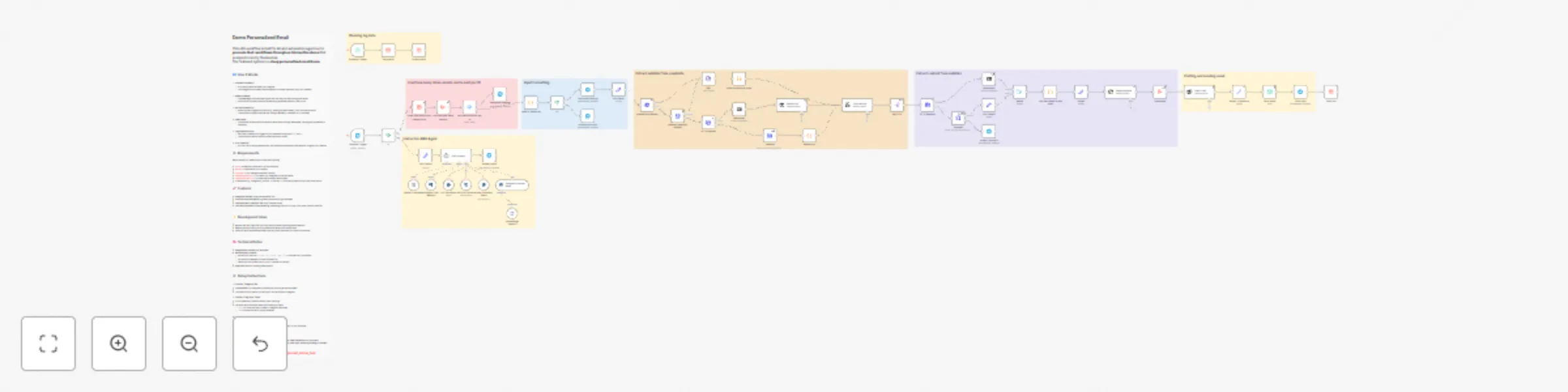
Workflow preview: Create personalized email outreach with AI, Telegram bot & website scraping
Free advanced

Create personalized email outreach with AI, Telegram bot & website scraping

# Demo Personalized Email This n8n workflow is built for AI and automation agencies to **promote their workflows through an interactive demo** that prospects can try themselves. The featured system is a **deep personalized email demo**. --- ## 🔄 How It Works 1. **Prospect Interaction** - A prospect starts the demo via Telegram. - The Telegram bot (created with BotFather) connects directly to your n8n instance. 2. **Demo Guidance** - The **RAG agent** and **instructor** guide the user step-by-step through the demo. - Instructions and responses are dynamically generated based on user input. 3. **Workflow Execution** - When the user triggers an action (e.g., testing the email demo), n8n runs the workflow. - The workflow collects website data using **Crawl4AI** or standard HTTP requests. 4. **Email Demo** - The system personalizes and sends a demo email through **SparkPost**, showing the automation’s capability. 5. **Logging and Control** - Each user interaction is logged in your database using their `name` and `id`. - The workflow checks limits to prevent misuse or spam. 6. **Error Handling** - If a low-CPU scraping method fails, the workflow automatically escalates to a higher-CPU method. ## ⚙️ Requirements Before setting up, make sure you have the following: - [**n8n**](https://n8n.io/) — Automation platform to run the workflow - [**Docker**](https://www.docker.com/) — Required to run Crawl4AI - [**Crawl4AI**](https://github.com/unclecode/crawl4ai) — For intelligent website crawling - [**Telegram Account**](https://t.me/BotFather) — To create your Telegram bot via BotFather - [**SparkPost Account**](https://www.sparkpost.com/) — To send personalized demo emails - A database (e.g., PostgreSQL, MySQL, or SQLite) — To store log data such as user name and ID ## 🚀 Features - **Telegram interface** using the BotFather API - **Instructor and RAG agent** to guide prospects through the demo - **Flow generation limits per user ID** to prevent abuse - **Low-cost yet powerful web scraping**, escalating from low- to high-CPU flows if earlier ones fail --- ## 💡 Development Ideas - Replace the RAG logic with your own query-answering and guidance method - Remove the flow limit if you’re confident the demo can’t be misused - Swap the personalized email demo with any other workflow you want to showcase --- ## 🧠 Technical Notes - **Telegram bot** created with BotFather - **Website crawl process:** - Extract sub-links via `/sitemap.xml`, `sitemap_index.xml`, or standard HTTP requests - Fall back to **Crawl4AI** if normal requests fail - Fetch sub-link content via HTTPS or Crawl4AI as backup - **SparkPost** used for sending demo emails --- ## ⚙️ Setup Instructions ### 1. Create a Telegram Bot - Use **BotFather** on Telegram to create your bot and get the **API token**. - This token will be used to connect your n8n workflow to Telegram. ### 2. Create a Log Data Table - In your database, create a table to store user logs. - The table must include at least the following columns: - `name` — to store the user’s name or Telegram username. - `id` — to store the user’s unique identifier. ### 3. Install Crawl4AI with Docker - Follow the installation guide from the official repository: 👉 [https://github.com/unclecode/crawl4ai](https://github.com/unclecode/crawl4ai) - **Crawl4AI** will handle website crawling and content extraction in your workflow. --- ## 📦 Notes This setup is optimized for **low cost**, **easy scalability**, and **real-time interaction** with prospects. You can customize each component — **Telegram bot behavior**, **RAG logic**, **scraping strategy**, and **email workflow** — to fit your agency’s demo needs. 👉 You can try the live demo here: [**@email_demo_bot**](https://t.me/email_demo_bot) ---

M
Michael A Putra
Lead Nurturing
25 Oct 2025
433
0