Create nested data processing loops using n8n sub-workflows
Workflow preview

$20/month : Unlimited workflows
2500 executions/month

THE #1 IN WEB SCRAPING
Scrape any website without limits
HOSTINGER  Early Deal
DISCOUNT 20% Try free
Early DealDISCOUNT 20%
Self-hosted n8n
Unlimited workflows - from $4.99/mo

#1 hub for scraping, AI & automation
6000+ actors - $5 credits/mo
Important notice
This workflow is provided as-is. Please review and test before using in production.
Overview
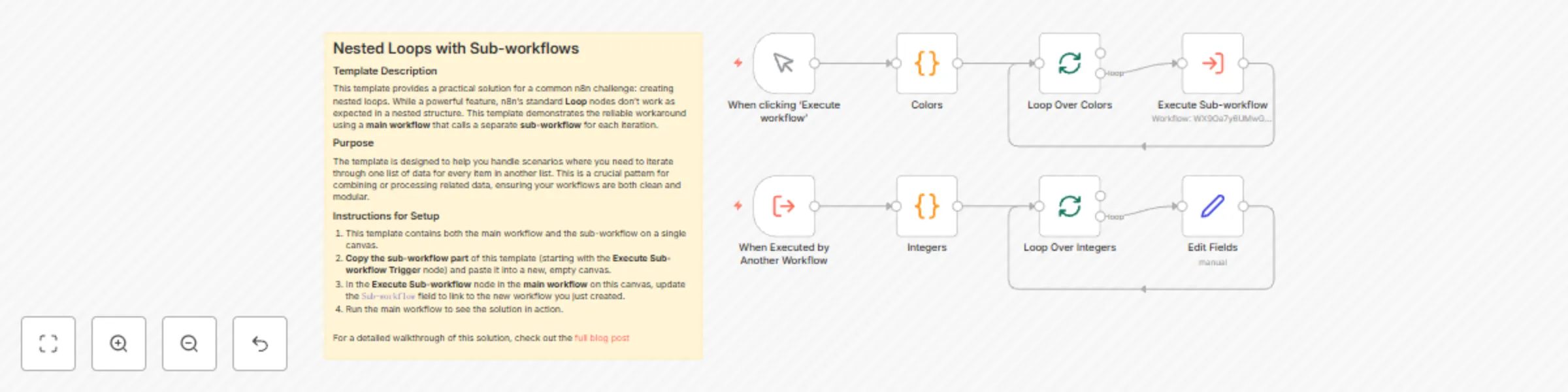
Nested Loops with Sub-workflows
Template Description
This template provides a practical solution for a common n8n challenge: creating nested loops. While a powerful feature, n8n's standard Loop nodes don't work as expected in a nested structure. This template demonstrates the reliable workaround using a main workflow that calls a separate sub-workflow for each iteration.
Purpose
The template is designed to help you handle scenarios where you need to iterate through one list of data for every item in another list. This is a crucial pattern for combining or processing related data, ensuring your workflows are both clean and modular.
Instructions for Setup
- This template contains both the main workflow and the sub-workflow on a single canvas.
- Copy the sub-workflow part of this template (starting with the Execute Sub-workflow Trigger node) and paste it into a new, empty canvas.
- In the Execute Sub-workflow node in the main workflow on this canvas, update the
Sub-workflowfield to link to the new workflow you just created. - Run the main workflow to see the solution in action.
For a detailed walkthrough of this solution, check out the full blog post