Block 1 - Google Sheets Trigger
- Type / Role
- n8n-nodes-base.googleSheetsTrigger - googleSheetsTrigger
- Config choices
- Version 1


 Early Deal
This workflow is provided as-is. Please review and test before using in production.
Automated Sales Rep Clone Outreach Video and Voice Note for B2B Outbound This workflow automatically transforms new leads from Google Sheets into hyper personalized outreach videos, voice notes, an...
n8n-nodes-base.googlesheetstrigger, @n8n/n8n-nodes-langchain.agent, n8n-nodes-base.perplexitytool, n8n-nodes-base.httprequest, n8n-nodes-base.gmail, n8n-nodes-base.twilio, n8n-nodes-base.code, @n8n/n8n-nodes-langchain.lmchatopenai
This workflow is cataloged by N8N Workflows and links back to its original n8n.io source page by Automate With Marc.
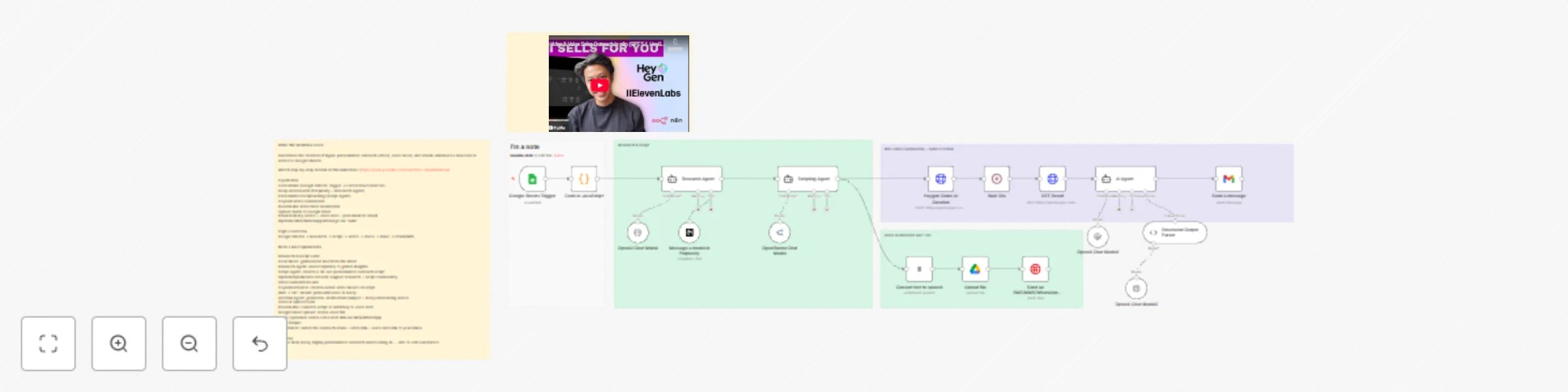
Original n8n.io sourceThis workflow automatically transforms new leads from Google Sheets into hyper-personalized outreach videos, voice notes, and emails using AI research, scriptwriting, video cloning, and voice generation. Perfect for SDRs, founders, and agencies who want to scale outreach without sacrificing personalization.
🎥 Watch step by step build: https://www.youtube.com/watch?v=q9AAh9zRou4
Whenever a new row is added to your Google Sheets CRM, this workflow:
Reads the new lead (Name, Email, Phone, Company, Industry, LinkedIn URL)
Runs deep research on the person & company using Perplexity
Generates a personalized 30-second outreach script
Creates a cloned-face, AI-generated HeyGen video with the script
Creates an ElevenLabs voice note using the same personalized insights
Uploads the audio file to Google Drive
Sends an email to yourself containing:
Outreach subject line
Email body
Personalized video link
Personalized voice note link
(Optional) Sends a WhatsApp/SMS/MMS message via Twilio with the files or links
This template builds a complete AI-powered outbound engine—research, video, voice note, and email—fully automated.
Turns manual outbound into a hands-free, 360° AI workflow
Personalized video outreach dramatically increases reply rates
Consistent research quality for every lead
SDRs save hours per day on manual prep
Perfect for:
Influencer agencies
SaaS outbound teams
Founders doing cold outreach
Recruitment agencies
Real estate & service businesses
Requirements
Before running this workflow, connect:
Google Sheets OAuth (trigger + CRM sheet)
Perplexity API Key
OpenAI API Key (GPT-5.1, GPT-4.1-mini)
OpenRouter API Key
HeyGen API Key (for video avatar)
ElevenLabs API Key (for voice note)
Google Drive OAuth (for file upload)
Twilio credentials (optional SMS/WhatsApp)
⚠️ All credentials must be added manually after importing. This ensures security and complies with n8n Template Guidelines.
Watches your CRM sheet and fires whenever a new lead row is added.
Ensures only the newly added row continues through the workflow.
Powered by OpenAI + Perplexity
Scrapes professional history, company insights, marketing gaps
Identifies outreach opportunities & triggers
Produces a structured research summary
Writes a natural, human-sounding 30-second outreach script tailored to that exact lead.
Creates a personalized avatar video narrating the script (720×1280).
Generates a custom voice note version of the pitch.
Saves the voice note file for sharing or sending via WhatsApp.
Sends the voice note or video link via SMS/WhatsApp.
Creates a fully structured JSON email including:
Subject line
Personalized body
HeyGen video link
Voice note link
Delivered via Gmail node.
Setup (Step-by-Step)
Import the template into n8n
Open Google Sheets Trigger → choose your CRM sheet
Add all required credentials:
Perplexity
OpenAI
OpenRouter
HeyGen
ElevenLabs
Google Drive
Gmail
Twilio (optional)
In HeyGen node, choose:
Your avatar
Your preferred voice ID
In ElevenLabs node, set:
Your preferred voice model
Review the system prompts of:
Research Agent
Script Agent
Email Agent Adjust for your brand tone if needed.
Run once manually to test.
Turn on the workflow—your AI outbound engine is live.
Customization Ideas
Swap HeyGen avatar to match your brand identity
Add a Slack notification when each video is ready
Save research & scripts into a Notion database
Create a HubSpot contact for each lead
Add duplicate detection logic
Auto-post video to social channels for public outreach
Video stuck in “processing”? → Increase the Wait node duration (30–60 sec).
Voice note too robotic? → Switch to a premium ElevenLabs voice.
Research not specific enough? → Strengthen the system prompt with more constraints.
Emails not arriving? → Ensure Gmail OAuth has send permission configured.
API authentication errors? → Check credentials in each node (OpenAI, Perplexity, HeyGen, etc.).
This catalog entry is organized from the workflow JSON. The node-level section below shows the executable blocks available for review before importing the template.
| Workflow | Create AI personalized video & voice outreach with HeyGen, ElevenLabs & Perplexity |
|---|---|
| Complexity | advanced |
| Nodes | 24 |
| Categories | Lead Nurturing, Multimodal AI |
| Author | Automate With Marc |
| Published | 28 Nov 2025 |
Use the JSON export at /data/workflows/11326/11326.json as the source template for this automation.
Open n8n, import the downloaded JSON, and review each node before activating the workflow.
Replace placeholder credentials, API keys, webhook URLs, account IDs, and environment-specific values with your own settings.
Run the workflow manually or in a staging workspace, inspect node output, and confirm downstream systems receive the expected data.
Enable the workflow only after testing, then monitor executions, errors, and rate limits during the first production runs.
Review imported nodes carefully before activation. This catalog entry is intended to help you inspect the workflow structure, understand required services, and find related templates faster.
Node names, credentials, schedules, webhook paths, and external service limits may need adjustment for your workspace.
Automated Sales Rep Clone Outreach Video and Voice Note for B2B Outbound This workflow automatically transforms new leads from Google Sheets into hyper personalized outreach videos, voice notes, an...
Review the workflow JSON, configure any required credentials in n8n, and test the automation in a safe workspace before using it in production.
Yes. Use the block-by-block analysis and the downloadable JSON to inspect each node, then adjust credentials, prompts, schedules, filters, or destinations for your Lead Nurturing, Multimodal AI use case.