Conversational Google Calendar management with Claude 3.5 Haiku & Telegram
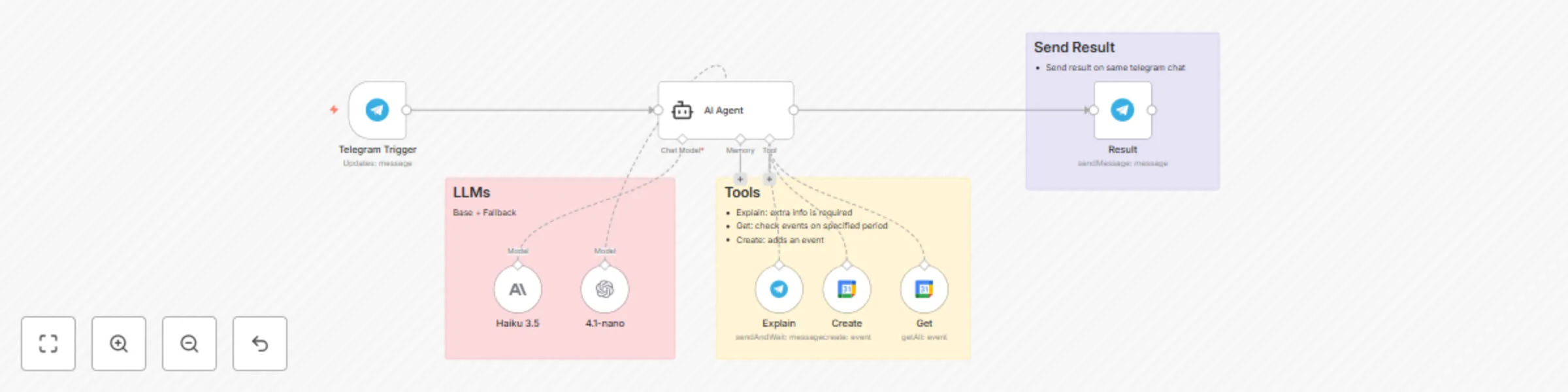
Workflow preview


 Early Deal
DISCOUNT 20%

Important notice
This workflow is provided as-is. Please review and test before using in production.
Overview
💬 Conversational Calendar Bot for Telegram This workflow creates an AI chatbot on Telegram that intelligently manages your Google Calendar using natural language. It even checks for conflicts before scheduling!
AI Models: Anthropic Claude 3.5 Haiku (Primary) & OpenAI GPT-4.1-mini (Fallback)
How It Works Listen 👂: Triggered by a message in your Telegram chat.
Understand 🧠: An AI Agent extracts the event details (title, date, time).
Check 🧐: It first checks Google Calendar for any conflicting events.
Decide ✅: If the slot is free, it creates the event. If not, it asks you for a new time.
Confirm 👍: Sends a final confirmation message back to you.
Nodes Used Telegram Trigger
LangChain Agent
Anthropic & OpenAI Models
Google Calendar & Telegram Tools
Setup Credentials: Add API keys for Telegram, Google Calendar, Anthropic, and OpenAI.
Configure Nodes:
Telegram Trigger: Add your specific Chat ID.
Google Calendar Nodes ("Create" & "Get"): Select your calendar from the dropdown list.
Example Usage To create a timed event:
🗓️ "Add an appointment to pick up graduation certificates on July 17th at 9 AM"
To create an all-day event:
PASSPORT "Remind me to renew my passport on August 20th"