Cold outreach automation: Scrape local leads with Dumpling AI & call via Vapi

Workflow preview

Workflow preview
100%
Cold outreach automation: Scrape local leads with Dumpling AI & call via Vapi preview
Open on n8n.io

Important notice

This workflow is provided as-is. Please review and test before using in production.

1. Workflow Overview

Who is this for? This template is for sales teams, agencies, or local service providers who want to quickly generate cold outreach lists and automatically call local businesses with a Vapi AI assis...

Best for

  • Lead Nurturing automation workflows
  • AI Chatbot automation workflows
  • intermediate n8n builders looking for reusable templates

Tools used

n8n-nodes-base.stickynote, n8n-nodes-base.manualtrigger, n8n-nodes-base.googlesheets, n8n-nodes-base.httprequest, n8n-nodes-base.splitout, n8n-nodes-base.set, n8n-nodes-base.filter

Source and attribution

This workflow is cataloged by N8N Workflows and links back to its original n8n.io source page by Yang.

Original n8n.io source

1.1 Workflow description

Title
Cold outreach automation: Scrape local leads with Dumpling AI & call via Vapi
Workflow name
Cold outreach automation: Scrape local leads with Dumpling AI & call via Vapi

Who is this for?

This template is for sales teams, agencies, or local service providers who want to quickly generate cold outreach lists and automatically call local businesses with a Vapi AI assistant. It’s perfect for automating cold calls from scraped local listings with no manual dialing or research.


What problem is this workflow solving?

Finding leads and initiating outreach calls can be time-consuming. This workflow automates the process: it scrapes business listings from Google Maps using Dumpling AI, extracts phone numbers, filters out incomplete data, formats the numbers, and uses Vapi to make outbound AI-powered calls. Every call is logged in Google Sheets for follow-up and tracking.


What this workflow does

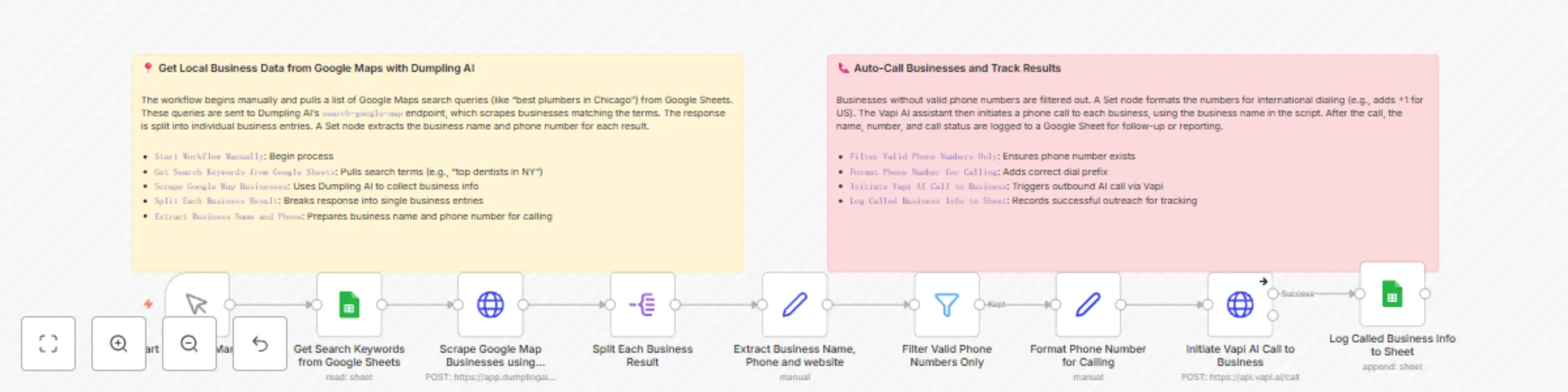
  1. Starts manually and pulls search queries (e.g., "plumbers in Austin") from Google Sheets.
  2. Sends each query to Dumpling AI’s Google Maps scraping endpoint.
  3. Splits the returned business data into individual leads.
  4. Extracts key info like business name, website, and phone number.
  5. Filters to only keep leads with valid phone numbers.
  6. Formats phone numbers for Vapi dialing (adds +1).
  7. Calls each business using Vapi AI.
  8. Logs each successful call in a Google Sheet.

Setup

  1. Google Sheets Setup

    • Create a sheet with business search queries in the first column (e.g., best+restaurants+in+Chicago)
    • Make sure the tab name is set and authorized in your credentials.
    • Connect your Google Sheets account in the Get Search Keywords from Google Sheets node.
  2. Dumpling AI Setup

    • Go to dumplingai.com
    • Generate an API Key and connect it as a header token in the Scrape Google Map Businesses using Dumpling AI node
  3. Vapi Setup

    • Sign into Vapi and create an assistant
    • Get your assistantId and phoneNumberId
    • Insert these into the JSON payload of the Initiate Vapi AI Call to Business node
    • Add your Vapi API key to the credentials section
  4. Call Logging

    • Create another tab in your sheet (e.g., “leads”) with these headers:
      • company name
      • phone number
      • website
    • This will be used in the Log Called Business Info to Sheet node

How to customize this workflow to your needs

  • Modify the business search terms in your Google Sheet to target specific industries or locations.
  • Add filters to exclude certain businesses based on ratings, keywords, or location.
  • Update your Vapi assistant script to match the type of outreach or pitch you’re using.
  • Add additional integrations (e.g., CRM logging, Slack notifications, follow-up emails).
  • Change the trigger to run on a schedule or webhook instead of manually.

Nodes and Functions Breakdown

  • Start Workflow Manually: Initiates the automation manually for testing or controlled runs.
  • Get Search Keywords from Google Sheets: Reads search phrases from the spreadsheet.
  • Scrape Google Map Businesses using Dumpling AI: Sends each search query to Dumpling AI and receives matching local business data.
  • Split Each Business Result: Breaks the returned array of businesses into individual records for processing.
  • Extract Business Name, Phone and website: Extracts title, phone, and website from each business record.
  • Filter Valid Phone Numbers Only: Ensures only entries with a phone number move forward.
  • Format Phone Number for Calling: Adds a +1 country code and strips non-numeric characters.
  • Initiate Vapi AI Call to Business: Uses the business name and number to initiate a Vapi AI outbound call.
  • Log Called Business Info to Sheet: Appends business details into a Google Sheet for tracking.

Notes

  • You must have valid API keys and authorized connections for Dumpling AI, Google Sheets, and Vapi.
  • Make sure to handle API rate limits if you're running the workflow on large datasets.
  • This workflow is optimized for US-based leads (+1 country code); adjust the formatting node if calling internationally.

1.2 Logical Blocks

This catalog entry is organized from the workflow JSON. The node-level section below shows the executable blocks available for review before importing the template.

2. Block-by-Block Analysis

Block 1 - Sticky Note

Type / Role
n8n-nodes-base.stickyNote - stickyNote
Config choices
Version 1

Block 2 - Start Workflow Manually

Type / Role
n8n-nodes-base.manualTrigger - manualTrigger
Config choices
Version 1

Block 3 - Get Search Keywords from Google Sheets

Type / Role
n8n-nodes-base.googleSheets - googleSheets
Config choices
Version 4.5

Block 4 - Scrape Google Map Businesses using Dumpling AI

Type / Role
n8n-nodes-base.httpRequest - httpRequest
Config choices
Version 4.2

Block 5 - Split Each Business Result

Type / Role
n8n-nodes-base.splitOut - splitOut
Config choices
Version 1

Block 6 - Extract Business Name, Phone and website

Type / Role
n8n-nodes-base.set - set
Config choices
Version 3.4

Block 7 - Filter Valid Phone Numbers Only

Type / Role
n8n-nodes-base.filter - filter
Config choices
Version 2.2

Block 8 - Format Phone Number for Calling

Type / Role
n8n-nodes-base.set - set
Config choices
Version 3.4

Block 9 - Initiate Vapi AI Call to Business

Type / Role
n8n-nodes-base.httpRequest - httpRequest
Config choices
Version 4.2

Block 10 - Log Called Business Info to Sheet

Type / Role
n8n-nodes-base.googleSheets - googleSheets
Config choices
Version 4.5

Block 11 - Sticky Note1

Type / Role
n8n-nodes-base.stickyNote - stickyNote
Config choices
Version 1

3. Summary Table

Workflow Cold outreach automation: Scrape local leads with Dumpling AI & call via Vapi
Complexity intermediate
Nodes 11
Categories Lead Nurturing, AI Chatbot
Author Yang
Published 14 May 2025

4. Reproducing the Workflow from Scratch

  1. 1. Download the workflow JSON

    Use the JSON export at /data/workflows/4031/4031.json as the source template for this automation.

  2. 2. Import the template into n8n

    Open n8n, import the downloaded JSON, and review each node before activating the workflow.

  3. 3. Configure credentials and variables

    Replace placeholder credentials, API keys, webhook URLs, account IDs, and environment-specific values with your own settings.

  4. 4. Test with sample data

    Run the workflow manually or in a staging workspace, inspect node output, and confirm downstream systems receive the expected data.

  5. 5. Activate and monitor

    Enable the workflow only after testing, then monitor executions, errors, and rate limits during the first production runs.

5. General Notes & Resources

Review imported nodes carefully before activation. This catalog entry is intended to help you inspect the workflow structure, understand required services, and find related templates faster.

Node names, credentials, schedules, webhook paths, and external service limits may need adjustment for your workspace.

Frequently asked questions

What does Cold outreach automation: Scrape local leads with Dumpling AI & call via Vapi do?

Who is this for? This template is for sales teams, agencies, or local service providers who want to quickly generate cold outreach lists and automatically call local businesses with a Vapi AI assis...

What do I need before importing this workflow?

Review the workflow JSON, configure any required credentials in n8n, and test the automation in a safe workspace before using it in production.

Can I customize this workflow?

Yes. Use the block-by-block analysis and the downloadable JSON to inspect each node, then adjust credentials, prompts, schedules, filters, or destinations for your Lead Nurturing, AI Chatbot use case.