Block 1 - Schedule Trigger
- Type / Role
- n8n-nodes-base.scheduleTrigger - scheduleTrigger
- Config choices
- Version 1.2


 Early Deal
This workflow is provided as-is. Please review and test before using in production.
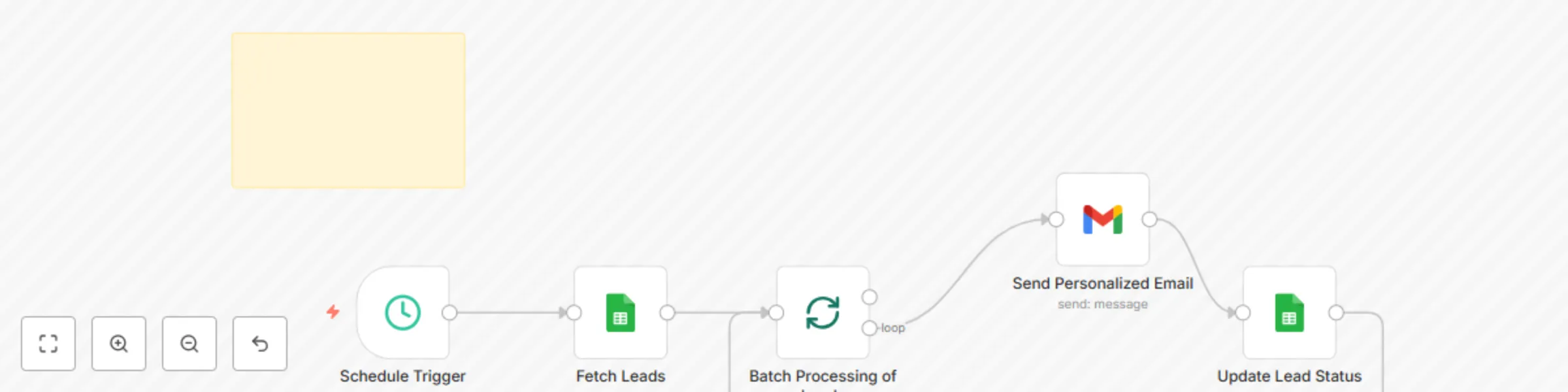
This workflow automates personalized cold email outreach by pulling lead data from a Google Sheet, sending emails via Gmail, and updating the sheet to track who has been contacted. Features Automat...
n8n-nodes-base.scheduletrigger, n8n-nodes-base.stickynote, n8n-nodes-base.splitinbatches, n8n-nodes-base.gmail, n8n-nodes-base.googlesheets
This workflow is cataloged by N8N Workflows and links back to its original n8n.io source page by Usman Liaqat.
Original n8n.io source"Is Email Sent" value is empty.Authenticate Google Sheets and Gmail nodes via OAuth2 in your n8n credentials settings.
Your Google Sheet must contain the following columns:
Email
Name (or WF Full Name (metadata))
Is Email Sent
| Name | Is Email Sent | |
|---|---|---|
| [email protected] | John Doe | |
| [email protected] | Jane Smith | yes |
Only rows where "Is Email Sent" is not marked as "yes" will be processed.
Open the “Send Personalized Email” node and update the message field. You can use variables like:
{{ $json.Name }}
{{ $json['WF Full Name (metadata)'] }}
Hello {{ $json.Name || $json['WF Full Name (metadata)'] }},

I’m a software developer and automation expert. I work with businesses and individuals to build websites, mobile apps, and powerful digital solutions that help save time and grow online.

I offer a range of services including:
- Website & App Development
- SEO & Digital Marketing
- Business Process Automation

If you’re looking to start a new project or improve your current setup, I’d love to connect and see how I can help.

Are you interested in discussing any of these services?

Best regards,
Software Developer | Automation Expert
Edit the Schedule Trigger node to your preferred time (currently set to 2 PM daily):
You can make a copy of this sample Google Sheet to get started.
This catalog entry is organized from the workflow JSON. The node-level section below shows the executable blocks available for review before importing the template.
| Workflow | Cold email outreach with Gmail and Google Sheets status tracking |
|---|---|
| Complexity | intermediate |
| Nodes | 6 |
| Categories | Lead Nurturing |
| Author | Usman Liaqat |
| Published | 19 May 2025 |
Use the JSON export at /data/workflows/4214/4214.json as the source template for this automation.
Open n8n, import the downloaded JSON, and review each node before activating the workflow.
Replace placeholder credentials, API keys, webhook URLs, account IDs, and environment-specific values with your own settings.
Run the workflow manually or in a staging workspace, inspect node output, and confirm downstream systems receive the expected data.
Enable the workflow only after testing, then monitor executions, errors, and rate limits during the first production runs.
Review imported nodes carefully before activation. This catalog entry is intended to help you inspect the workflow structure, understand required services, and find related templates faster.
Node names, credentials, schedules, webhook paths, and external service limits may need adjustment for your workspace.
This workflow automates personalized cold email outreach by pulling lead data from a Google Sheet, sending emails via Gmail, and updating the sheet to track who has been contacted. Features Automat...
Review the workflow JSON, configure any required credentials in n8n, and test the automation in a safe workspace before using it in production.
Yes. Use the block-by-block analysis and the downloadable JSON to inspect each node, then adjust credentials, prompts, schedules, filters, or destinations for your Lead Nurturing use case.