Client nurture & testimonial auto-pilot for Gumroad with Notion and Email

Workflow preview

Workflow preview
100%
Client nurture & testimonial auto-pilot for Gumroad with Notion and Email preview
Open on n8n.io

Important notice

This workflow is provided as-is. Please review and test before using in production.

1. Workflow Overview

Client Nurture & Testimonial Auto Pilot (Gumroad → Notion → Email) TL;DR Every Gumroad sale becomes a gentle, on brand experience: instant delivery , a Day 3 check in , and a Day 7 1 click te...

Best for

  • Social Media automation workflows
  • Lead Nurturing automation workflows
  • advanced n8n builders looking for reusable templates

Tools used

n8n-nodes-base.stickynote, n8n-nodes-base.webhook, n8n-nodes-base.function, n8n-nodes-base.notion, n8n-nodes-base.emailsend, n8n-nodes-base.wait, n8n-nodes-base.respondtowebhook, n8n-nodes-base.errortrigger

Source and attribution

This workflow is cataloged by N8N Workflows and links back to its original n8n.io source page by Shelly-Ann Davy.

Original n8n.io source

1.1 Workflow description

Title
Client nurture & testimonial auto-pilot for Gumroad with Notion and Email
Workflow name
Client nurture & testimonial auto-pilot for Gumroad with Notion and Email

✨ Client Nurture & Testimonial Auto-Pilot (Gumroad → Notion → Email)

TL;DR

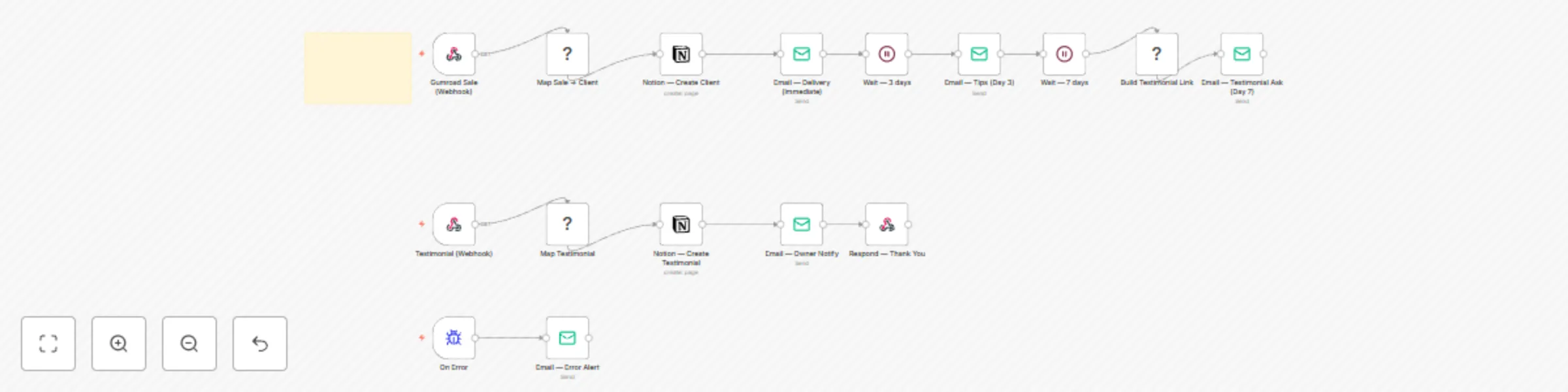
Every Gumroad sale becomes a gentle, on-brand experience: instant delivery 💌, a Day-3 check-in 🌷, and a Day-7 1-click testimonial ⭐ — all saved to Notion for your “Wall of Love.” Install in ~15 minutes.


Who It’s For

Soft-tech creators, solopreneurs, women-led businesses, and busy homemakers who want kind, reliable automation without dev headaches. If you sell templates/courses on Gumroad and want hands-off onboarding + real social proof, this is for you.


What It Does (in plain English)

  • Listen for sales from Gumroad (webhook)

  • Create a Client record in Notion 📇

  • Send 3 friendly emails:

    1. Delivery right away (access + quick start)
    2. Tips on Day 3 (mini wins + troubleshooting)
    3. Testimonial ask on Day 7 with a 1-click rating link
  • When they click the rating → log testimonial in Notion + notify you


What You Get

  • n8n workflow (JSON import)
  • Notion DB templates (Clients, Testimonials)
  • 3 pre-written email drafts (delivery, tips, ask)
  • A short Loom script for your demo 🎥

Requirements

  • n8n (Cloud or self-hosted with public URL)
  • Gumroad account (Sale webhook)
  • Notion workspace
  • Email (SMTP, Gmail, or Outlook node)

> ✅ No hard-coded secrets. Use n8n Credentials + the env vars below.


Environment Variables

  • PUBLIC_N8N_URL → e.g. https://your-n8n.example.com
  • NOTION_CLIENTS_DB_ID → Notion Clients DB
  • NOTION_TESTIMONIALS_DB_ID → Notion Testimonials DB

Notion Database Fields

ClientsName (title), Email, Product, Sale ID, Purchased At (date), Status (select) TestimonialsEmail, Rating (number), Quote (text), Permission (checkbox), Published (checkbox)


Setup (5 Steps)

  1. Import the JSON into n8n.
  2. Connect credentials: Notion + Email (no keys in nodes).
  3. Create/Import the Notion databases (CSV templates included).
  4. Set env vars above in n8n Settings → Variables.
  5. In Gumroad → Settings → Advanced → Webhooks, add SalePOST https://<your-n8n>/webhook/gumroad-sale.

Run a $0 test purchase → watch the Client appear in Notion → Delivery email lands → after waits, Tips + Testimonial emails send → click the rating link → testimonial saves in Notion ✨


How It Flows (node map)

Gumroad Webhook → Function (map payload) → Notion (create client) → Email (Delivery) → Wait 3d → Email (Tips) → Wait 7d → Function (build testimonial link) → Email (Ask) Testimonial Webhook → Function (map rating) → Notion (create testimonial) → Email (owner notify) → Respond (thank-you)


Testing & Troubleshooting

  • Emails not sending? Attach Email credentials + set From.
  • Testimonial not saving? Check PUBLIC_N8N_URL + Notion DB IDs.
  • Long delays use Wait nodes; keep Save Execution Progress ✅.

Privacy & Safety

  • Stores only the fields shown above; you control the Notion workspace.
  • Buyers can be removed on request; simply delete rows from Notion.
  • Works with $0 products for early feedback (great for soft launches).

Suggested Tags

gumroad, notion, email, onboarding, crm, testimonials, soft-tech, creators


Changelog

  • v1.0 — First release: delivery + tips + 1-click testimonials, Notion logging, owner alerts.

1.2 Logical Blocks

This catalog entry is organized from the workflow JSON. The node-level section below shows the executable blocks available for review before importing the template.

2. Block-by-Block Analysis

Block 1 - 📌 Sticky — Overview & Setup

Type / Role
n8n-nodes-base.stickyNote - stickyNote
Config choices
Version 1

Block 2 - Gumroad Sale (Webhook)

Type / Role
n8n-nodes-base.webhook - webhook
Config choices
Version 1

Block 3 - Map Sale → Client

Type / Role
n8n-nodes-base.function - function
Config choices
Version 2

Block 4 - Notion — Create Client

Type / Role
n8n-nodes-base.notion - notion
Config choices
Version 2

Block 5 - Email — Delivery (Immediate)

Type / Role
n8n-nodes-base.emailSend - emailSend
Config choices
Version 2

Block 6 - Wait — 3 days

Type / Role
n8n-nodes-base.wait - wait
Config choices
Version 1

Block 7 - Email — Tips (Day 3)

Type / Role
n8n-nodes-base.emailSend - emailSend
Config choices
Version 2

Block 8 - Wait — 7 days

Type / Role
n8n-nodes-base.wait - wait
Config choices
Version 1

Block 9 - Build Testimonial Link

Type / Role
n8n-nodes-base.function - function
Config choices
Version 2

Block 10 - Email — Testimonial Ask (Day 7)

Type / Role
n8n-nodes-base.emailSend - emailSend
Config choices
Version 2

Block 11 - Testimonial (Webhook)

Type / Role
n8n-nodes-base.webhook - webhook
Config choices
Version 1

Block 12 - Map Testimonial

Type / Role
n8n-nodes-base.function - function
Config choices
Version 2

Block 13 - Notion — Create Testimonial

Type / Role
n8n-nodes-base.notion - notion
Config choices
Version 2

Block 14 - Email — Owner Notify

Type / Role
n8n-nodes-base.emailSend - emailSend
Config choices
Version 2

Block 15 - Respond — Thank You

Type / Role
n8n-nodes-base.respondToWebhook - respondToWebhook
Config choices
Version 1

Block 16 - On Error

Type / Role
n8n-nodes-base.errorTrigger - errorTrigger
Config choices
Version 1

Block 17 - Email — Error Alert

Type / Role
n8n-nodes-base.emailSend - emailSend
Config choices
Version 2

3. Summary Table

Workflow Client nurture & testimonial auto-pilot for Gumroad with Notion and Email
Complexity advanced
Nodes 17
Categories Social Media, Lead Nurturing
Author Shelly-Ann Davy
Published 29 Aug 2025

4. Reproducing the Workflow from Scratch

  1. 1. Download the workflow JSON

    Use the JSON export at /data/workflows/8020/8020.json as the source template for this automation.

  2. 2. Import the template into n8n

    Open n8n, import the downloaded JSON, and review each node before activating the workflow.

  3. 3. Configure credentials and variables

    Replace placeholder credentials, API keys, webhook URLs, account IDs, and environment-specific values with your own settings.

  4. 4. Test with sample data

    Run the workflow manually or in a staging workspace, inspect node output, and confirm downstream systems receive the expected data.

  5. 5. Activate and monitor

    Enable the workflow only after testing, then monitor executions, errors, and rate limits during the first production runs.

5. General Notes & Resources

Review imported nodes carefully before activation. This catalog entry is intended to help you inspect the workflow structure, understand required services, and find related templates faster.

Node names, credentials, schedules, webhook paths, and external service limits may need adjustment for your workspace.

Frequently asked questions

What does Client nurture & testimonial auto-pilot for Gumroad with Notion and Email do?

Client Nurture & Testimonial Auto Pilot (Gumroad → Notion → Email) TL;DR Every Gumroad sale becomes a gentle, on brand experience: instant delivery , a Day 3 check in , and a Day 7 1 click te...

What do I need before importing this workflow?

Review the workflow JSON, configure any required credentials in n8n, and test the automation in a safe workspace before using it in production.

Can I customize this workflow?

Yes. Use the block-by-block analysis and the downloadable JSON to inspect each node, then adjust credentials, prompts, schedules, filters, or destinations for your Social Media, Lead Nurturing use case.