Capture website screenshots via Google Sheets to Google Drive with CustomJS
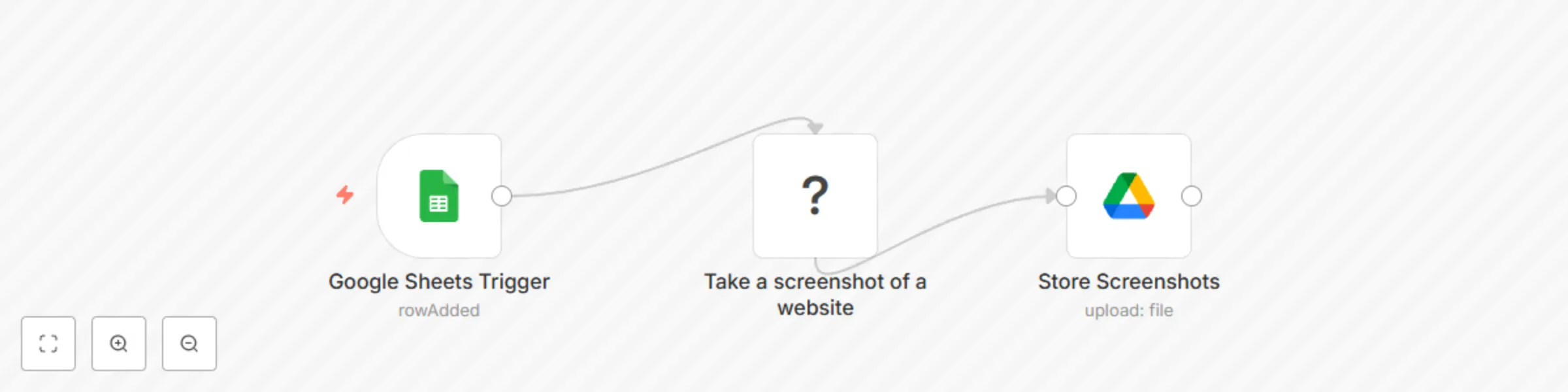
Workflow preview

$20/month : Unlimited workflows
2500 executions/month

THE #1 IN WEB SCRAPING
Scrape any website without limits
HOSTINGER  Early Deal
DISCOUNT 20% Try free
Early DealDISCOUNT 20%
Self-hosted n8n
Unlimited workflows - from $4.99/mo

#1 hub for scraping, AI & automation
6000+ actors - $5 credits/mo
Important notice
This workflow is provided as-is. Please review and test before using in production.
Overview
n8n Workflow: Automating Website Screenshots from Google Sheets
This n8n workflow captures screenshots of websites listed in a Google Sheet and saves them to Google Drive using the CustomJS PDF Toolkit.
@custom-js/n8n-nodes-pdf-toolkit
Features
- Monitors a Google Sheet for new rows with website URLs.
- Captures screenshots of the websites using the CustomJS PDF Toolkit.
- Uploads the screenshots to a specified Google Drive folder.
Notice
Community nodes can only be installed on self-hosted instances of n8n.
Requirements
- Self-hosted n8n instance
- A Google Sheets document containing website URLs and Titles.
- A Google Drive folder to store the screenshots.
- A CustomJS API key for website screenshots.
- n8n credentials for Google Sheets and Google Drive.
Workflow Steps
Google Sheets Trigger
- Monitors a specified sheet for new rows.
- Extracts the
URLandTitlefrom the row.
Website Screenshot Node
- Uses CustomJS PDF Toolkit to take a screenshot of the given URL.
Google Drive Upload
- Saves the screenshot to a specific Google Drive folder.
- Uses the
Titlecolumn as the filename.
Setup Guide
1. Connect Google Sheets
- Ensure your Google Sheet has a column named
Urlfor website URLs andNamefor website names. - Set up Google Sheets credentials in n8n.
2. Configure CustomJS API
- Sign up at CustomJS.
- Retrieve your API key from the profile page.
- Add your API key as n8n credentials.
3. Set Up Google Drive
- Create a folder in Google Drive to store screenshots.
- Copy the folder ID and set it in the Google Drive node in n8n.
Perfect for:
- Website monitoring
- Generating visual archives of web pages
- Automating content curation
This workflow streamlines the process of capturing and organizing website screenshots efficiently.