C

CustomJS

14
Workflows

Workflows by CustomJS

Workflow preview: Automatic invoice generation and email with Airtable and CustomJS PDF generator
Free advanced

Automatic invoice generation and email with Airtable and CustomJS PDF generator

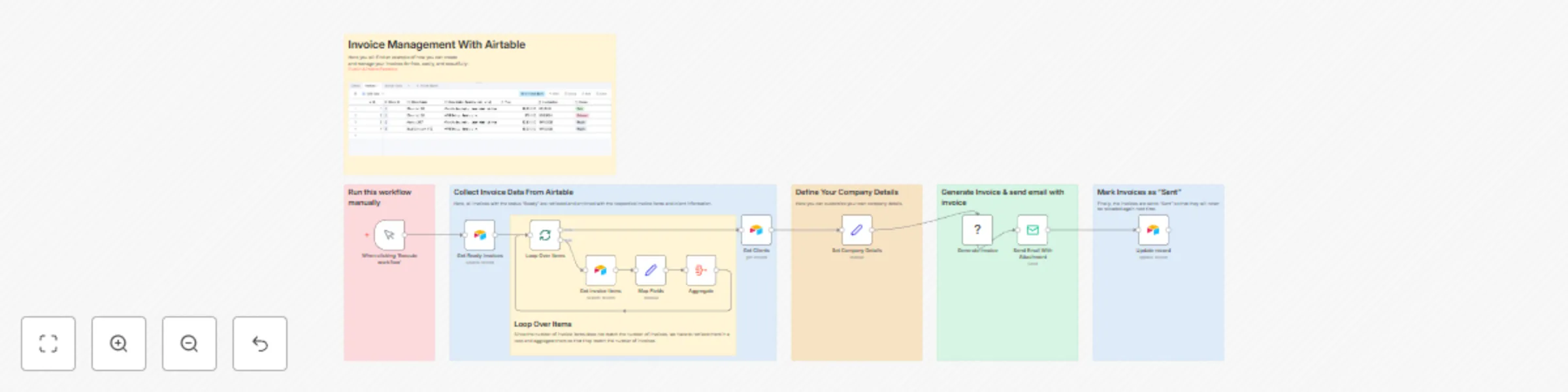
> ⚠️ **Notice:** > This workflow uses the **CustomJS Invoice Generator node** from [customjs.space](https://www.customjs.space), which requires a self-hosted n8n instance and a CustomJS API key. --- # Google Spreadsheet → Invoice Generation → Email Workflow This workflow demonstrates how to: 1. Pull **invoices ready to be sent** from Airtable. 2. Retrieve **client details** and **invoice items** from Airtable. 3. Generate a **professional invoice PDF** using CustomJS Invoice Generator. 4. Send the completed invoice via **email** to the client. 5. Update the invoice status in Airtable automatically. ![InvoiceGeneratorWorkflow.png](fileId:2981) [Public Airtable Example](https://airtable.com/apphyDa3uYAq0VOMW/shrSe39NZYrqm4gtE) --- ## Workflow Overview ### 1. Trigger Workflow - **Node:** `When clicking ‘Execute workflow’` (Manual Trigger) - Starts the workflow when executed manually in n8n. ### 2. Get Ready Invoices - **Node:** `Get Ready Invoices` (Airtable) - Retrieves all invoices from Airtable where `Status = 'Ready'`. ### 3. Loop Over Items - **Node:** `Loop Over Items` (Split In Batches) - Processes each invoice individually. ### 4. Get Clients - **Node:** `Get Clients` (Airtable) - Fetches client details for the current invoice: - Name - Address - Tax ID ### 5. Get Invoice Items - **Node:** `Get Invoice Items` (Airtable) - Retrieves all items associated with the invoice and passes them for aggregation. ### 6. Map Fields - **Node:** `Map Fields` (Set) - Maps the invoice items into a structured format for the invoice generator: - Description - Quantity / Hours - Unit Price - Invoice ID ### 7. Aggregate - **Node:** `Aggregate` - Aggregates all invoice items into a single JSON array for the invoice. ### 8. Set Company Details - **Node:** `Set Company Details` (Set) - Defines issuer and payment information: - Company Name - Address - Tax ID - Email & Phone - Bank Details ### 9. Generate Invoice - **Node:** `Generate Invoice` (CustomJS Invoice Generator) - Generates a **PDF invoice** using all collected data: - Issuer / Company information - Recipient / Client information - Invoice items - Billing information (Invoice number, date, currency, tax, notes) ### 10. Send Email With Attachment - **Node:** `Send Email With Attachment` (Email Send) - Sends the generated invoice PDF to the client: - From: `{{ $json.InvoiceEmail }}` - To: `[email protected]` - Subject: `Your Invoice for Last Month` - Body Text: ``` Hello, Please find attached your invoice for the last month. Thank you very much for your cooperation. Best regards, Henrik ``` - Uses SMTP credentials for sending emails. ### 11. Update Record - **Node:** `Update record` (Airtable) - Marks the invoice as `Sent` in Airtable. --- ## Requirements - Self-hosted n8n instance - CustomJS API key - SMTP credentials - Airtable API key and base access ---

C
CustomJS
Invoice Processing
16 Oct 2025
157
0
Workflow preview: Generate & email custom NDA documents from web form submissions
Free intermediate

Generate & email custom NDA documents from web form submissions

> ⚠️ **Notice:** > This workflow uses the **HTML to Docx node** from [customjs.space](https://www.customjs.space), which requires a self-hosted n8n instance and a CustomJS API key. --- # Landingpage → NDA Word Document (Docx) → Email Workflow This workflow demonstrates how to: 1. Serve a **landing page** for requesting an NDA. 2. Receive form submissions from users. 3. Generate a **Word Document (Docx)** version of the NDA populated with the submitted data. 4. Send the completed NDA via **email** to a recipient. --- ## Workflow Overview ### 1. Landingpage Endpoint - **Node:** `Landingpage Endpoint` (Webhook) - Hosts the landing page and passes the URL dynamically to the HTML node. ### 2. Set Form Endpoint - **Node:** `Set Form Endpoint` - Stores the landing page webhook URL into a variable `FormEndpoint` for the HTML form to submit to. ### 3. HTML for Landingpage - **Node:** `HTML for Landingpage` - Renders a user-friendly landing page with a form for users to fill in their personal details: - First Name - Last Name - Address - House No. - Postal Code - City - Country - Includes **success** and **error messages** after submission. - Submits data as JSON to the `FormData Endpoint`. ### 4. Respond to Webhook - **Node:** `Respond to Webhook` - Returns the landing page HTML to the visitor when accessing the landing page URL. ### 5. FormData Endpoint - **Node:** `FormData Endpoint` (Webhook) - Receives the submitted form data from the landing page. - Passes data to the `NDA (HTML Version)` node. ### 6. NDA (HTML Version) - **Node:** `NDA (HTML Version)` - Generates a **personalized NDA document** in HTML using the submitted form data: - Populates recipient details (name, address, city, country, etc.) - NDA clauses include: 1. Definition of Confidential Information 2. Obligations of the Recipient 3. Exclusions 4. Duration 5. Return or Destruction of information 6. Governing Law (England & Wales) ### 7. HTML to Docx - **Node:** `HTML to Docx` - Converts the HTML NDA to a **Word Document (Docx)** using the CustomJS PDF/Docx Toolkit. - Requires a CustomJS API key (`Coding Service` credential). ### 8. Send Email - **Node:** `Send email` - Sends the generated NDA Docx as an **email attachment**. - Email configuration: - From: `[email protected]` - To: `[email protected]` - Subject: `NDA` - Body Text: ``` Hello, Here is the requested NDA form. Best Henrik ``` - Uses SMTP credentials for sending emails. --- ## Notes - **Sticky Notes** provide internal documentation and guidance for the workflow: - `Sticky Note1` – Landingpage server info - `Sticky Note` – FormData endpoint info - **Dynamic Form Submission**: The form posts JSON to the `FormData Endpoint`. - **Automation Flow**: Landingpage → Form Submission → NDA HTML → Docx → Email --- ## Requirements - Self-hosted n8n instance - CustomJS API key - SMTP credentials - Optional: Tailwind CSS CDN for landing page styling --- ## Customization Tips - **Landing Page Styling**: Adjust the `HTML for Landingpage` node for branding, colors, or additional fields. - **NDA Content**: Edit the `NDA (HTML Version)` node to change NDA clauses or layout. - **Email Settings**: Change `Send email` node to modify sender, recipient, or message content. - **Field Mapping**: Ensure all form input names match the NDA template placeholders.

C
CustomJS
Document Extraction
9 Oct 2025
141
0
Workflow preview: Automated PDF form processing with web forms and email delivery
Free intermediate

Automated PDF form processing with web forms and email delivery

> ⚠️ **Notice:** > Community nodes like **@custom-js/n8n-nodes-pdf-toolkit** can only be installed on self-hosted instances of n8n. --- This n8n workflow demonstrates how to **collect form submissions from a landing page, fill a PDF form automatically, and send it via email**. It uses the **PDF Form Fill node from [customjs.space](https://www.customjs.space)** to populate PDF fields with the submitted data. --- ## What this workflow does - Serves a **landing page** with a user-friendly form. - Receives form submissions via a **Webhook**. - Uses the **HTTP Request node** to fetch a PDF template. - Fills the PDF form fields with the submitted data using the **PDF Form Fill node**. - Optionally reads PDF form field names using **Get PDF Form Fields**. - Sends the completed PDF as an **email attachment**. --- ## Requirements - Self-hosted n8n instance. - CustomJS API key for the PDF Toolkit nodes. - SMTP account for sending emails. - Optional: Access to the PDF template online. --- ## Workflow Steps 1. **Landingpage Endpoint (Webhook)** Serves the landing page HTML to visitors. 2. **Set Form Endpoint** Dynamically injects the endpoint URL into the HTML form. 3. **HTML for Landingpage** Provides the form where users enter personal information (name, address, city, country, etc.). 4. **Respond to Webhook** Returns the landing page HTML to the visitor. 5. **FormData Endpoint (Webhook)** Receives the submitted form data as JSON. 6. **HTTP Request – Get PDF Template** Fetches the PDF form template from a URL. 7. **PDF Form Fill (Fill PDF Fields)** Populates the PDF with the submitted form data. 8. **Get PDF Form Fields (Optional)** Reads and lists the names of the form fields in the PDF. 9. **Send Email** Sends the completed PDF as an attachment to a configured recipient. 10. **Sticky Notes** Provide documentation within the workflow for easier understanding and maintenance. --- ## Usage 1. **Get API key from CustomJS** - Sign up on the [CustomJS platform](https://www.customjs.space). - Navigate to your profile page and copy your API key. 2. **Set Credentials for CustomJS API in n8n** - Create a new credential in n8n with your API key. 3. **Prepare SMTP Credentials** - Add your SMTP server credentials to n8n for sending emails. 4. **Run or schedule the workflow** - The workflow will serve the landing page, fill the PDF form with submissions, and send it via email. --- ## Customization Tips - **Modify the landing page form** in the HTML node to add or remove fields. - **Change PDF template URL** in the HTTP Request node. - **Add more recipients** or dynamic email addresses in the Send Email node. - **Track submitted form data** in Google Sheets or a database for long-term storage. - **Extend workflow logic** with validation or notifications using additional nodes.

C
CustomJS
Document Extraction
9 Oct 2025
244
0
Workflow preview: Monitor competitor SEO changes with CustomJS Scraper, Google Sheets & Slack alerts
Free intermediate

Monitor competitor SEO changes with CustomJS Scraper, Google Sheets & Slack alerts

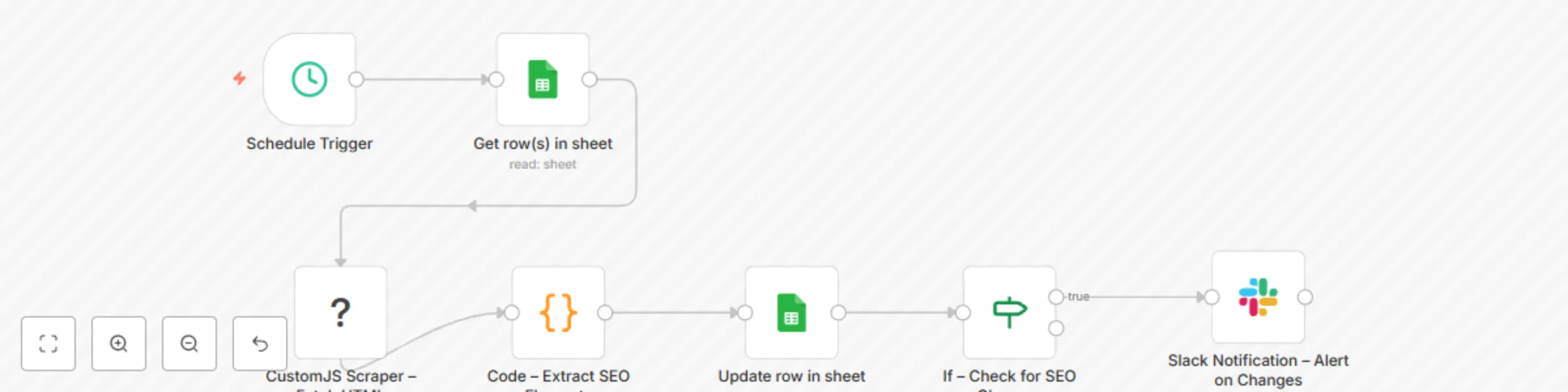
&gt; ⚠️ **Notice:** &gt; Community nodes like **@custom-js/n8n-nodes-pdf-toolkit** can only be installed on self-hosted instances of n8n. --- ![Screenshot from 20250911 001042.png](fileId:2349) This n8n workflow demonstrates how to **monitor competitor websites for SEO changes** by scraping content and updating a Google Sheet. It uses the **Scraper node from [customjs.space](https://www.customjs.space)** to extract HTML content and parse key SEO elements like `title`, `<h1>`, `<h2>`, and meta description. --- ## What this workflow does - Reads a list of competitor websites from a **Google Sheet**. - Uses the **CustomJS Scraper node** to fetch raw HTML for each website. - Extracts important SEO data: - Page `title` - `<h1>` headings - `<h2>` headings - Meta description - Updates the Google Sheet with the latest scraped values and a timestamp. - Compares the new values with the previous ones: - If changes are detected, a **Slack notification** is sent. --- ## Requirements - Self-hosted n8n instance. - CustomJS API key for the Scraper node. - A Google Sheet containing competitor website URLs. - Slack workspace (optional, for notifications). --- ## Workflow Steps 1. **Schedule Trigger** Runs automatically (weekly by default, adjustable as needed). 2. **Google Sheets – Get Competitor URLs** Reads competitor website URLs from the configured sheet. 3. **CustomJS Scraper – Fetch HTML** - Inputs each website URL. - Returns raw HTML text for analysis. 4. **Code – Extract SEO Elements** Parses the HTML to extract: - Title - H1s - H2s - Meta description 5. **Google Sheets – Update SEO Data** Updates the sheet with the new SEO data and a current date. 6. **If – Check for SEO Changes** Compares old vs. new values. 7. **Slack Notification – Alert on Changes** Sends a message to Slack when updates are detected. --- ## Usage 1. **Get API key from CustomJS** - Sign up on the [CustomJS platform](https://www.customjs.space). - Navigate to your profile page. - Click “Show” to reveal your API key. 2. **Set Credentials for CustomJS API in n8n** - Copy your API key into a new `CustomJS` credential. 3. **Prepare your Google Sheet** - Create a sheet with a column named **Websites**. - Enter competitor URLs (must start with `https://`). 4. **Run or schedule the workflow** - The workflow will scrape competitor sites, update the sheet, and notify you of any SEO changes. --- ## Example Output **Google Sheet after update:** | Websites | Title | Meta Description | H1s | H2s | Date | |----------------------|------------------------|--------------------------|--------------------|-------------|---------------------| | https://example.com | Example Title | Example meta description | Example H1 Heading | Example H2s | 2025-09-07 12:00:00 | ## Slack Notification Example &gt; ⚠️ **Competitor SEO Change Detected!** **Website:** https://example.com **Title** - Old: Example Title - New: New Example Title **Meta Description** - Old: Example meta description - New: Updated example meta description **H1s** - Old: Example Heading - New: Updated Heading **H2s** - Old: Example Subheading - New: Updated Subheading **Date:** 2025-09-07 12:00:00 --- ## Customization Tips - **Change scraping frequency** in the **Schedule Trigger** (daily, weekly, etc.). - **Track additional elements** by extending the regex in the **Code Node**. - **Send alerts to other platforms** (e.g., Email, Microsoft Teams, Discord) by swapping the Slack node. - **Store results in a database** instead of Google Sheets if long-term history is required.

C
CustomJS
Market Research
24 Jun 2025
166
0
Workflow preview: Monitor SSL certificate expiry dates with Google Sheets & Slack alerts
Free intermediate

Monitor SSL certificate expiry dates with Google Sheets & Slack alerts

&gt; ⚠️ **Notice:** &gt; Community nodes like **@custom-js/n8n-nodes-pdf-toolkit** can only be installed on self-hosted instances of n8n. --- ![Screenshot from 20250914 161153.png](fileId:2630) This n8n workflow illustrates how to **monitor and track SSL certificate expiration dates** for any domain using the **SSL Checker node** from [customJS](https://www.customjs.space). It automatically updates a Google Sheet with the number of days left until expiry and sends a Slack notification when certificates are about to expire. --- ## What this workflow does - **Input** a list of domains from Google Sheets. - **Check** each domain’s SSL certificate details, including expiration date and days left. - **Update** the Google Sheet with the latest SSL expiry information. - **Notify** via Slack if any certificate is expiring soon (e.g., less than 8 days). --- ## Requirements - **Self-hosted** n8n instance. - **CustomJS API key** for SSL checking. - **Google Sheets API credentials** for reading/updating domain data. - **Slack API credentials** (optional, for notifications). --- ## Workflow Steps 1. **Schedule Trigger** - ⏰ Starts the workflow automatically (weekly by default, configurable). 2. **Google Sheets (Read Rows)** - 📄 Retrieves the list of domains from your Google Sheet. 3. **SSL Checker (CustomJS node)** - 🔐 Fetches SSL certificate details for each domain. - Returns JSON output with fields such as `expires` and `daysLeft`. 4. **Google Sheets (Update Rows)** - 📝 Updates the sheet with the current number of days left until certificate expiry. 5. **Check Days Left Threshold** (formerly "If" node) - ⚠️ Evaluates whether the certificate expires within the threshold (e.g., `&lt; 8 days`). 6. **Slack Node** - 💬 Sends a notification message if a certificate is close to expiration. Example Slack alert message: ```text ⏰ Reminder: SSL certificate of www.example.com will expire in 7 days. ---- ### SSL Checker node JSON output ```json { "output": { "domain": "example.com", "valid": true, "expires": "2025-12-31T23:59:59.000Z", "issuer": "Let's Encrypt", "daysLeft": 5 } }

C
CustomJS
SecOps
24 Jun 2025
134
0
Workflow preview: Merge multiple PDF files with CustomJS API
Free intermediate

Merge multiple PDF files with CustomJS API

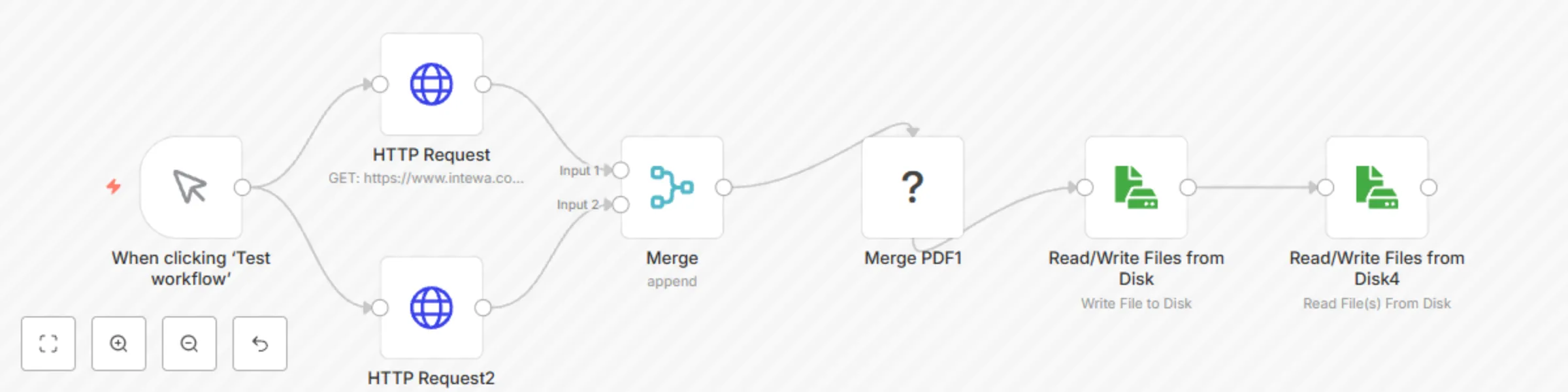
![workflow.png](fileId:1280) This n8n template demonstrates how to download multiple PDF files from public URLs and merge them into a single PDF using the PDF Toolkit from www.customjs.space. [@custom-js/n8n-nodes-pdf-toolkit](https://www.npmjs.com/package/@custom-js/n8n-nodes-pdf-toolkit) ### Notice Community nodes can only be installed on self-hosted instances of n8n. ### What this workflow does - **Downloads** each PDF using an HTTP Request. - **Populates** files into an array with **Merge** node from n8n. - **Merges** all downloaded PDFs using the Merge PDF node from the @custom-js/n8n-nodes-pdf-toolkit. - **Writes** the final merged PDF to disk. ### Requirements - **Self-hosted** n8n instance - **CustomJS API key** for merging multiple PDF files. - **PDF files to be merged** to be converted into a PDF ### Workflow Steps: 1. **Manual Trigger**: - Runs with user interaction. 2. **HTTP Request Node For PDF Download**: - Pass urls for PDF files to merge. 3. **Merge Node For Array Population**: - Just populates two files into an array. 4. **Merge PDF files**: - Uses the **CustomJS** node to merge the incoming PDF files into a single PDF file. - If size of PDF files exceeds 6MB, you can simply pass an array of URLs for PDF files. --- ### Usage ### Get API key from [customJS](https://www.customjs.space) - Sign up to customJS platform. - Navigate to your profile page - Press "Show" button to get API key ![1.png](fileId:1281) ### Set Credentials for CustomJS API on n8n Copy and paste your API key generated from CustomJS here. ![2.png](fileId:1279) ### Design workflow - A Manual Trigger for starting workflow. - Two HTTP Request Nodes for downloading PDF files. - A Merge Node for populating files as an array. - Merge PDFs node for merging files - Write to Disk node for saving merged PDF file. You can replace logic for triggering and returning results. For example, you can trigger this workflow by calling a webhook and get a result as a response from webhook. Simply replace Manual Trigger and Write to Disk nodes. ### Perfect for - Bundling reports or invoices. - Generating document sets from external sources. - Automating PDF handling without writing custom code

C
CustomJS
File Management
5 May 2025
1001
0
Workflow preview: Extract specific pages from PDFs with CustomJS API
Free beginner

Extract specific pages from PDFs with CustomJS API

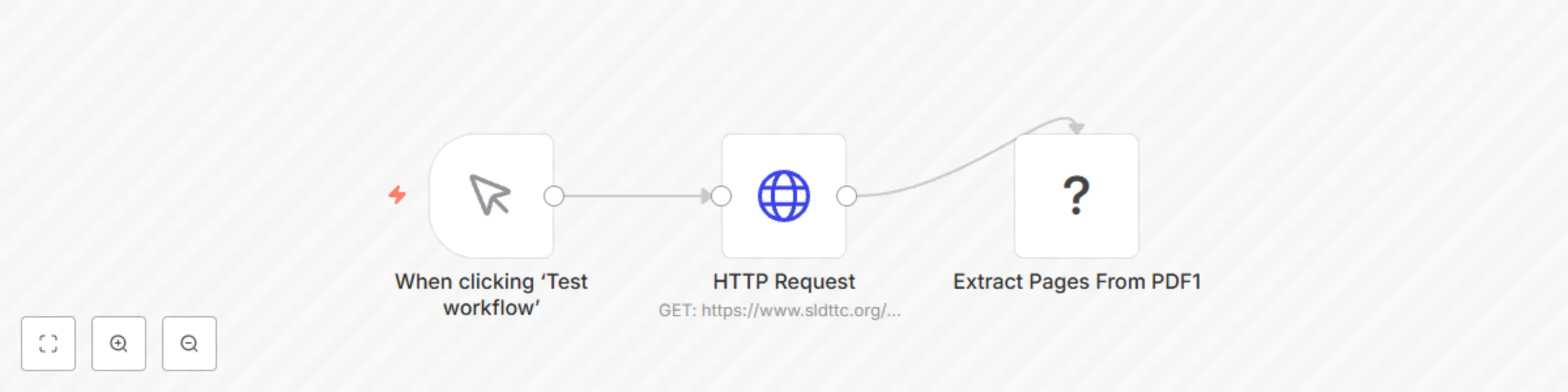
![workflow.png](fileId:1276) This n8n template shows how to extract selected pages from a generated PDF with the PDF Toolkit by www.customjs.space. [@custom-js/n8n-nodes-pdf-toolkit](https://www.npmjs.com/package/@custom-js/n8n-nodes-pdf-toolkit) ## Notice Community nodes can only be installed on self-hosted instances of n8n. ## What this workflow does - **Downloads** each PDF using an HTTP Request. - **Extract** pages from the PDF file as needed. ## Requirements - **Self-hosted** n8n instance - **CustomJS API key** for extracting PDF files. - **PDF files to be merged** to be converted into a PDF ## Workflow Steps: 1. **Manual Trigger**: - Runs with user interaction. 2. **Download PDF File**: - Pass urls for PDF files to merge. 3. **Extract Pages from PDF**: - Extract selected pages from a generated PDF --- ## Usage ### Get API key from [customJS](https://www.customjs.space) - Sign up to customJS platform. - Navigate to your profile page - Press "Show" button to get API key ![1.png](fileId:1278) ### Set Credentials for CustomJS API on n8n Copy and paste your API key generated from CustomJS here. ![2.png](fileId:1277) ### Design workflow - A Manual Trigger for starting workflow. - HTTP Request Nodes for downloading PDF files. - Extract Pages from PDF. You can replace logic for triggering and returning results. For example, you can trigger this workflow by calling a webhook and get a result as a response from webhook. Simply replace Manual Trigger and Write to Disk nodes. ## Perfect for - Taking a note of specific pages from PDF files. - Splitting PDF file into multiple parts.

C
CustomJS
Document Extraction
5 May 2025
590
0
Workflow preview: Convert HTML to PDF & extract text from PDFs with CustomJS API
Free intermediate

Convert HTML to PDF & extract text from PDFs with CustomJS API

![workflow.png](fileId:1274) This n8n workflow illustrates how to convert PDF files into text with the PDF Toolkit from www.customjs.space. [@custom-js/n8n-nodes-pdf-toolkit](https://www.npmjs.com/package/@custom-js/n8n-nodes-pdf-toolkit) ### Notice Community nodes can only be installed on self-hosted instances of n8n. ### What this workflow does - **Change** the requested HTML to PDF.. - **Extract** text from the PDF. - **Use** a Code node to handle URLs that point to PDF files. - **Convert** the PDF to text. ### Requirements - **Self-hosted** n8n instance. - **CustomJS API key** for converting PDF to text. - **HTML** Data to convert PDF files. - **Code node** for handling URL that indicates PDF file. ### Workflow Steps: 1. **Manual Trigger**: - Runs with user interaction. 2. **HTML to PDF**: - Request HTML Data - Convert HTML to PDF 3. **Convert PDF to Text**: - Convert the generated Text from PDF --- ### Usage ### Get API key from [customJS](https://www.customjs.space) - Sign up to customJS platform. - Navigate to your profile page - Press "Show" button to get API key ![1.png](fileId:1275) ### Set Credentials for CustomJS API on n8n Copy and paste your API key generated from CustomJS here. ![2.png](fileId:1273) ### Design workflow - A Manual Trigger for starting workflow. - HTTP Request Nodes for downloading PDF files. - Code node for handling URL that indicates PDF file. - Convert PDF to Text. You can replace logic for triggering and returning results. For example, you can trigger this workflow by calling a webhook and get a result as a response from webhook. Simply replace Manual Trigger and Write to Disk nodes.

C
CustomJS
Document Extraction
5 May 2025
2465
0
Workflow preview: Convert HTML & PDF files to PNG images with CustomJS PDF Toolkit
Free intermediate

Convert HTML & PDF files to PNG images with CustomJS PDF Toolkit

![workflow.png](fileId:1271) This n8n workflow shows how to convert PDF files into PNG format with the PDF Toolkit from www.customjs.space. [@custom-js/n8n-nodes-pdf-toolkit](https://www.npmjs.com/package/@custom-js/n8n-nodes-pdf-toolkit) ### Notice Community nodes can only be installed on self-hosted instances of n8n. ### What this workflow does - **Generate** PDF file from the requested HTML. - **Convert** the PDF to PNG images. - **Use** a Code node to handle URLs that point to PDF files. - **Convert** the PDF to PNG format. ### Requirements - **Self-hosted** n8n instance. - **CustomJS API key** for converting PDF to PNG. - **HTML** Data to convert PDF files. - **Code node** for handling URL that indicates PDF file. ### Workflow Steps: 1. **Manual Trigger**: - Runs with user interaction. 2. **HTML to PDF**: - Request HTML Data. - Convert HTML to PDF. - Request PDF from Code. 3. **Convert PDF to PNG**: - Convert the generated PNG from PDF --- ### Usage ### Get API key from [customJS](https://www.customjs.space) - Sign up to customJS platform. - Navigate to your profile page - Press "Show" button to get API key ![1.png](fileId:1272) ### Set Credentials for CustomJS API on n8n Copy and paste your API key generated from CustomJS here. ![2.png](fileId:1270) ### Design workflow - A Manual Trigger for starting workflow. - HTTP Request Nodes for downloading PDF files. - Code node for handling URL that indicates PDF file. - Convert PDF to PNG. You can replace logic for triggering and returning results. For example, you can trigger this workflow by calling a webhook and get a result as a response from webhook. Simply replace Manual Trigger and Write to Disk nodes.

C
CustomJS
Document Extraction
5 May 2025
3949
0
Workflow preview: Convert HTML to PDF and compress files with CustomJS API
Free intermediate

Convert HTML to PDF and compress files with CustomJS API

![workflow.png](fileId:1268) This n8n template demonstrates how to convert HTML into a PDF, compress the generated PDF, and return it as a binary response using the PDF Toolkit from www.customjs.space. ### Notice Community nodes can only be installed on self-hosted instances of n8n. [@custom-js/n8n-nodes-pdf-toolkit](https://www.npmjs.com/package/@custom-js/n8n-nodes-pdf-toolkit) ### What this workflow does - **Convert** the requested HTML to PDF. - **Compress** the PDF file. - **Use** a Code node to handle URLs pointing to PDF files if they exceed 6MB. - **Compress** the PDF pages. ### Requirements - **Self-hosted** n8n instance - **CustomJS API key** for compressing PDF files. - **HTML** Data to convert PDF files - **Code node** for handling URL that indicates PDF file. ### Workflow Steps: 1. **Manual Trigger**: - Runs with user interaction. 2. **HTML to PDF**: - Request HTML Data - Convert HTML to PDF - Request PDF from URL. 3. **Compress Pages from PDF**: - Compress PDF as a binary file. --- ### Usage ### Get API key from [customJS](https://www.customjs.space) - Sign up to customJS platform. - Navigate to your profile page - Press "Show" button to get API key ![1.png](fileId:1269) ### Set Credentials for CustomJS API on n8n Copy and paste your API key generated from CustomJS here. ![2.png](fileId:1267) ### Design workflow - A Manual Trigger for starting workflow. - HTTP Request Nodes for downloading PDF files. - Code node for handling URL that indicates PDF file. - Compress PDF files. You can replace logic for triggering and returning results. For example, you can trigger this workflow by calling a webhook and get a result as a response from webhook. Simply replace Manual Trigger and Write to Disk nodes.

C
CustomJS
Document Extraction
5 May 2025
1872
0
Workflow preview: Generate PDF invoices with CustomJS API
Free intermediate

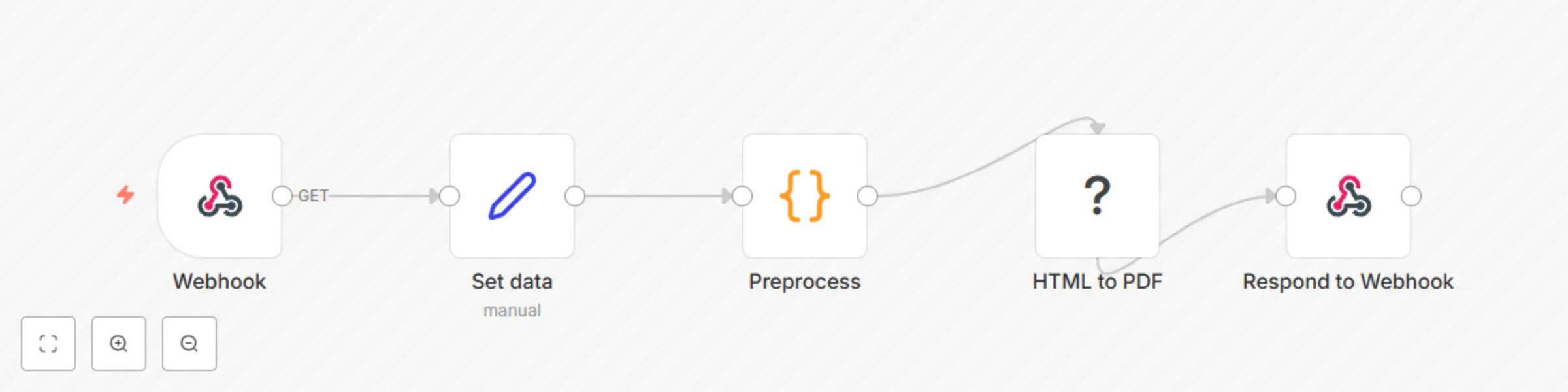
Generate PDF invoices with CustomJS API

![workflow.png](fileId:1056) # n8n Workflow: Invoice PDF Generator This n8n workflow captures invoice data and generates a PDF invoice, ready to be sent or saved. It uses a webhook to trigger the process, preprocesses the invoice data, and converts it to a PDF using HTML and custom styling. [@custom-js/n8n-nodes-pdf-toolkit](@custom-js/n8n-nodes-pdf-toolkit) ## Features: - **Webhook Trigger**: Receives incoming data, including invoice details. - **Preprocessing**: Transforms the invoice data into HTML format. - **HTML to PDF Conversion**: Converts the preprocessed HTML into a styled PDF document. - **Response**: Sends the generated PDF back to the webhook response. # Notice Community nodes can only be installed on self-hosted instances of n8n. ## Requirements - **Self-hosted** n8n instance - A **CustomJS API key** for website screenshots. - **Invoice data** for PDF generation ## Workflow Steps: 1. **Webhook Trigger**: - Accepts incoming data (e.g., invoice number, recipient details, itemized list). - This data is passed to the next node for processing. 2. **Set Data Node**: - Configures initial values for the invoice, including the recipient, sender, invoice number, and the items on the invoice. - The invoice details include information like description, unit price, and quantity. 3. **Preprocess Node**: - Processes the raw data to format it correctly for HTML. This includes splitting addresses and converting the items into an HTML table format. 4. **HTML to PDF Conversion**: - Converts the generated HTML into a PDF document. The HTML includes a header, a detailed invoice table, and a footer with contact information. 5. **Respond to Webhook**: - Returns the generated PDF as a response to the initial webhook request. --- ## Setup Guide: ### 1. Configure CustomJS API - Sign up at [CustomJS](https://www.customjs.space). - Retrieve your API key from the profile page. ![1.png](fileId:1057) - Add your API key as n8n credentials. ![2.png](fileId:1055) ### 2. Design Workflow 1. **Create a Webhook**: - Set up a webhook to trigger the workflow when invoice data is received. 2. **Prepare Data**: - Ensure the incoming request contains fields like "Invoice No", "Bill To", "From", and "Details" (list of items with price and quantity). 3. **Customize the HTML**: - The HTML template for the invoice includes custom styling to give the invoice a professional look. 4. **Convert to PDF**: - The **HTML to PDF** node is configured with the data generated from the preprocessing step to convert the invoice HTML to a PDF format. --- ## Example Invoice Data: ```json { "Invoice No": "1", "Bill To": "John Doe\n1234 Elm St, Apt 567\nCity, Country, 12345", "From": "ABC Corporation\n789 Business Ave\nCity, Country, 67890", "Details": [ { "description": "Web Hosting", "price": 150, "qty": 2 }, { "description": "Domain", "price": 15, "qty": 5 } ], "Email": "[email protected]" } ``` ## Result PDF File ![3.png](fileId:1058)

C
CustomJS
Invoice Processing
26 Mar 2025
7511
0
Workflow preview: Capture website screenshots via Google Sheets to Google Drive with CustomJS
Free beginner

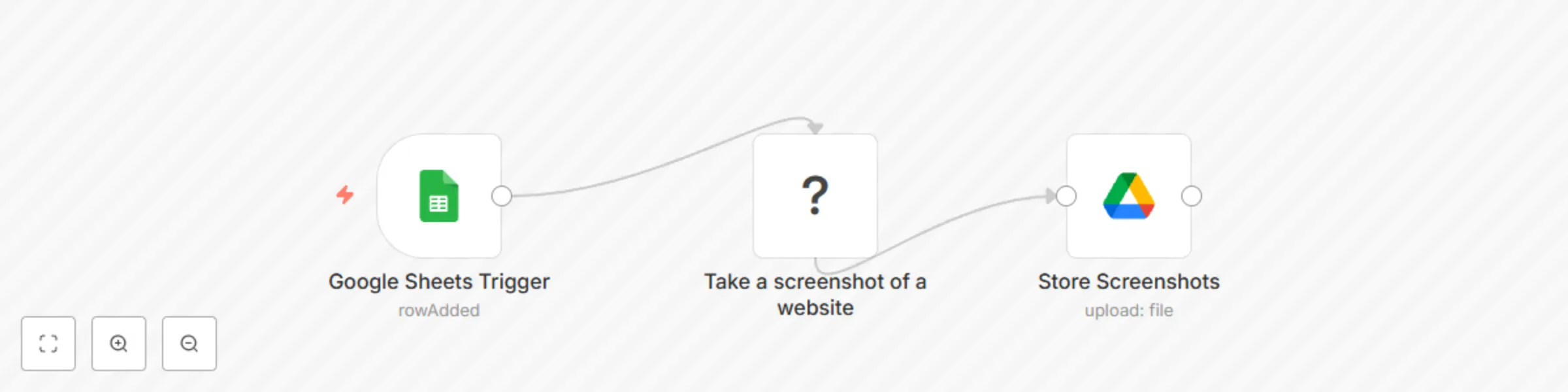
Capture website screenshots via Google Sheets to Google Drive with CustomJS

![workflow.png](fileId:1053) # n8n Workflow: Automating Website Screenshots from Google Sheets This n8n workflow captures screenshots of websites listed in a Google Sheet and saves them to Google Drive using the CustomJS PDF Toolkit. [@custom-js/n8n-nodes-pdf-toolkit](@custom-js/n8n-nodes-pdf-toolkit) ## Features - **Monitors** a Google Sheet for new rows with website URLs. - **Captures** screenshots of the websites using the CustomJS PDF Toolkit. - **Uploads** the screenshots to a specified Google Drive folder. # Notice Community nodes can only be installed on self-hosted instances of n8n. ## Requirements - **Self-hosted** n8n instance - A **Google Sheets** document containing website URLs and Titles. - A **Google Drive** folder to store the screenshots. - A **CustomJS API key** for website screenshots. - **n8n credentials** for Google Sheets and Google Drive. ## Workflow Steps 1. **Google Sheets Trigger** - Monitors a specified sheet for new rows. - Extracts the `URL` and `Title` from the row. 2. **Website Screenshot Node** - Uses CustomJS PDF Toolkit to take a screenshot of the given URL. 3. **Google Drive Upload** - Saves the screenshot to a specific Google Drive folder. - Uses the `Title` column as the filename. ## Setup Guide ### 1. Connect Google Sheets - Ensure your Google Sheet has a column named `Url` for website URLs and `Name` for website names. - Set up Google Sheets credentials in n8n. ### 2. Configure CustomJS API - Sign up at [CustomJS](https://www.customjs.space). - Retrieve your API key from the profile page. ![1.png](fileId:1054) - Add your API key as n8n credentials. ![2.png](fileId:1052) ### 3. Set Up Google Drive - Create a folder in Google Drive to store screenshots. - Copy the folder ID and set it in the Google Drive node in n8n. ## Perfect for: - **Website monitoring** - **Generating visual archives of web pages** - **Automating content curation** This workflow streamlines the process of capturing and organizing website screenshots efficiently.

C
CustomJS
File Management
26 Mar 2025
2583
0
Workflow preview: Convert HTML to PDF and return via webhook using CustomJS API
Free beginner

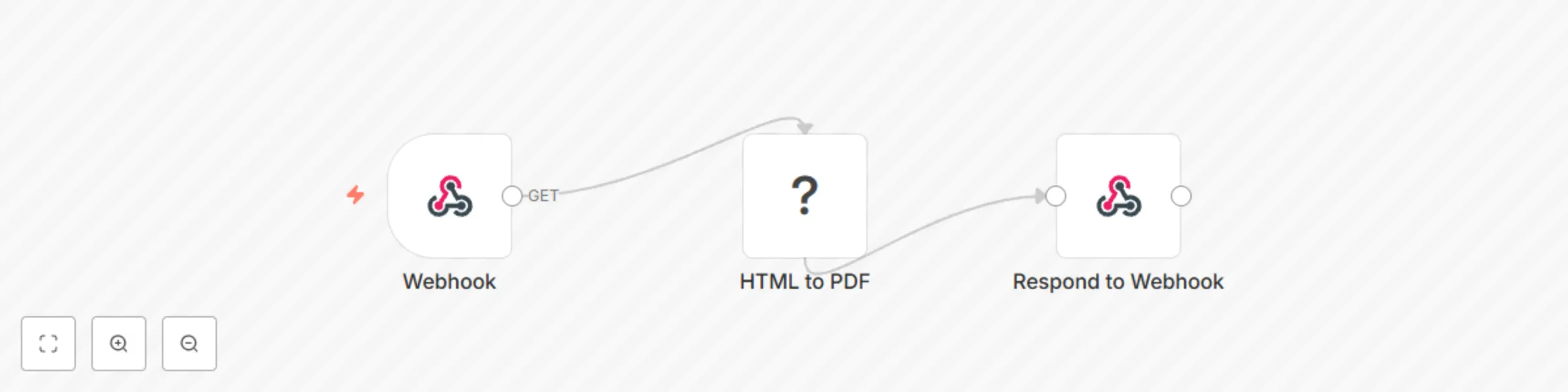
Convert HTML to PDF and return via webhook using CustomJS API

![workflow.png](fileId:1048)! # n8n Workflow: HTML to PDF Generator This n8n workflow converts HTML content into a styled PDF and returns it as a response via a webhook. The workflow receives HTML input, processes it using CustomJS's PDF toolkit, and sends back the resulting PDF to the original webhook requester. [@custom-js/n8n-nodes-pdf-toolkit](@custom-js/n8n-nodes-pdf-toolkit) ## Features: - **Webhook Trigger**: Accepts incoming requests with HTML content. - **HTML to PDF Conversion**: Uses CustomJS to transform HTML into a PDF. - **Response**: Sends the generated PDF back to the webhook response. ## Requirements: - **Self-hosted** n8n instance - A **CustomJS API key** for HTML to PDF conversion - **HTML content** to be converted into a PDF ## Workflow Steps: 1. **Webhook Trigger**: - Accepts incoming HTTP requests with HTML content. - This data is passed to the next node for processing. 2. **HTML to PDF Conversion**: - Uses the **CustomJS** node to convert the incoming HTML into a PDF document. - You can customize the HTML content to match the design requirements. 3. **Respond to Webhook**: - Sends the generated PDF as a binary response to the original webhook request. --- ## Setup Guide: ### 1. Configure CustomJS API - Sign up at [CustomJS](https://www.customjs.space). - Retrieve your API key from the profile page. ![image.png](fileId:1051) - Add your API key as n8n credentials. ![image.png](fileId:1049) ### 2. Design Workflow 1. **Create a Webhook**: - Set up a webhook to trigger the workflow when HTML content is received. 2. **Prepare HTML Content**: - The incoming request should include the HTML content you wish to convert into a PDF. 3. **Configure HTML to PDF Node**: - Use the **HTML to PDF** node to convert the provided HTML into a PDF. - The node uses the HTML input to generate a PDF using the CustomJS API. 4. **Respond with the PDF**: - The **Respond to Webhook** node will send the generated PDF back to the original requester as a binary response. --- ## Example HTML Input: ```html <h1>Hello CustomJS!</h1> <h2>CustomJS provides the missing toolset for your no-code projects</h2> ``` ## Result PDF ![image.png](fileId:1050)

C
CustomJS
Document Extraction
26 Mar 2025
3718
0
Workflow preview: Download and merge multiple PDFs from URLs with the CustomJS API
Free intermediate

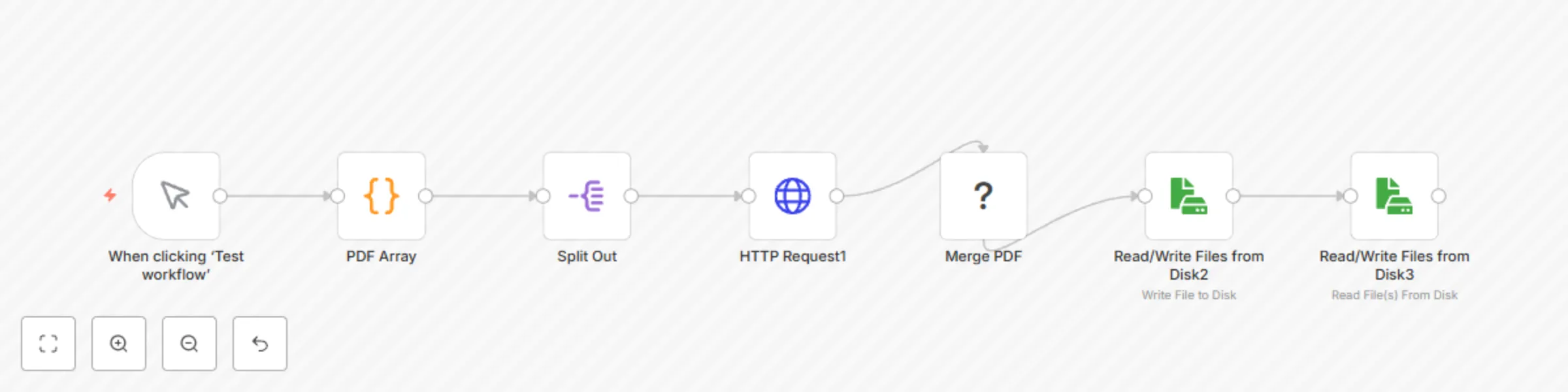
Download and merge multiple PDFs from URLs with the CustomJS API

![image.png](fileId:1038) This n8n template demonstrates how to download multiple PDF files from public URLs and merge them into a single PDF using the PDF Toolkit from [www.customjs.space](https://www.customjs.space). [@custom-js/n8n-nodes-pdf-toolkit](https://www.npmjs.com/package/@custom-js/n8n-nodes-pdf-toolkit) ## What this workflow does - **Defines** an array of PDF URLs. - **Splits** the array to process each URL individually. - **Downloads** each PDF using an HTTP Request. - **Merges** all downloaded PDFs using the Merge PDF node from the @custom-js/n8n-nodes-pdf-toolkit. - **Writes** the final merged PDF to disk. ## Requirements A free CustomJS account. An API Key saved in n8n as credentials of type CustomJS account. ## Notice Community nodes can only be installed on self-hosted instances of n8n. ## Usage ### Get API key from [customJS](https://www.customjs.space) - Sign up to customJS platform. - Navigate to your profile page - Press "Show" button to get API key ![image.png](fileId:1042) ### Set Credentials for CustomJS API on n8n Copy and paster your API key generated from CustomJS here. ![image.png](fileId:1037) ### Design workflow - A Manual Trigger for starting workflow. - A code node that returns URLs of PDF files as an array - Split Out node for concurrent processing - HTTP node for downloading PDF file locally - Merge PDFs node for merging files - Write to Disk node for saving merged PDF file. You can replace logic for triggering and returning results. For example, you can trigger this workflow by calling a webhook and get a result as a response from webhook. Simply replace Manual Trigger and Write to Disk nodes. ## Perfect for - Bundling reports or invoices. - Generating document sets from external sources. - Automating PDF handling without writing custom code. ![workflow.png](fileId:1040)![1.png](fileId:1041)![2.png](fileId:1039)

C
CustomJS
File Management
22 Mar 2025
2246
0