Capture and nurture AI agency leads with Google Gemini, Outlook and Sheets

Workflow preview

Workflow preview
100%
Capture and nurture AI agency leads with Google Gemini, Outlook and Sheets preview
Open on n8n.io

Important notice

This workflow is provided as-is. Please review and test before using in production.

1. Workflow Overview

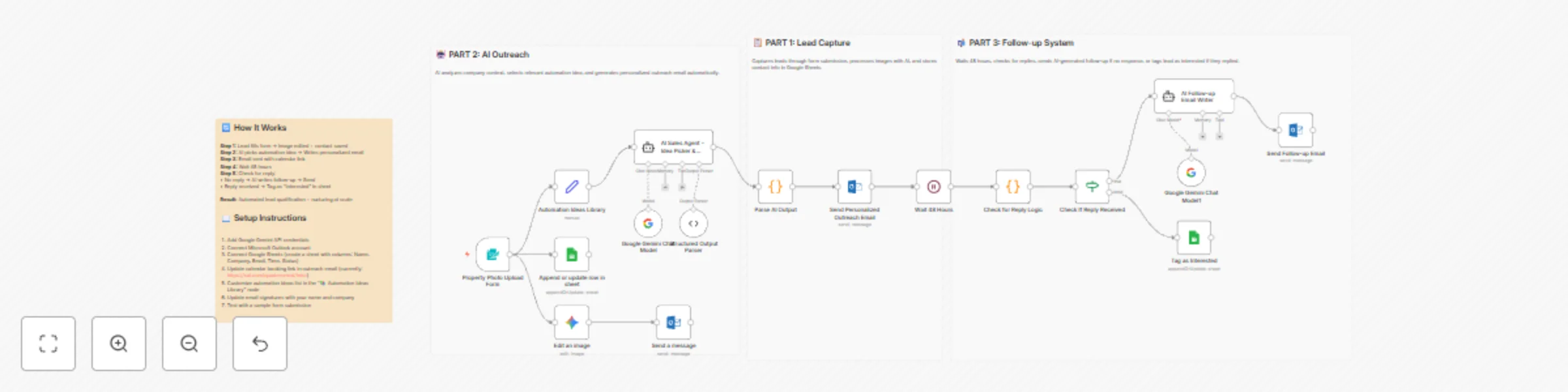
AI Agent Lead Funnel for AI Agencies An End to End Automation That Turns Demos Into Booked Calls This n8n workflow is a full inbound → outbound hybrid funnel designed for AI agencies. It captures w...

Best for

  • Lead Nurturing automation workflows
  • AI Chatbot automation workflows
  • advanced n8n builders looking for reusable templates

Tools used

n8n-nodes-base.formtrigger, @n8n/n8n-nodes-langchain.googlegemini, n8n-nodes-base.microsoftoutlook, n8n-nodes-base.googlesheets, n8n-nodes-base.set, @n8n/n8n-nodes-langchain.agent, @n8n/n8n-nodes-langchain.outputparserstructured, n8n-nodes-base.code

Source and attribution

This workflow is cataloged by N8N Workflows and links back to its original n8n.io source page by Hyrum Hurst.

Original n8n.io source

1.1 Workflow description

Title
Capture and nurture AI agency leads with Google Gemini, Outlook and Sheets
Workflow name
Capture and nurture AI agency leads with Google Gemini, Outlook and Sheets

AI Agent Lead Funnel for AI Agencies

An End-to-End Automation That Turns Demos Into Booked Calls

This n8n workflow is a full inbound → outbound hybrid funnel designed for AI agencies.
It captures warm leads through instant AI value, then automatically follows up with personalized, context-aware outreach and reminders until the lead either replies or books a call.

No cold scraping. No manual follow-ups. Just leverage + timing.


🚀 How the Workflow Works


📋 PART 1 — Lead Capture & Instant Value

1 — Share High-Impact AI Image Edits

You post before/after examples using the NanoBanna / Gemini image-editing model on social platforms.
Each post includes a link to a lightweight form.

The visual results do the selling for you.


2 — Lead Submits Image & Details

The form collects:

  • Image upload
  • Edit instructions
  • Name
  • Email
  • Company name

This filters for high-intent prospects only.


3 — AI Edits the Image Instantly

Once submitted, the workflow:

  • Sends the image + instructions to the AI image editor
  • Preserves lighting and camera angle unless specified
  • Generates a polished result in seconds

4 — Result Delivered via Email

The edited image is emailed directly to the user with:

  • A friendly confirmation message
  • Soft positioning for future work

This establishes trust before any sales motion happens.


5 — Lead Is Logged Automatically

All lead data is saved to Google Sheets:

  • Name
  • Company
  • Email
  • Timestamp

This becomes your live CRM of warm inbound leads.


🤖 PART 2 — AI-Driven Personalized Outreach

6 — AI Analyzes the Lead

An AI sales agent:

  • Looks at the company name + context
  • Reviews a library of proven automation ideas
  • Either selects the best fit or creates a simple custom one

7 — AI Writes a Personalized Outreach Email

The agent generates a short email that:

  • Mentions a specific automation already built
  • States you can help implement it quickly
  • Invites them to book a call via your calendar

No marketing fluff. No generic pitches.
Every email feels hand-written.


8 — Outreach Email Is Sent Automatically

The email is sent from your inbox (Outlook, Gmail, SMTP, etc.) and includes:

  • Their name
  • Their company
  • A clear calendar booking link

📬 PART 3 — Smart Follow-Up System

9 — Wait 48 Hours

The workflow pauses to give the lead time to respond naturally.


10 — Check for a Reply

After 48 hours:

  • If the lead replied → they are tagged as Interested
  • If no reply → continue to follow-up

(Current reply detection is placeholder logic and can be swapped for a live inbox listener.)


11 — AI Writes a Polite Follow-Up

If there’s no response, an AI agent writes:

  • A short, non-pushy follow-up
  • Referencing the original automation idea
  • Under 60 words

12 — Follow-Up Email Is Sent

The follow-up goes out automatically and keeps the conversation alive without manual effort.


📈 Why This Workflow Converts So Well

Instant Value First

Leads experience AI results before being pitched anything.

Context-Aware Outreach

Every email is personalized based on the lead, not a template.

Built-In Persistence

The system follows up automatically — no leads fall through the cracks.

Fully Automated

Once live, this workflow handles:

  • Lead capture
  • AI delivery
  • Outreach
  • Follow-ups
  • CRM updates

You just keep posting content.


🔧 Setup Requirements

To deploy this workflow, connect:

  • Google Gemini API (image editing + agents)
  • Email provider
    • Outlook
    • Gmail
    • SMTP
  • Google Sheets
    • Columns: Name, Company, Email, Time, Status
  • Calendar booking link
    • Example: https://cal.com/your-link

All credentials are modular and easily swappable.


🎯 Summary

This n8n automation turns attention into action by:

  1. Delivering immediate AI value
  2. Following up with relevant, personalized ideas
  3. Nudging leads toward a booked call — automatically

It’s not just a lead funnel.
It’s an AI sales assistant that runs 24/7.

1.2 Logical Blocks

This catalog entry is organized from the workflow JSON. The node-level section below shows the executable blocks available for review before importing the template.

2. Block-by-Block Analysis

Block 1 - Property Photo Upload Form

Type / Role
n8n-nodes-base.formTrigger - formTrigger
Config choices
Version 2.3

Block 2 - Edit an image

Type / Role
@n8n/n8n-nodes-langchain.googleGemini - googleGemini
Config choices
Version 1

Block 3 - Send a message

Type / Role
n8n-nodes-base.microsoftOutlook - microsoftOutlook
Config choices
Version 2

Block 4 - Append or update row in sheet

Type / Role
n8n-nodes-base.googleSheets - googleSheets
Config choices
Version 4.7

Block 5 - Automation Ideas Library

Type / Role
n8n-nodes-base.set - set
Config choices
Version 3.4

Block 6 - AI Sales Agent - Idea Picker & Email Writer

Type / Role
@n8n/n8n-nodes-langchain.agent - agent
Config choices
Version 3

Block 7 - Structured Output Parser

Type / Role
@n8n/n8n-nodes-langchain.outputParserStructured - outputParserStructured
Config choices
Version 1.3

Block 8 - Parse AI Output

Type / Role
n8n-nodes-base.code - code
Config choices
Version 2

Block 9 - Send Personalized Outreach Email

Type / Role
n8n-nodes-base.microsoftOutlook - microsoftOutlook
Config choices
Version 2

Block 10 - Wait 48 Hours

Type / Role
n8n-nodes-base.wait - wait
Config choices
Version 1.1

Block 11 - AI Follow-up Email Writer

Type / Role
@n8n/n8n-nodes-langchain.agent - agent
Config choices
Version 3

Block 12 - Google Gemini Chat Model1

Type / Role
@n8n/n8n-nodes-langchain.lmChatGoogleGemini - lmChatGoogleGemini
Config choices
Version 1

Block 13 - Send Follow-up Email

Type / Role
n8n-nodes-base.microsoftOutlook - microsoftOutlook
Config choices
Version 2

Block 14 - Tag as Interested

Type / Role
n8n-nodes-base.googleSheets - googleSheets
Config choices
Version 4.7

Block 15 - Check for Reply Logic

Type / Role
n8n-nodes-base.code - code
Config choices
Version 2

Block 16 - 📋 PART 1: Lead Capture

Type / Role
n8n-nodes-base.stickyNote - stickyNote
Config choices
Version 1

Block 17 - 🤖 PART 2: AI Outreach

Type / Role
n8n-nodes-base.stickyNote - stickyNote
Config choices
Version 1

Block 18 - 📬 PART 3: Follow-up System

Type / Role
n8n-nodes-base.stickyNote - stickyNote
Config choices
Version 1

Block 19 - 🔄 How It Works

Type / Role
n8n-nodes-base.stickyNote - stickyNote
Config choices
Version 1

Block 20 - Google Gemini Chat Model

Type / Role
@n8n/n8n-nodes-langchain.lmChatGoogleGemini - lmChatGoogleGemini
Config choices
Version 1

Block 21 - Check If Reply Received

Type / Role
n8n-nodes-base.if - if
Config choices
Version 2.2

3. Summary Table

Workflow Capture and nurture AI agency leads with Google Gemini, Outlook and Sheets
Complexity advanced
Nodes 21
Categories Lead Nurturing, AI Chatbot
Author Hyrum Hurst
Published 09 Dec 2025

4. Reproducing the Workflow from Scratch

  1. 1. Download the workflow JSON

    Use the JSON export at /data/workflows/11616/11616.json as the source template for this automation.

  2. 2. Import the template into n8n

    Open n8n, import the downloaded JSON, and review each node before activating the workflow.

  3. 3. Configure credentials and variables

    Replace placeholder credentials, API keys, webhook URLs, account IDs, and environment-specific values with your own settings.

  4. 4. Test with sample data

    Run the workflow manually or in a staging workspace, inspect node output, and confirm downstream systems receive the expected data.

  5. 5. Activate and monitor

    Enable the workflow only after testing, then monitor executions, errors, and rate limits during the first production runs.

5. General Notes & Resources

Review imported nodes carefully before activation. This catalog entry is intended to help you inspect the workflow structure, understand required services, and find related templates faster.

Node names, credentials, schedules, webhook paths, and external service limits may need adjustment for your workspace.

Frequently asked questions

What does Capture and nurture AI agency leads with Google Gemini, Outlook and Sheets do?

AI Agent Lead Funnel for AI Agencies An End to End Automation That Turns Demos Into Booked Calls This n8n workflow is a full inbound → outbound hybrid funnel designed for AI agencies. It captures w...

What do I need before importing this workflow?

Review the workflow JSON, configure any required credentials in n8n, and test the automation in a safe workspace before using it in production.

Can I customize this workflow?

Yes. Use the block-by-block analysis and the downloadable JSON to inspect each node, then adjust credentials, prompts, schedules, filters, or destinations for your Lead Nurturing, AI Chatbot use case.