Block 1 - When clicking ‘Execute workflow’
- Type / Role
- n8n-nodes-base.manualTrigger - manualTrigger
- Config choices
- Version 1


 Early Deal
This workflow is provided as-is. Please review and test before using in production.
Description: Easily extract, download, and organize multiple JSON files from Google Drive using this no code automation template for n8n. Ideal for operations, analysts, or data engineers managing ...
n8n-nodes-base.manualtrigger, n8n-nodes-base.googlesheets, n8n-nodes-base.httprequest, n8n-nodes-base.splitinbatches, n8n-nodes-base.readwritefile, n8n-nodes-base.code, n8n-nodes-base.stickynote
This workflow is cataloged by N8N Workflows and links back to its original n8n.io source page by Rahul Joshi.
Original n8n.io sourceDescription:
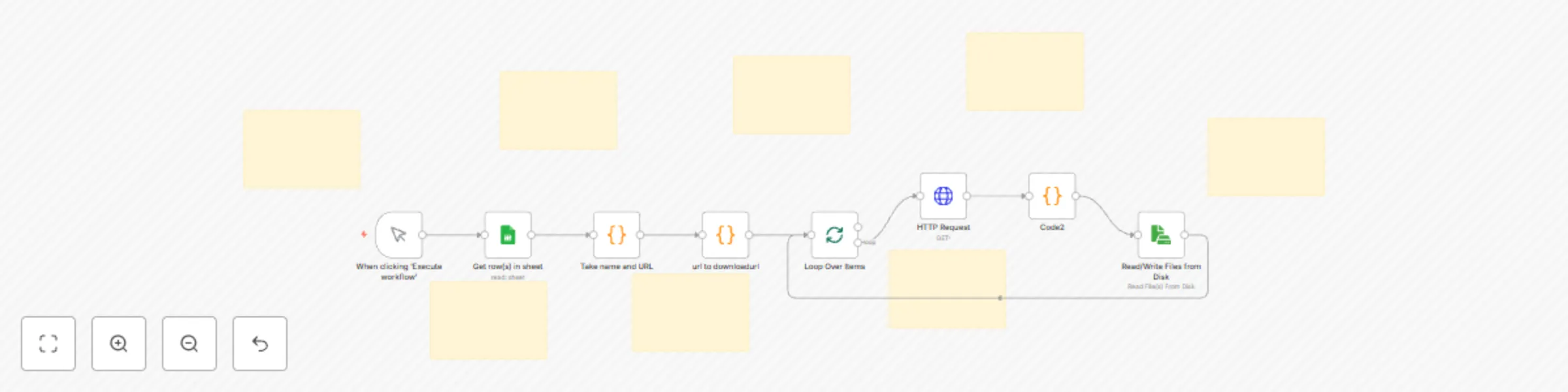
Easily extract, download, and organize multiple JSON files from Google Drive using this no-code automation template for n8n. Ideal for operations, analysts, or data engineers managing bulk document processing, this workflow reads a Google Sheet containing file names and Google Drive URLs, converts those links into downloadable JSONs, and automatically writes each file to a local disk folder—sorted by name.
No more manual downloading or copy-pasting. Everything is processed in a structured loop, ensuring reliable and scalable folder-based separation of your JSON data files.
What This Template Does (Step-by-Step)
🟢 Trigger: Manual Execution: Initiates the flow when you click “Execute Workflow” in n8n.
📄 Google Sheet Reader: Connects to your Google Sheet to fetch rows with columns like Name and Google Drive URL.
🧹 Clean & Filter Data (Python Code Node): Filters out rows missing name or URL. Keeps only valid entries to prevent failure in downstream steps.
🔗 Convert Drive URL to Download Link (JavaScript Code): Extracts the Google Drive File ID and transforms it into a direct download link for each JSON file.
🔁 Batch Looping for Controlled Processing: Uses SplitInBatches to handle each file sequentially to avoid system overload.
📥 Download JSON File via HTTP Request: Makes a GET request to each file’s download URL and loads it as binary data into memory.
🗂️ Generate Local Path for Each File: Prepares the path C:/Users/YourName/Desktop/Healthcare/{filename}.json using the name from the sheet.
💾 Write File to Disk:Saves each JSON file to the local disk at the generated path, effectively separating each entry into its own file.
Required Integrations
✅ Google Sheets OAuth2 API (for reading file metadata) ✅ Local write permissions (for saving files to disk)
Perfect For
📦 Bulk JSON Extraction Pipelines 🏥 Healthcare or Data Ops Teams managing case records or medical file links 🧾 Invoice or Document Download Automations 📁 Content Management or Archival Processes
Why Use This Template?
This catalog entry is organized from the workflow JSON. The node-level section below shows the executable blocks available for review before importing the template.
| Workflow | Bulk JSON file downloader from Google Sheet to local folders |
|---|---|
| Complexity | advanced |
| Nodes | 16 |
| Categories | File Management |
| Author | Rahul Joshi |
| Published | 24 Jul 2025 |
Use the JSON export at /data/workflows/6366/6366.json as the source template for this automation.
Open n8n, import the downloaded JSON, and review each node before activating the workflow.
Replace placeholder credentials, API keys, webhook URLs, account IDs, and environment-specific values with your own settings.
Run the workflow manually or in a staging workspace, inspect node output, and confirm downstream systems receive the expected data.
Enable the workflow only after testing, then monitor executions, errors, and rate limits during the first production runs.
Review imported nodes carefully before activation. This catalog entry is intended to help you inspect the workflow structure, understand required services, and find related templates faster.
Node names, credentials, schedules, webhook paths, and external service limits may need adjustment for your workspace.
Description: Easily extract, download, and organize multiple JSON files from Google Drive using this no code automation template for n8n. Ideal for operations, analysts, or data engineers managing ...
Review the workflow JSON, configure any required credentials in n8n, and test the automation in a safe workspace before using it in production.
Yes. Use the block-by-block analysis and the downloadable JSON to inspect each node, then adjust credentials, prompts, schedules, filters, or destinations for your File Management use case.