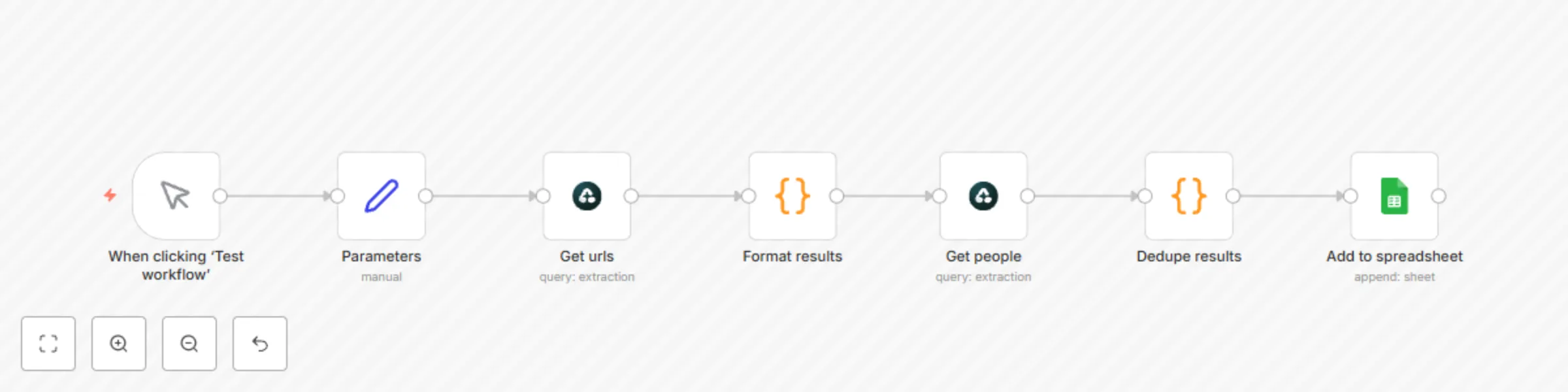
Block 1 - When clicking ‘Test workflow’
- Type / Role
- n8n-nodes-base.manualTrigger - manualTrigger
- Config choices
- Version 1


 Early Deal
This workflow is provided as-is. Please review and test before using in production.
About The List Building Automation This automation will guide you on how to automate list building using Airtop. You’ll have a streamlined workflow that can reduce your research time by up to 90% w...
n8n-nodes-base.manualtrigger, n8n-nodes-base.code, n8n-nodes-base.airtop, n8n-nodes-base.googlesheets, n8n-nodes-base.set
This workflow is cataloged by N8N Workflows and links back to its original n8n.io source page by Airtop.
Original n8n.io sourceThis automation will guide you on how to automate list building using Airtop. You’ll have a streamlined workflow that can reduce your research time by up to 90% while improving the accuracy of your target lists.
It can be challenging to spend too much time on tasks like compiling lists of potential investors, customers, job candidates, industry influencers, or key decision-makers. Verifying contact details often requires significant effort, whether building an outreach list, tracking thought leaders, or researching potential customers. Not anymore. With Airtop's List Building Automation, turn hours of tedious research into clean, reliable and accurate lists, built in just minutes.
Check this out:
This automation leverages Airtop's advanced data processing capabilities powered by AI to scan multiple unstructured sources and compile accurate, targeted lists based on your specific requirements. The magic lies in its ability to understand context and verify information across different platforms.
This workflow:
While our template works out of the box, you might want to customize it for your specific needs:
Here's how businesses can use this automation:
A VC firm could use this automation to build a comprehensive EU angel investors database. What previously required their analysts to work 15 hours per week now runs automatically in the background, providing fresh leads daily.
A PR agency could automate its influencer discovery process across multiple platforms, reducing its research time from 10 hours to 30 minutes per client while increasing the relevance of its outreach lists.
To get the most out of this automation:
Now that you've automated your list building, you might be interested in:
Happy automating!
This catalog entry is organized from the workflow JSON. The node-level section below shows the executable blocks available for review before importing the template.
| Workflow | Build lists of profiles from any platform using Airtop and Google Sheets |
|---|---|
| Complexity | intermediate |
| Nodes | 7 |
| Categories | Lead Generation, AI Summarization |
| Author | Airtop |
| Published | 08 Apr 2025 |
Use the JSON export at /data/workflows/3479/3479.json as the source template for this automation.
Open n8n, import the downloaded JSON, and review each node before activating the workflow.
Replace placeholder credentials, API keys, webhook URLs, account IDs, and environment-specific values with your own settings.
Run the workflow manually or in a staging workspace, inspect node output, and confirm downstream systems receive the expected data.
Enable the workflow only after testing, then monitor executions, errors, and rate limits during the first production runs.
Review imported nodes carefully before activation. This catalog entry is intended to help you inspect the workflow structure, understand required services, and find related templates faster.
Node names, credentials, schedules, webhook paths, and external service limits may need adjustment for your workspace.
About The List Building Automation This automation will guide you on how to automate list building using Airtop. You’ll have a streamlined workflow that can reduce your research time by up to 90% w...
Review the workflow JSON, configure any required credentials in n8n, and test the automation in a safe workspace before using it in production.
Yes. Use the block-by-block analysis and the downloadable JSON to inspect each node, then adjust credentials, prompts, schedules, filters, or destinations for your Lead Generation, AI Summarization use case.