Block 1 - Mistral Cloud Chat Model4
- Type / Role
- @n8n/n8n-nodes-langchain.lmChatMistralCloud - lmChatMistralCloud
- Config choices
- Version 1


 Early Deal
This workflow is provided as-is. Please review and test before using in production.
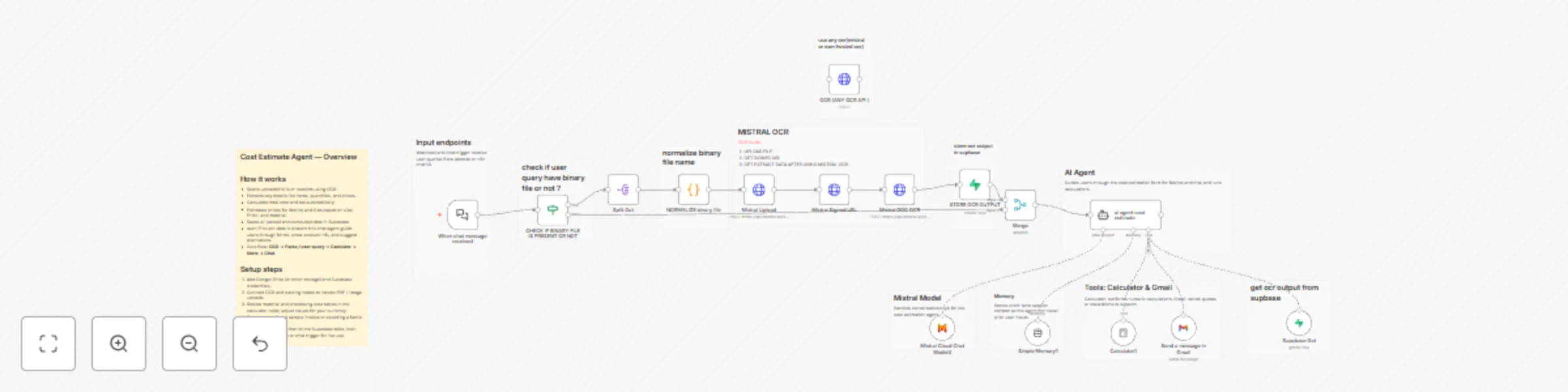
AI Cost Estimation Chatbot (Conversational Dual Agent + OCR Workflow) Overview This workflow introduces a conversational AI Cost Estimation Chatbot with built in OCR document analysis and interacti...
@n8n/n8n-nodes-langchain.lmchatmistralcloud, @n8n/n8n-nodes-langchain.memorybufferwindow, @n8n/n8n-nodes-langchain.toolcalculator, @n8n/n8n-nodes-langchain.chattrigger, n8n-nodes-base.gmailtool, n8n-nodes-base.stickynote, @n8n/n8n-nodes-langchain.agent, n8n-nodes-base.splitout
This workflow is cataloged by N8N Workflows and links back to its original n8n.io source page by DIGITAL BIZ TECH.
Original n8n.io sourceThis workflow introduces a conversational AI Cost Estimation Chatbot with built-in OCR document analysis and interactive form guidance.
It helps users and teams handle pricing, measurement, and product configuration for multiple categories such as fabrics and tiles — whether data comes from an uploaded invoice, a stored RFQ, or live user input.
The system blends Mistral AI’s reasoning with n8n’s native tools — OCR Extract, Calculator, Supabase, and Gmail — to deliver clear, step-by-step cost calculations.
It automatically retrieves or parses OCR data, confirms details conversationally, performs unit conversions, and returns accurate estimates in real time.
Escalation and recordkeeping are handled via Gmail and Supabase.
Trigger: Chat message (from n8n Chat UI) or Webhook (from a live site).
Model: Mistral Cloud Chat Model (mistral-medium-latest)
Memory: Simple Memory (Buffer Window, 15-message history)
Tools:
ai agent cost estimateWorkflow Behavior:
| Service | Purpose |
|---|---|
| ** Chat** | User-facing chatbot interface |
| OCR Extract | Processes uploaded documents or receipts |
| Supabase | Stores and retrieves OCR / quote data |
| Mistral AI | Chat model and reasoning engine |
| Calculator | Handles all numeric and cost calculations |
| Gmail | Sends escalations or quote summaries |
> “You are an AI cost estimation assistant for a brand.
> Retrieve or parse OCR data from Supabase, confirm details with the user, and calculate costs transparently.
> Use the Calculator for all numeric logic based on MATERIAL_COSTS and PROCESSING_COSTS.
> Handle GSM-to-sqm and other conversions automatically.
> If support or follow-up is needed, send a message through Gmail.
> Always guide the user conversationally, confirm assumptions, and explain every step clearly.”
input: Chat Interface
Conversational guidance even when OCR data doesnt exist
OCR + Supabase integration for document reuse
Interactive cost estimator for fabrics and tiles
Transparent calculations and unit conversions
Gmail integration for escalation or order confirmation
Modular design for scaling to other product types
A powerful AI + OCR conversational cost estimation assistant that retrieves or parses order data, guides users through setup, and calculates costs transparently.
It combines intelligence (Mistral), precision (Calculator), and automation (OCR + Supabase + Gmail) to create a complete, human-like quotation system — perfect for brands, manufacturers, and B2B platforms.
We can help you set it up for free — from connecting credentials to deploying it live.
Contact: [email protected]
Website: https://www.digitalbiz.tech
LinkedIn: https://www.linkedin.com/company/digital-biz-tech/
You can also DM us on LinkedIn for any help.
This catalog entry is organized from the workflow JSON. The node-level section below shows the executable blocks available for review before importing the template.
Showing the first 24 of 28 workflow blocks. Download the JSON for the full node graph.
| Workflow | Build a cost estimation chatbot with Mistral AI, OCR & Supabase |
|---|---|
| Complexity | advanced |
| Nodes | 28 |
| Categories | Lead Nurturing, AI Chatbot |
| Author | DIGITAL BIZ TECH |
| Published | 03 Nov 2025 |
Use the JSON export at /data/workflows/10467/10467.json as the source template for this automation.
Open n8n, import the downloaded JSON, and review each node before activating the workflow.
Replace placeholder credentials, API keys, webhook URLs, account IDs, and environment-specific values with your own settings.
Run the workflow manually or in a staging workspace, inspect node output, and confirm downstream systems receive the expected data.
Enable the workflow only after testing, then monitor executions, errors, and rate limits during the first production runs.
Review imported nodes carefully before activation. This catalog entry is intended to help you inspect the workflow structure, understand required services, and find related templates faster.
Node names, credentials, schedules, webhook paths, and external service limits may need adjustment for your workspace.
AI Cost Estimation Chatbot (Conversational Dual Agent + OCR Workflow) Overview This workflow introduces a conversational AI Cost Estimation Chatbot with built in OCR document analysis and interacti...
Review the workflow JSON, configure any required credentials in n8n, and test the automation in a safe workspace before using it in production.
Yes. Use the block-by-block analysis and the downloadable JSON to inspect each node, then adjust credentials, prompts, schedules, filters, or destinations for your Lead Nurturing, AI Chatbot use case.