Batch upscale portrait photos with Real-ESRGAN AI, Google Drive and Airtable

Workflow preview

Workflow preview
100%
Batch upscale portrait photos with Real-ESRGAN AI, Google Drive and Airtable preview
Open on n8n.io

Important notice

This workflow is provided as-is. Please review and test before using in production.

1. Workflow Overview

Portrait Photo Upscaler Workflow Overview Automated workflow that retrieves portrait photos from Airtable, upscales them using AI, and stores the enhanced images in Google Drive with organized fold...

Best for

  • File Management automation workflows
  • Multimodal AI automation workflows
  • intermediate n8n builders looking for reusable templates

Tools used

n8n-nodes-base.manualtrigger, n8n-nodes-base.googledrive, n8n-nodes-base.splitinbatches, n8n-nodes-base.httprequest, n8n-nodes-base.code, n8n-nodes-base.stickynote, n8n-nodes-base.airtable

Source and attribution

This workflow is cataloged by N8N Workflows and links back to its original n8n.io source page by Robert Schröder.

Original n8n.io source

1.1 Workflow description

Title
Batch upscale portrait photos with Real-ESRGAN AI, Google Drive and Airtable
Workflow name
Batch upscale portrait photos with Real-ESRGAN AI, Google Drive and Airtable

Portrait Photo Upscaler Workflow

Overview

Automated workflow that retrieves portrait photos from Airtable, upscales them using AI, and stores the enhanced images in Google Drive with organized folder structure.

Features

  • Automated Folder Creation: Creates timestamped folders in Google Drive
  • AI-Powered Upscaling: Uses Replicate's Real-ESRGAN for 2x image enhancement
  • Batch Processing: Handles multiple images efficiently with loop processing
  • Error Handling: Continues processing even if individual images fail
  • Airtable Integration: Retrieves images from specified database records

Prerequisites

Required Credentials

  • Google Drive OAuth2 API: For folder creation and file uploads
  • Airtable Token API: For accessing image records
  • Replicate HTTP Header Auth: For AI upscaling service

Airtable Setup

  • Column name: PortraitFotoAuswahl
  • Column type: Attachment field containing image files
  • Required: Valid Airtable Base ID and Table ID

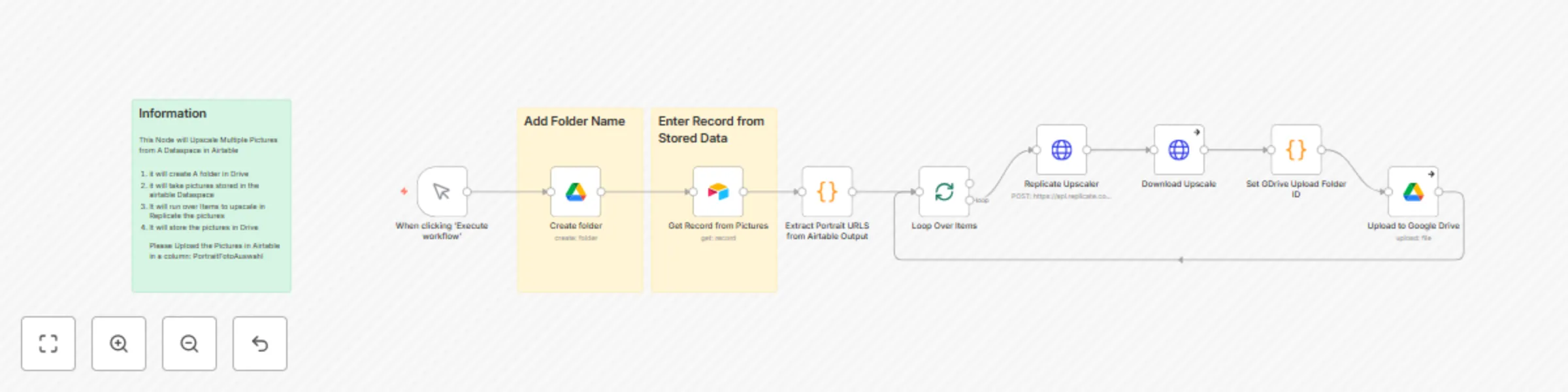
Workflow Steps

  1. Manual Trigger: Initiates the workflow execution
  2. Create Folder: Generates new Google Drive folder with custom name
  3. Get Airtable Record: Retrieves specified record containing portrait images
  4. Extract URLs: Processes attachment URLs from Airtable field
  5. Loop Processing: Iterates through each image for individual processing
  6. AI Upscaling: Enhances images using Replicate's Real-ESRGAN (2x scale)
  7. Download Results: Retrieves processed images from Replicate
  8. Upload to Drive: Stores enhanced images in created folder

Configuration

Required Inputs

  • Folder Name: Custom name for Google Drive folder
  • Record ID: Airtable record identifier containing images
  • Base ID: (configurable)
  • Table ID: (configurable)

Upscaling Settings

  • Scale Factor: 2x (configurable)
  • Face Enhancement: Disabled (configurable)
  • Model: Real-ESRGAN v1.3

Technical Details

Node Configuration

  • Error Handling: Continue on individual failures
  • Response Format: File binary for image processing
  • Naming Convention: LoRa{timestamp}.png
  • Batch Processing: Automatic item splitting

API Endpoints

  • Replicate: https://api.replicate.com/v1/predictions
  • Model Version: nightmareai/real-esrgan:f121d640bd286e1fdc67f9799164c1d5be36ff74576ee11c803ae5b665dd46aa

Use Cases

  • Portrait photography enhancement
  • Batch image processing for portfolios
  • Automated content preparation workflows
  • Quality improvement for archived images

Output

  • Enhanced images stored in Google Drive
  • Organized folder structure with timestamps
  • Preserved original filenames with processed variants
  • Failed processes continue without stopping workflow

Template Benefits

  • Scalable: Processes unlimited images in single execution
  • Reliable: Built-in error handling and continuation logic
  • Organized: Automatic folder management and file naming
  • Professional: High-quality AI upscaling for commercial use

1.2 Logical Blocks

This catalog entry is organized from the workflow JSON. The node-level section below shows the executable blocks available for review before importing the template.

2. Block-by-Block Analysis

Block 1 - When clicking ‘Execute workflow’

Type / Role
n8n-nodes-base.manualTrigger - manualTrigger
Config choices
Version 1

Block 2 - Create folder

Type / Role
n8n-nodes-base.googleDrive - googleDrive
Config choices
Version 3

Block 3 - Loop Over Items

Type / Role
n8n-nodes-base.splitInBatches - splitInBatches
Config choices
Version 3

Block 4 - Upload to Google Drive

Type / Role
n8n-nodes-base.googleDrive - googleDrive
Config choices
Version 3

Block 5 - Download Upscale

Type / Role
n8n-nodes-base.httpRequest - httpRequest
Config choices
Version 4.2

Block 6 - Extract Portrait URLS from Airtable Output

Type / Role
n8n-nodes-base.code - code
Config choices
Version 2

Block 7 - Replicate Upscaler

Type / Role
n8n-nodes-base.httpRequest - httpRequest
Config choices
Version 4.2

Block 8 - Set GDrive Upload Folder ID

Type / Role
n8n-nodes-base.code - code
Config choices
Version 2

Block 9 - Sticky Note

Type / Role
n8n-nodes-base.stickyNote - stickyNote
Config choices
Version 1

Block 10 - Get Record from Pictures

Type / Role
n8n-nodes-base.airtable - airtable
Config choices
Version 2.1

Block 11 - Sticky Note1

Type / Role
n8n-nodes-base.stickyNote - stickyNote
Config choices
Version 1

Block 12 - Sticky Note2

Type / Role
n8n-nodes-base.stickyNote - stickyNote
Config choices
Version 1

3. Summary Table

Workflow Batch upscale portrait photos with Real-ESRGAN AI, Google Drive and Airtable
Complexity intermediate
Nodes 12
Categories File Management, Multimodal AI
Author Robert Schröder
Published 30 Aug 2025

4. Reproducing the Workflow from Scratch

  1. 1. Download the workflow JSON

    Use the JSON export at /data/workflows/8047/8047.json as the source template for this automation.

  2. 2. Import the template into n8n

    Open n8n, import the downloaded JSON, and review each node before activating the workflow.

  3. 3. Configure credentials and variables

    Replace placeholder credentials, API keys, webhook URLs, account IDs, and environment-specific values with your own settings.

  4. 4. Test with sample data

    Run the workflow manually or in a staging workspace, inspect node output, and confirm downstream systems receive the expected data.

  5. 5. Activate and monitor

    Enable the workflow only after testing, then monitor executions, errors, and rate limits during the first production runs.

5. General Notes & Resources

Review imported nodes carefully before activation. This catalog entry is intended to help you inspect the workflow structure, understand required services, and find related templates faster.

Node names, credentials, schedules, webhook paths, and external service limits may need adjustment for your workspace.

Frequently asked questions

What does Batch upscale portrait photos with Real-ESRGAN AI, Google Drive and Airtable do?

Portrait Photo Upscaler Workflow Overview Automated workflow that retrieves portrait photos from Airtable, upscales them using AI, and stores the enhanced images in Google Drive with organized fold...

What do I need before importing this workflow?

Review the workflow JSON, configure any required credentials in n8n, and test the automation in a safe workspace before using it in production.

Can I customize this workflow?

Yes. Use the block-by-block analysis and the downloadable JSON to inspect each node, then adjust credentials, prompts, schedules, filters, or destinations for your File Management, Multimodal AI use case.