R

Robert Schröder

3
Workflows

Workflows by Robert Schröder
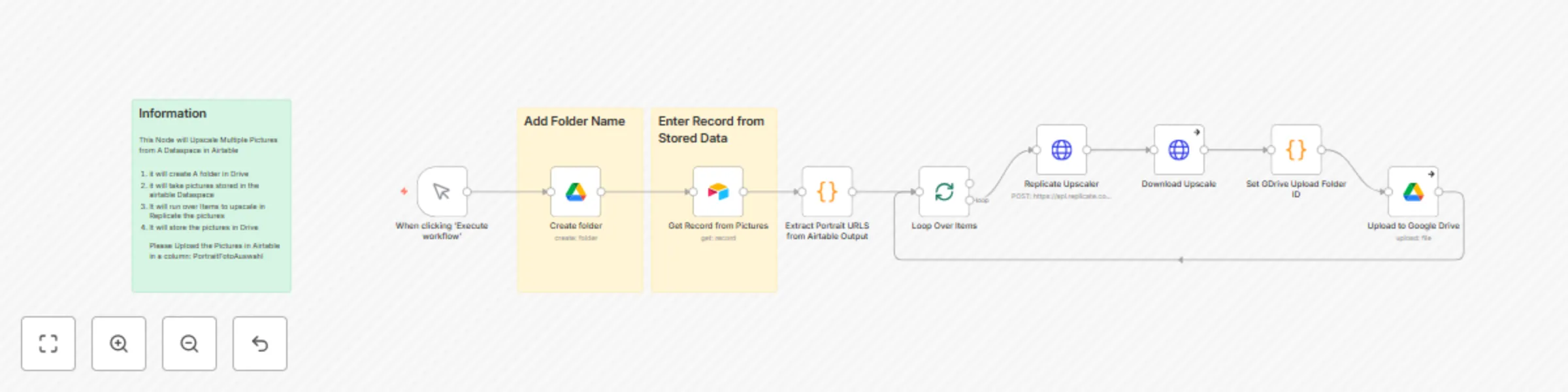
Workflow preview: Batch upscale portrait photos with Real-ESRGAN AI, Google Drive and Airtable
Free intermediate

Batch upscale portrait photos with Real-ESRGAN AI, Google Drive and Airtable

# Portrait Photo Upscaler Workflow ## Overview Automated workflow that retrieves portrait photos from Airtable, upscales them using AI, and stores the enhanced images in Google Drive with organized folder structure. ## Features - **Automated Folder Creation**: Creates timestamped folders in Google Drive - **AI-Powered Upscaling**: Uses Replicate's Real-ESRGAN for 2x image enhancement - **Batch Processing**: Handles multiple images efficiently with loop processing - **Error Handling**: Continues processing even if individual images fail - **Airtable Integration**: Retrieves images from specified database records ## Prerequisites ### Required Credentials - **Google Drive OAuth2 API**: For folder creation and file uploads - **Airtable Token API**: For accessing image records - **Replicate HTTP Header Auth**: For AI upscaling service ### Airtable Setup - Column name: `PortraitFotoAuswahl` - Column type: Attachment field containing image files - Required: Valid Airtable Base ID and Table ID ## Workflow Steps 1. **Manual Trigger**: Initiates the workflow execution 2. **Create Folder**: Generates new Google Drive folder with custom name 3. **Get Airtable Record**: Retrieves specified record containing portrait images 4. **Extract URLs**: Processes attachment URLs from Airtable field 5. **Loop Processing**: Iterates through each image for individual processing 6. **AI Upscaling**: Enhances images using Replicate's Real-ESRGAN (2x scale) 7. **Download Results**: Retrieves processed images from Replicate 8. **Upload to Drive**: Stores enhanced images in created folder ## Configuration ### Required Inputs - **Folder Name**: Custom name for Google Drive folder - **Record ID**: Airtable record identifier containing images - **Base ID**: (configurable) - **Table ID**: (configurable) ### Upscaling Settings - **Scale Factor**: 2x (configurable) - **Face Enhancement**: Disabled (configurable) - **Model**: Real-ESRGAN v1.3 ## Technical Details ### Node Configuration - **Error Handling**: Continue on individual failures - **Response Format**: File binary for image processing - **Naming Convention**: `LoRa{timestamp}.png` - **Batch Processing**: Automatic item splitting ### API Endpoints - **Replicate**: `https://api.replicate.com/v1/predictions` - **Model Version**: `nightmareai/real-esrgan:f121d640bd286e1fdc67f9799164c1d5be36ff74576ee11c803ae5b665dd46aa` ## Use Cases - Portrait photography enhancement - Batch image processing for portfolios - Automated content preparation workflows - Quality improvement for archived images ## Output - Enhanced images stored in Google Drive - Organized folder structure with timestamps - Preserved original filenames with processed variants - Failed processes continue without stopping workflow ## Template Benefits - **Scalable**: Processes unlimited images in single execution - **Reliable**: Built-in error handling and continuation logic - **Organized**: Automatic folder management and file naming - **Professional**: High-quality AI upscaling for commercial use

R
Robert Schröder
File Management
30 Aug 2025
366
0

Workflow preview: Instagram carousel posts from Google Drive via Cloudinary with Telegram alerts
Free advanced

Instagram carousel posts from Google Drive via Cloudinary with Telegram alerts

## **Overview** This n8n workflow automates the creation and publishing of Instagram carousel posts by downloading images from Google Drive, uploading them to Cloudinary for hosting, and publishing them as a coordinated carousel post via Facebook Graph API. ### This workflow is perfect for social media managers and content creators who need to publish coordinated multi-image posts from cloud-stored assets with minimal manual intervention. ## Key Features #### Multi-Image Processing: Handles multiple images for carousel posts automatically #### Cloud Image Hosting: Uses Cloudinary for reliable image hosting and delivery #### Instagram API Integration: Creates and publishes carousel posts via Facebook Graph API #### Google Drive Integration: Downloads images directly from Google Drive links #### Telegram Notifications: Sends success notifications after post publication #### Error Handling: Continues workflow execution even if individual images fail Technical Workflow #### Data Preparation: Structures input data with image links and post content #### Batch Processing: Loops through multiple image URLs from Google Drive #### Image Download: Downloads each image from Google Drive #### Cloud Upload: Uploads images to Cloudinary for public hosting #### Media Creation: Creates Instagram media objects for each image #### ID Collection: Collects all media IDs for carousel creation #### Carousel Assembly: Creates carousel post with all images and caption #### Publication: Publishes the complete carousel to Instagram Notification: Sends Telegram confirmation message ## Prerequisites Facebook Graph API credentials with Instagram Business permissions Google Drive API access for image downloads Cloudinary Account for image hosting Instagram Business Account connected to Facebook Telegram Bot for notifications ## Input Data Structure The workflow expects data with these fields: #### instagram_content: Caption text for the post #### Instagram Account ID: Target Instagram business account #### pose_X_drive_fotolink: Google Drive links for carousel images #### Image metadata for processing ## Configuration Options #### Wait Times: 20s between carousel creation and 15s before publishing for API rate limits #### Image Processing: Automatic upload to Cloudinary with preset configurations #### Error Handling: Individual image failures won't stop the entire carousel creation Batch Processing: Processes all images simultaneously for efficiency

R
Robert Schröder
Social Media
20 Aug 2025
912
0
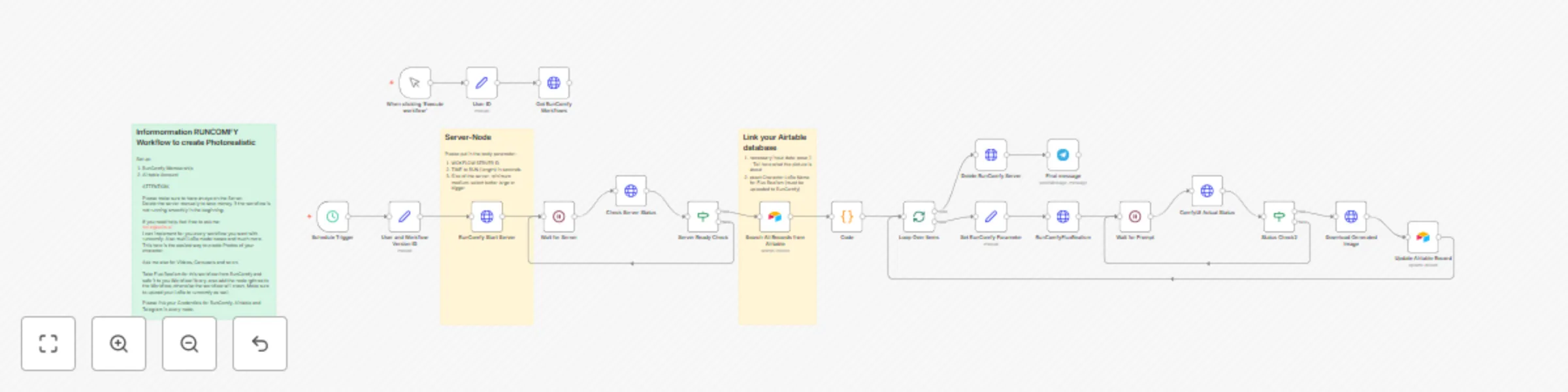
Workflow preview: Create photorealistic social media images with Flux Realism, LoRa models & Airtable
Free advanced

Create photorealistic social media images with Flux Realism, LoRa models & Airtable

# AI Image Generation Workflow for Social Media Content ## Overview This n8n workflow automates the creation of photorealistic AI-generated images for social media content. The workflow uses RunComfy (ComfyUI cloud service) combined with Airtable for data management to create high-quality images based on custom prompts and LoRa models. ## Key Features **Automated Image Generation**: Creates photorealistic images using Flux Realism model and custom LoRa models **Airtable Integration**: Centrally manages content requests, model information, and image status **Cloud-based Processing**: Utilizes RunComfy servers for powerful GPU processing without local hardware requirements **Status Tracking**: Monitors generation process and automatically updates database entries **Telegram Notifications**: Sends success notifications after image completion ## Technical Workflow 1. **Server Initialization**: Starts RunComfy server with configured specifications 2. **Data Retrieval**: Fetches content requests from Airtable database 3. **Image Generation**: Sends prompts to ComfyUI with Flux Realism + LoRa models 4. **Status Monitoring**: Checks generation progress in 30-second intervals 5. **Download**: Downloads completed images 6. **Database Update**: Updates Airtable with image links and status 7. **Server Cleanup**: Deletes RunComfy server for cost optimization ## Prerequisites - **RunComfy Membership** with API access - **Airtable Account** with configured database - **Telegram Bot** for notifications - **Flux Realism Workflow** in RunComfy library - **Uploaded LoRa Models** in RunComfy ## Airtable Schema The database must contain these fields: - `topic`: Content description - `pose_1`: Detailed image prompt - `LoRa Name Flux`: LoRa model name - `Model`: Character name - `pose_1_drive_fotolink`: Link to generated image - `Bilder erstellt`: Generation status ## Configuration Options **Image Resolution**: Default 832x1216px (adjustable in ComfyUI parameters) **Generation Parameters**: 35 steps, Euler sampler, Guidance 2.0 **Server Size**: "Large" for optimal performance (adjustable based on requirements) **Time Intervals**: 30s status checks, 50s server initialization This workflow is ideal for content creators who need regular, high-quality, character-consistent images for social media campaigns.

R
Robert Schröder
Content Creation
19 Aug 2025
627
0