Block 1 - Structured Output Parser
- Type / Role
- @n8n/n8n-nodes-langchain.outputParserStructured - outputParserStructured
- Config choices
- Version 1.2


 Early Deal
This workflow is provided as-is. Please review and test before using in production.
Automatically Scrape Make.com Job Board with GPT 5 mini Summaries & Email Digest Overview Who is this for? Make.com consultants, automation specialists, and freelancers who want to catch new client...
@n8n/n8n-nodes-langchain.outputparserstructured, @n8n/n8n-nodes-langchain.lmchatopenrouter, n8n-nodes-base.httprequest, n8n-nodes-base.html, n8n-nodes-base.filter, @n8n/n8n-nodes-langchain.chainllm, n8n-nodes-base.merge, n8n-nodes-base.code
This workflow is cataloged by N8N Workflows and links back to its original n8n.io source page by Julian Kaiser.
Original n8n.io sourceWho is this for?
Make.com consultants, automation specialists, and freelancers who want to catch new client opportunities without manually checking the forum.
What problem does it solve?
Scrolling through forum posts to find jobs wastes time. This automation finds new postings, uses AI to summarize what clients need, and emails you a clean digest.
How it works:
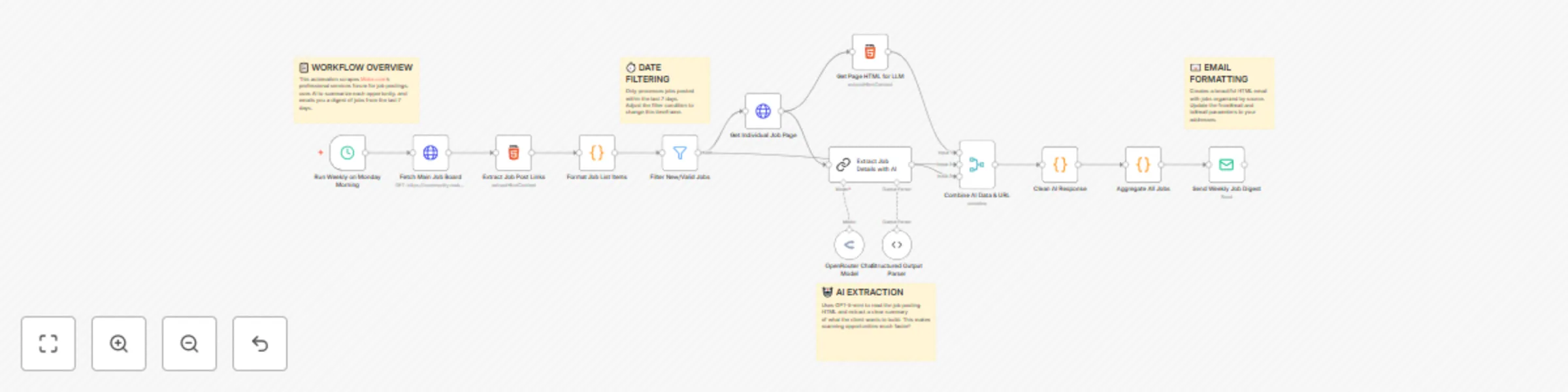
Runs on schedule → scrapes the Make.com professional services forum → filters jobs from last 7 days → AI summarizes each posting → sends formatted email digest.
Scraping: HTTP module pulls HTML from the Make.com forum job board
Parsing: Extracts job titles, dates, authors, and thread links
Filtering: Only jobs posted within last 7 days pass through (configurable)
AI Processing: GPT-5-mini analyzes each post to extract:
Email Generation: Aggregates summaries into organized HTML email with direct links
Delivery: Sends via SMTP to your inbox
Time: ~10 minutes
Requirements:
Steps:
Change date range: Modify filter from 7 days to X days: {{now - X days}}
Keyword filtering: Add filter module to only show jobs mentioning "API", "Shopify", etc.
AI detail level: Edit prompt for shorter/longer summaries
Multiple recipients: Add comma-separated emails in Send Email node
Different AI model: Switch to Gemini or Claude in OpenRouter settings
Team notifications: Add Slack/Discord webhook instead of email
This catalog entry is organized from the workflow JSON. The node-level section below shows the executable blocks available for review before importing the template.
| Workflow | Automatically Scrape Make.com Job Board with GPT-5-mini Summaries & Email Digest |
|---|---|
| Complexity | advanced |
| Nodes | 18 |
| Categories | Lead Generation, AI Summarization |
| Author | Julian Kaiser |
| Published | 06 Oct 2025 |
Use the JSON export at /data/workflows/9300/9300.json as the source template for this automation.
Open n8n, import the downloaded JSON, and review each node before activating the workflow.
Replace placeholder credentials, API keys, webhook URLs, account IDs, and environment-specific values with your own settings.
Run the workflow manually or in a staging workspace, inspect node output, and confirm downstream systems receive the expected data.
Enable the workflow only after testing, then monitor executions, errors, and rate limits during the first production runs.
Review imported nodes carefully before activation. This catalog entry is intended to help you inspect the workflow structure, understand required services, and find related templates faster.
Node names, credentials, schedules, webhook paths, and external service limits may need adjustment for your workspace.
Automatically Scrape Make.com Job Board with GPT 5 mini Summaries & Email Digest Overview Who is this for? Make.com consultants, automation specialists, and freelancers who want to catch new client...
Review the workflow JSON, configure any required credentials in n8n, and test the automation in a safe workspace before using it in production.
Yes. Use the block-by-block analysis and the downloadable JSON to inspect each node, then adjust credentials, prompts, schedules, filters, or destinations for your Lead Generation, AI Summarization use case.