Automatically join WhatsApp groups with Google Sheets and Evolution API
Workflow preview

$20/month : Unlimited workflows
2500 executions/month

THE #1 IN WEB SCRAPING
Scrape any website without limits
HOSTINGER  Early Deal
DISCOUNT 20% Try free
Early DealDISCOUNT 20%
Self-hosted n8n
Unlimited workflows - from $4.99/mo

#1 hub for scraping, AI & automation
6000+ actors - $5 credits/mo
Important notice
This workflow is provided as-is. Please review and test before using in production.
Overview
Who’s it for
This workflow is ideal for community managers, event organizers, and businesses that regularly manage multiple WhatsApp groups. If you have a growing list of invitation codes stored in Google Sheets, this automation helps you automatically join groups, update statuses, and track results without manual work.
How it works / What it does
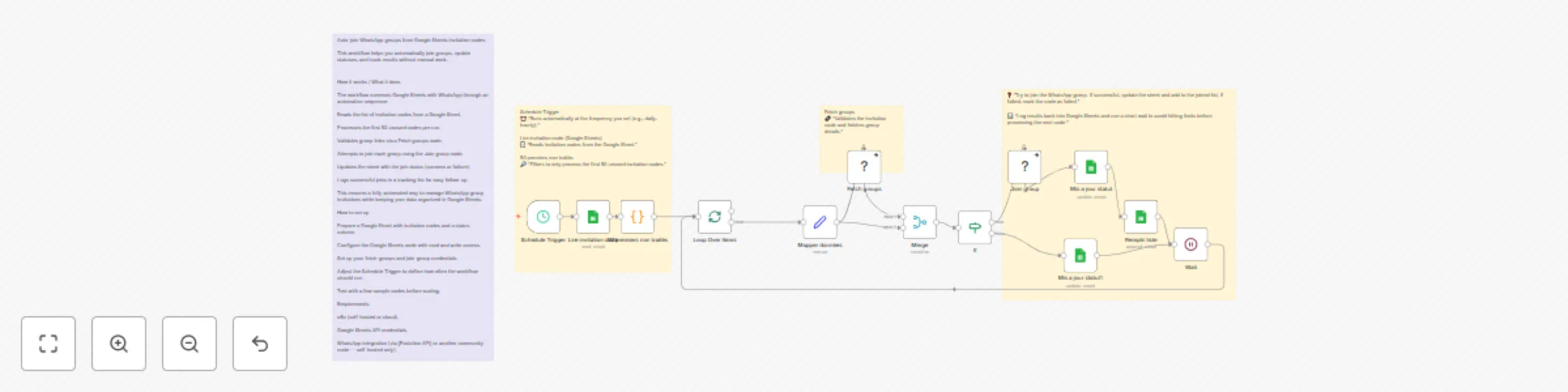
The workflow connects Google Sheets with WhatsApp through an automation sequence:
- Reads the list of invitation codes from a Google Sheet.
- Processes the first 50 unused codes per run.
- Validates group links via a Fetch groups node.
- Attempts to join each group using the Join group node.
- Updates the sheet with the join status (success or failure).
- Logs successful joins in a tracking list for easy follow-up.
This ensures a fully automated way to manage WhatsApp group invitations while keeping your data organized in Google Sheets.
How to set up
- Prepare a Google Sheet with invitation codes and a status column.
- Configure the Google Sheets node with read and write access.
- Set up your fetch-groups and join-group credentials.
- Adjust the Schedule Trigger to define how often the workflow should run.
- Test with a few sample codes before scaling.
Requirements
- n8n (self-hosted or cloud).
- Google Sheets API credentials.
- WhatsApp integration (via [Evolution API] or another community node — self-hosted only).
How to customize the workflow
- Change the batch size (default: 50 codes per run).
- Add error handling or retry logic for invalid links.
- Send real-time notifications (Slack, email, or Telegram) after each join.
- Extend your Google Sheet schema with extra details (e.g., group category, campaign, date joined).