Automatic Gmail unsubscribe detection with AI and Google Sheets contact management

Workflow preview

Workflow preview
100%
Automatic Gmail unsubscribe detection with AI and Google Sheets contact management preview
Open on n8n.io

Important notice

This workflow is provided as-is. Please review and test before using in production.

1. Workflow Overview

Automatically detect unsubscribe replies in your outreach emails and clean your Google Sheets contact list; keeping your domain reputation and deliverability strong. Who it’s for This template i...

Best for

  • Social Media automation workflows
  • AI Summarization automation workflows
  • advanced n8n builders looking for reusable templates

Tools used

n8n-nodes-base.gmailtrigger, @n8n/n8n-nodes-langchain.lmchatopenai, @n8n/n8n-nodes-langchain.chainllm, n8n-nodes-base.code, n8n-nodes-base.googlesheets, n8n-nodes-base.gmail, n8n-nodes-base.if, n8n-nodes-base.stickynote

Source and attribution

This workflow is cataloged by N8N Workflows and links back to its original n8n.io source page by Itunu.

Original n8n.io source

1.1 Workflow description

Title
Automatic Gmail unsubscribe detection with AI and Google Sheets contact management
Workflow name
Automatic Gmail unsubscribe detection with AI and Google Sheets contact management

Automatically detect unsubscribe replies in your outreach emails and clean your Google Sheets contact list; keeping your domain reputation and deliverability strong.


🎯 Who it’s for

This template is designed for freelancers, lead generation specialists, and outreach managers; particularly those running email outreach campaigns for clients or personal lead-gen projects.

If you send cold emails, manage multiple lead lists, or handle outreach at scale, this workflow helps you automatically manage unsubscribe requests to maintain healthy email deliverability and protect your domain reputation.


⚙️ How it works

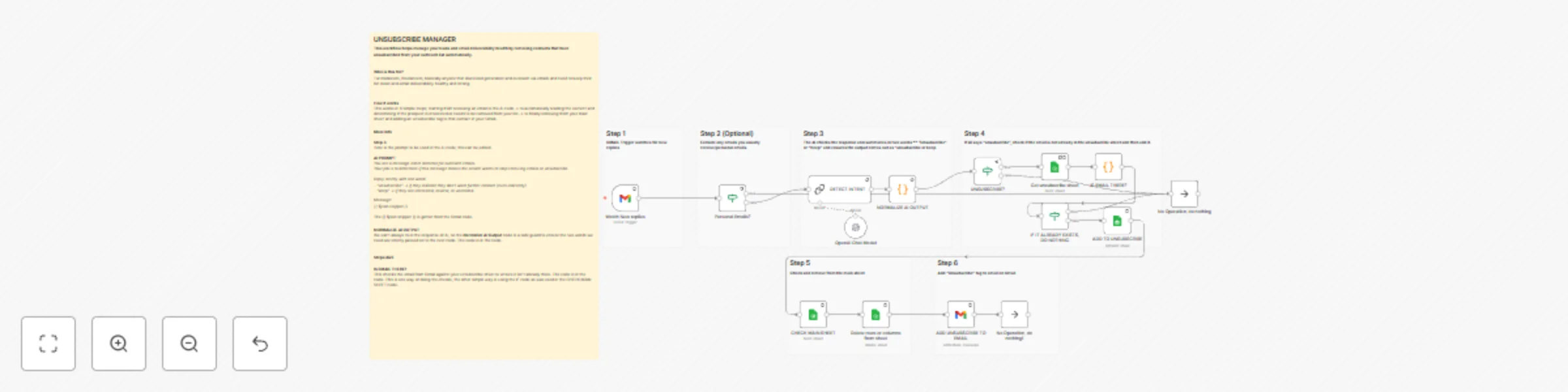
  1. Trigger: The workflow starts when a new reply is received in your Gmail inbox.
  2. Intent Detection: The email text is analyzed using OpenAI to detect unsubscribe intent (“unsubscribe”, “remove me”, “opt out”, etc.).
  3. Normalization & Filtering: A Code node verifies the AI output for accuracy and ensures the result is standardized as either "unsubscribe" or "keep".
  4. Check & Update Sheets:
    • If the contact requested removal, the workflow checks your Unsubscribe Sheet to see if they’re already listed.
    • If not, the contact is added to the Unsubscribe Sheet and simultaneously removed from your Main Outreach Sheet.
  5. Optional Gmail Label: Adds an “Unsubscribe” tag in Gmail for quick visual tracking (optional customization).

🧩 Requirements

To run this workflow, you’ll need:

  • Gmail Credentials → for reading incoming replies and applying labels.
  • Google Sheets Credentials → to manage both the “Main” and “Unsubscribe” spreadsheets.
  • OpenAI API Key → used for detecting unsubscribe intent from message text.

All credentials can be added through the n8n Credentials Manager.


🧠 How to Customize

  • Polling Time: Adjust how often the Gmail Trigger checks for new replies (default: every 5 minutes).
  • Sheets: Replace the linked Google Sheets IDs with your own. You can change sheet names and columns freely.
  • Intent Rules: Modify the Code node to include additional unsubscribe phrases or alternate keywords.
  • Optional Gmail Tagging: Enable or disable tagging for unsubscribed messages.
  • Secondary Validation: Enable the second “If” check after the OpenAI node to double-confirm unsubscribe intent before moving contacts.

💡 Why this workflow matters

By automatically managing unsubscribe requests, you:

  • Respect recipients’ opt-out preferences
  • Reduce spam complaints
  • Protect your domain reputation and increase deliverability
  • Save hours of manual list cleaning

This is a must-have automation for anyone running cold email outreach, especially freelancers managing multiple client inboxes.


🪄 Quick Setup Tips

  • Replace all "Gmail account" and "Google Service Account account" credential references with your actual credentials.
  • Ensure your sheet has an EMAIL column for lookup.
  • Test with a few mock replies before activating for production.
  • Optional: Add a time-based trigger to run the sheet cleanup periodically.

1.2 Logical Blocks

This catalog entry is organized from the workflow JSON. The node-level section below shows the executable blocks available for review before importing the template.

2. Block-by-Block Analysis

Block 1 - Watch New replies

Type / Role
n8n-nodes-base.gmailTrigger - gmailTrigger
Config choices
Version 1.3

Block 2 - OpenAI Chat Model

Type / Role
@n8n/n8n-nodes-langchain.lmChatOpenAi - lmChatOpenAi
Config choices
Version 1.2

Block 3 - DETECT INTENT

Type / Role
@n8n/n8n-nodes-langchain.chainLlm - chainLlm
Config choices
Version 1.7

Block 4 - NORMALIZE AI OUTPUT

Type / Role
n8n-nodes-base.code - code
Config choices
Version 2

Block 5 - CHECK MAIN SHEET

Type / Role
n8n-nodes-base.googleSheets - googleSheets
Config choices
Version 4.7

Block 6 - Delete rows or columns from sheet

Type / Role
n8n-nodes-base.googleSheets - googleSheets
Config choices
Version 4.7

Block 7 - ADD TO UNSUBSCRIBE

Type / Role
n8n-nodes-base.googleSheets - googleSheets
Config choices
Version 4.7

Block 8 - ADD UNSUBSCRIBE TO EMAIL

Type / Role
n8n-nodes-base.gmail - gmail
Config choices
Version 2.1

Block 9 - Get unsubscribe sheet

Type / Role
n8n-nodes-base.googleSheets - googleSheets
Config choices
Version 4.7

Block 10 - IS EMAIL THERE?

Type / Role
n8n-nodes-base.code - code
Config choices
Version 2

Block 11 - IF IT ALREADY EXISTS, DO NOTHING

Type / Role
n8n-nodes-base.if - if
Config choices
Version 2.2

Block 12 - Sticky Note

Type / Role
n8n-nodes-base.stickyNote - stickyNote
Config choices
Version 1

Block 13 - Sticky Note2

Type / Role
n8n-nodes-base.stickyNote - stickyNote
Config choices
Version 1

Block 14 - No Operation, do nothing

Type / Role
n8n-nodes-base.noOp - noOp
Config choices
Version 1

Block 15 - No Operation, do nothing1

Type / Role
n8n-nodes-base.noOp - noOp
Config choices
Version 1

Block 16 - Sticky Note3

Type / Role
n8n-nodes-base.stickyNote - stickyNote
Config choices
Version 1

Block 17 - Sticky Note5

Type / Role
n8n-nodes-base.stickyNote - stickyNote
Config choices
Version 1

Block 18 - Sticky Note4

Type / Role
n8n-nodes-base.stickyNote - stickyNote
Config choices
Version 1

Block 19 - Sticky Note6

Type / Role
n8n-nodes-base.stickyNote - stickyNote
Config choices
Version 1

Block 20 - Sticky Note7

Type / Role
n8n-nodes-base.stickyNote - stickyNote
Config choices
Version 1

Block 21 - UNSUBSCRIBE?

Type / Role
n8n-nodes-base.if - if
Config choices
Version 2.2

Block 22 - Personal Emails?

Type / Role
n8n-nodes-base.if - if
Config choices
Version 2.2

3. Summary Table

Workflow Automatic Gmail unsubscribe detection with AI and Google Sheets contact management
Complexity advanced
Nodes 22
Categories Social Media, AI Summarization
Author Itunu
Published 30 Oct 2025

4. Reproducing the Workflow from Scratch

  1. 1. Download the workflow JSON

    Use the JSON export at /data/workflows/10351/10351.json as the source template for this automation.

  2. 2. Import the template into n8n

    Open n8n, import the downloaded JSON, and review each node before activating the workflow.

  3. 3. Configure credentials and variables

    Replace placeholder credentials, API keys, webhook URLs, account IDs, and environment-specific values with your own settings.

  4. 4. Test with sample data

    Run the workflow manually or in a staging workspace, inspect node output, and confirm downstream systems receive the expected data.

  5. 5. Activate and monitor

    Enable the workflow only after testing, then monitor executions, errors, and rate limits during the first production runs.

5. General Notes & Resources

Review imported nodes carefully before activation. This catalog entry is intended to help you inspect the workflow structure, understand required services, and find related templates faster.

Node names, credentials, schedules, webhook paths, and external service limits may need adjustment for your workspace.

Frequently asked questions

What does Automatic Gmail unsubscribe detection with AI and Google Sheets contact management do?

Automatically detect unsubscribe replies in your outreach emails and clean your Google Sheets contact list; keeping your domain reputation and deliverability strong. Who it’s for This template i...

What do I need before importing this workflow?

Review the workflow JSON, configure any required credentials in n8n, and test the automation in a safe workspace before using it in production.

Can I customize this workflow?

Yes. Use the block-by-block analysis and the downloadable JSON to inspect each node, then adjust credentials, prompts, schedules, filters, or destinations for your Social Media, AI Summarization use case.