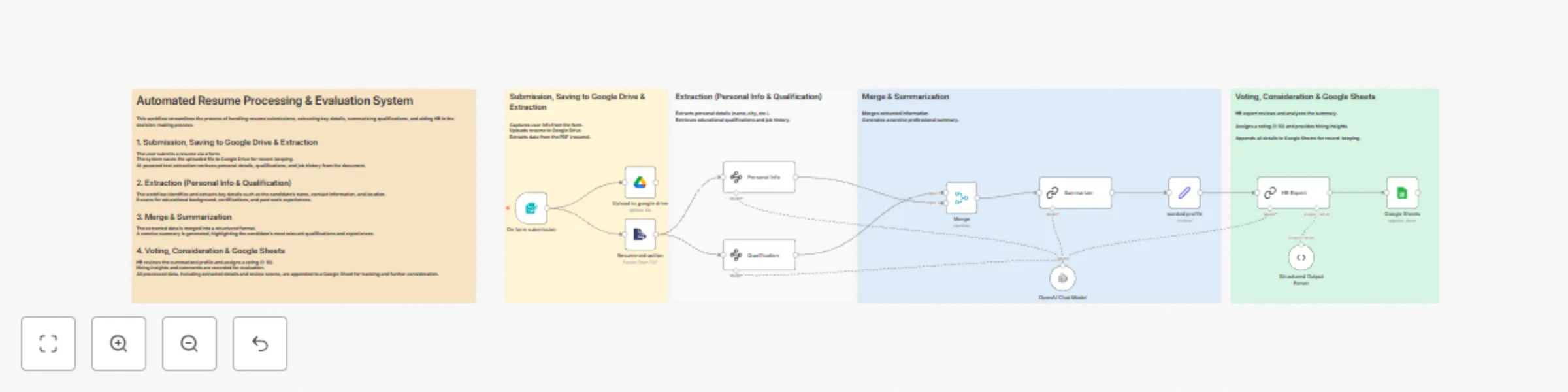
Automated resume review system using OpenAI + Google Sheets

Workflow preview

Workflow preview
100%
Automated resume review system using OpenAI + Google Sheets preview
Open on n8n.io

Important notice

This workflow is provided as-is. Please review and test before using in production.

1. Workflow Overview

Who is this for? This workflow is ideal for: HR teams and recruiters seeking to streamline resume screening. Hiring managers who want quick, summarized candidate insights. Recruitment agencies hand...

Best for

  • HR automation workflows
  • AI Summarization automation workflows
  • advanced n8n builders looking for reusable templates

Tools used

n8n-nodes-base.formtrigger, n8n-nodes-base.merge, @n8n/n8n-nodes-langchain.outputparserstructured, n8n-nodes-base.googlesheets, @n8n/n8n-nodes-langchain.informationextractor, @n8n/n8n-nodes-langchain.chainllm, n8n-nodes-base.stickynote, n8n-nodes-base.googledrive

Source and attribution

This workflow is cataloged by N8N Workflows and links back to its original n8n.io source page by Mirza Ajmal.

Original n8n.io source

1.1 Workflow description

Title
Automated resume review system using OpenAI + Google Sheets
Workflow name
Automated resume review system using OpenAI + Google Sheets

Who is this for? This workflow is ideal for:

  • HR teams and recruiters seeking to streamline resume screening.
  • Hiring managers who want quick, summarized candidate insights.
  • Recruitment agencies handling large volumes of applicant data.
  • Startups and small businesses looking to automate hiring without complex systems.
  • AI and automation professionals who want to build smart HR workflows using n8n and OpenAI.

What problem is this workflow solving? / Use Case

  • Manually reviewing resumes is time-consuming, inconsistent, and prone to human bias.
  • This workflow automates the resume intake and evaluation process—ensuring that each applicant is screened, summarized, and scored using a consistent, data-driven method.
  • It enhances efficiency and supports better hiring decisions.

What this workflow does

  • Accepts resume submissions via form and saves files to Google Drive.
  • Extracts key information from resumes using AI (e.g., name, contact, education, experience).
  • Summarizes candidate qualifications into a short, readable profile.
  • Allows HR to rate applicants and leave comments.
  • Logs all extracted data and evaluations into a centralized Google Sheet for tracking.

Setup

  • Resume is submitted through an n8n form.
  • The uploaded file is automatically stored in Google Drive.
  • n8n uses OpenAI and document parsing tools to extract candidate data.
  • Extracted information is structured and summarized using GPT.
  • A review form is triggered for internal HR rating and notes.
  • All data is appended to a Google Sheet for records and filtering.

How to customize this workflow to your needs

  • Change the form tool (e.g., Typeform, Tally, or custom HTML) based on your stack.
  • Adapt the summary prompt to align with your specific role requirements.
  • Add filters to auto-flag top-tier candidates based on score or skills.
  • Integrate Slack or email to notify hiring managers when top resumes are processed.
  • Connect to your ATS if you want to push processed resumes into your recruitment system.

1.2 Logical Blocks

This catalog entry is organized from the workflow JSON. The node-level section below shows the executable blocks available for review before importing the template.

2. Block-by-Block Analysis

Block 1 - On form submission

Type / Role
n8n-nodes-base.formTrigger - formTrigger
Config choices
Version 2.2

Block 2 - Merge

Type / Role
n8n-nodes-base.merge - merge
Config choices
Version 3

Block 3 - Structured Output Parser

Type / Role
@n8n/n8n-nodes-langchain.outputParserStructured - outputParserStructured
Config choices
Version 1.2

Block 4 - Google Sheets

Type / Role
n8n-nodes-base.googleSheets - googleSheets
Config choices
Version 4.5

Block 5 - Personal Info

Type / Role
@n8n/n8n-nodes-langchain.informationExtractor - informationExtractor
Config choices
Version 1

Block 6 - Qualification

Type / Role
@n8n/n8n-nodes-langchain.informationExtractor - informationExtractor
Config choices
Version 1

Block 7 - HR Expert

Type / Role
@n8n/n8n-nodes-langchain.chainLlm - chainLlm
Config choices
Version 1.5

Block 8 - Sticky Note

Type / Role
n8n-nodes-base.stickyNote - stickyNote
Config choices
Version 1

Block 9 - Sticky Note1

Type / Role
n8n-nodes-base.stickyNote - stickyNote
Config choices
Version 1

Block 10 - Sticky Note2

Type / Role
n8n-nodes-base.stickyNote - stickyNote
Config choices
Version 1

Block 11 - Sticky Note3

Type / Role
n8n-nodes-base.stickyNote - stickyNote
Config choices
Version 1

Block 12 - Sticky Note4

Type / Role
n8n-nodes-base.stickyNote - stickyNote
Config choices
Version 1

Block 13 - Upload to google drive

Type / Role
n8n-nodes-base.googleDrive - googleDrive
Config choices
Version 3

Block 14 - Resume extraction

Type / Role
n8n-nodes-base.extractFromFile - extractFromFile
Config choices
Version 1

Block 15 - wanted profile

Type / Role
n8n-nodes-base.set - set
Config choices
Version 3.4

Block 16 - Summarizer

Type / Role
@n8n/n8n-nodes-langchain.chainSummarization - chainSummarization
Config choices
Version 2

Block 17 - OpenAI Chat Model

Type / Role
@n8n/n8n-nodes-langchain.lmChatOpenAi - lmChatOpenAi
Config choices
Version 1.2

3. Summary Table

Workflow Automated resume review system using OpenAI + Google Sheets
Complexity advanced
Nodes 17
Categories HR, AI Summarization
Author Mirza Ajmal
Published 25 Mar 2025

4. Reproducing the Workflow from Scratch

  1. 1. Download the workflow JSON

    Use the JSON export at /data/workflows/3318/3318.json as the source template for this automation.

  2. 2. Import the template into n8n

    Open n8n, import the downloaded JSON, and review each node before activating the workflow.

  3. 3. Configure credentials and variables

    Replace placeholder credentials, API keys, webhook URLs, account IDs, and environment-specific values with your own settings.

  4. 4. Test with sample data

    Run the workflow manually or in a staging workspace, inspect node output, and confirm downstream systems receive the expected data.

  5. 5. Activate and monitor

    Enable the workflow only after testing, then monitor executions, errors, and rate limits during the first production runs.

5. General Notes & Resources

Review imported nodes carefully before activation. This catalog entry is intended to help you inspect the workflow structure, understand required services, and find related templates faster.

Node names, credentials, schedules, webhook paths, and external service limits may need adjustment for your workspace.

Frequently asked questions

What does Automated resume review system using OpenAI + Google Sheets do?

Who is this for? This workflow is ideal for: HR teams and recruiters seeking to streamline resume screening. Hiring managers who want quick, summarized candidate insights. Recruitment agencies hand...

What do I need before importing this workflow?

Review the workflow JSON, configure any required credentials in n8n, and test the automation in a safe workspace before using it in production.

Can I customize this workflow?

Yes. Use the block-by-block analysis and the downloadable JSON to inspect each node, then adjust credentials, prompts, schedules, filters, or destinations for your HR, AI Summarization use case.