Block 1 - Loop Over Items
- Type / Role
- n8n-nodes-base.splitInBatches - splitInBatches
- Config choices
- Version 3


 Early Deal
This workflow is provided as-is. Please review and test before using in production.
Notice Community nodes can only be installed on self hosted instances of n8n. Who this is for The Automated Resume Job Matching Engine is an...
n8n-nodes-base.splitinbatches, n8n-nodes-base.manualtrigger, n8n-nodes-mcp.mcpclient, n8n-nodes-base.set, n8n-nodes-base.splitout, @n8n/n8n-nodes-langchain.informationextractor, @n8n/n8n-nodes-langchain.chainllm, @n8n/n8n-nodes-langchain.outputparserstructured
This workflow is cataloged by N8N Workflows and links back to its original n8n.io source page by Ranjan Dailata.
Original n8n.io sourceCommunity nodes can only be installed on self-hosted instances of n8n.
The Automated Resume Job Matching Engine is an intelligent workflow designed for career platforms, HR tech startups, recruiting firms, and AI developers who want to streamline job-resume matching using real-time data from LinkedIn and job boards.
This workflow is tailored for:
HR Tech Founders - Building next-gen recruiting products
Recruiters & Talent Sourcers - Seeking automated candidate-job fit evaluation
Job Boards & Portals - Enriching user experience with AI-driven job recommendations
Career Coaches & Resume Writers - Offering personalized job fit analysis
AI Developers - Automating large-scale matching tasks using LinkedIn and job data
Manually matching a resume to job description is time-consuming, biased, and inefficient. Additionally, accessing live job postings and candidate profiles requires overcoming web scraping limitations.
This workflow solves:
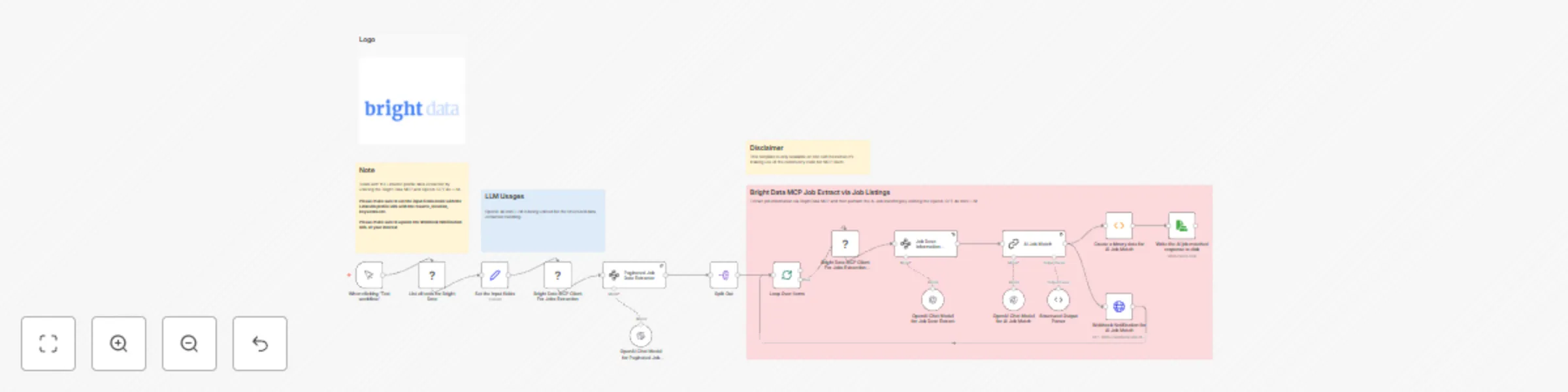
Automated LinkedIn profile and job post data extraction using Bright Data MCP infrastructure
Semantic matching between job requirements and candidate resume using OpenAI 4o mini
Pagination handling for high-volume job data
End-to-end automation from scraping to delivery via webhook and persisting the job matched response to disk
Bright Data MCP for Job Data Extraction
Uses Bright Data MCP Clients to extract multiple job listings (supports pagination)
Pulls job data from LinkedIn with the pre-defined filtering criteria's
OpenAI 4o mini LLM Matching Engine
Extracts paginated job data from the Bright Data MCP extracted info via the MCP scrape_as_html tool.
Extracts textual job description information via the scraped job information by leveraging the Bright Data MCP scrape_as_html tool.
AI Job Matching node handles the job description and the candidate resume compare to generate match scores with insights
Data Delivery
Sends final match report to a Webhook Notification endpoint
Persistence of AI matched job response to disk
Target Different Job Boards
Customize Matching Criteria
Adjust the prompt inside the AI Job Match node
Include scoring metrics like skills match %, experience relevance, or cultural fit
Automate Scheduling
Use a Cron Node to periodically check for new jobs matching a profile
Set triggers based on webhook or input form submissions
Output Customization
Add Markdown/PDF formatting for report summaries
Extend with Google Sheets export for internal analytics
Enhance Data Security
This catalog entry is organized from the workflow JSON. The node-level section below shows the executable blocks available for review before importing the template.
| Workflow | Automated resume job matching engine with Bright Data MCP & OpenAI 4o mini |
|---|---|
| Complexity | advanced |
| Nodes | 22 |
| Categories | HR, AI Summarization |
| Author | Ranjan Dailata |
| Published | 23 May 2025 |
Use the JSON export at /data/workflows/4330/4330.json as the source template for this automation.
Open n8n, import the downloaded JSON, and review each node before activating the workflow.
Replace placeholder credentials, API keys, webhook URLs, account IDs, and environment-specific values with your own settings.
Run the workflow manually or in a staging workspace, inspect node output, and confirm downstream systems receive the expected data.
Enable the workflow only after testing, then monitor executions, errors, and rate limits during the first production runs.
Review imported nodes carefully before activation. This catalog entry is intended to help you inspect the workflow structure, understand required services, and find related templates faster.
Node names, credentials, schedules, webhook paths, and external service limits may need adjustment for your workspace.
Notice Community nodes can only be installed on self hosted instances of n8n. Who this is for The Automated Resume Job Matching Engine is an...
Review the workflow JSON, configure any required credentials in n8n, and test the automation in a safe workspace before using it in production.
Yes. Use the block-by-block analysis and the downloadable JSON to inspect each node, then adjust credentials, prompts, schedules, filters, or destinations for your HR, AI Summarization use case.