Automated plagiarism detection with email reports using RapidAPI & Google Sheets
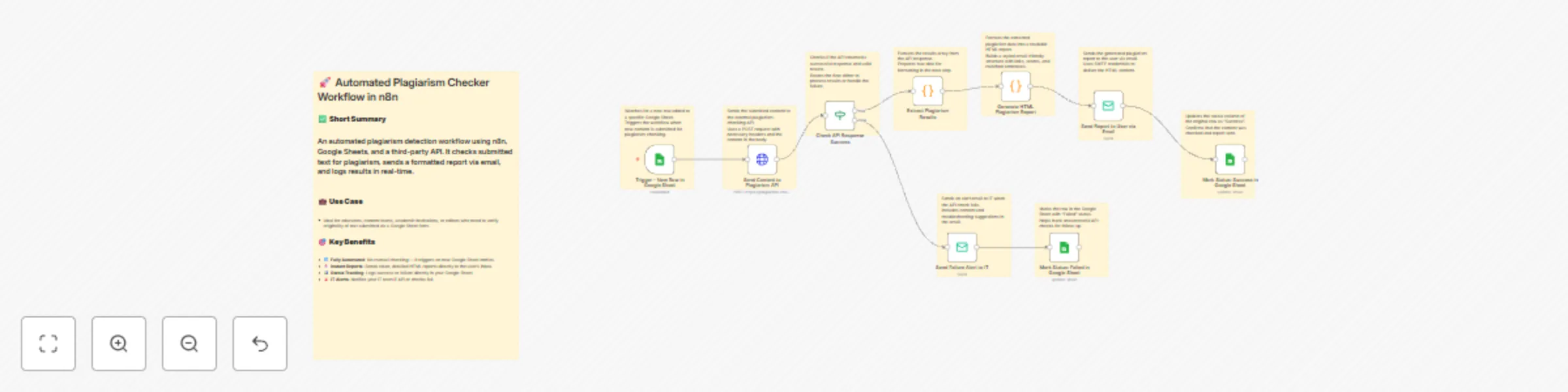
Workflow preview

$20/month : Unlimited workflows
2500 executions/month

THE #1 IN WEB SCRAPING
Scrape any website without limits
HOSTINGER  Early Deal
DISCOUNT 20% Try free
Early DealDISCOUNT 20%
Self-hosted n8n
Unlimited workflows - from $4.99/mo

#1 hub for scraping, AI & automation
6000+ actors - $5 credits/mo
Important notice
This workflow is provided as-is. Please review and test before using in production.
Overview
🚀 Automated Plagiarism Checker Using Rapid API & Google Sheet logging
📄 Description
This powerful no-code workflow automates plagiarism detection using Plagiarism Checker AI Powered. Users submit text through Google Sheets. The system checks for duplication using the API, sends a detailed HTML report via email, and logs the results — all without human intervention.
🔧 How the Workflow Works
| Node Name | Purpose |
|---|---|
Trigger - New Row in Google Sheet |
Watches for new rows added to a connected Google Sheet. |
Send Content to Plagiarism API |
Sends the user-submitted content to the Plagiarism Checker AI Powered API via POST. |
Check API Response Success |
Verifies if the API responded successfully and returned results. |
Extract Plagiarism Results |
Extracts matched results (if any) from the API response. |
Generate HTML Plagiarism Report |
Creates a styled HTML report with similarity scores, links, and matched content. |
Send Report to User via Email |
Sends the plagiarism report to the user using SMTP. |
Mark Status: Success in Google Sheet |
Updates the Google Sheet with a "Success" status once the email is sent. |
Send Failure Alert to IT |
If the API check fails, sends an alert email to IT for investigation. |
Mark Status: Failed in Google Sheet |
Updates the Google Sheet with a "Failed" status if the process doesn’t complete successfully. |
🧾 Google Sheet Configuration
✅ Required Columns:
| Column Name | Description |
|---|---|
Content |
The text to be checked for plagiarism |
Status |
Workflow result (Success / Failed) |
Make sure these column headers exist in Row 1 of your Google Sheet.
📊 How to Connect Google Sheets to n8n
Create a new Google Sheet.
In n8n, use the Google Sheets Trigger node:
- Set your document ID (from the sheet’s URL).
- Specify the sheet name (e.g.,
Sheet1or usegid=0).
Use Google Sheets (service account) credential type for writing updates.
🔑 How to Get a RapidAPI Key for Plagiarism Checker AI Powered
- Go to Plagiarism Checker AI Powered API.
- Sign up or log in to RapidAPI.
- Subscribe to the free or paid plan.
- Copy your
x-rapidapi-keyand paste it into theSend Content to Plagiarism APInode's header.
🧠 Use Cases
- Educators verifying student submissions
- Content marketers validating blog originality
- Academic institutions enforcing anti-plagiarism policies
- Editors reviewing freelance work
✅ Benefits
- ⚙️ 100% Automated: Set once, run forever
- 📨 Instant Reports: Plagiarism reports delivered via email
- 📋 Easy Tracking: Status updates in Google Sheet
- 🛡️ Alerts Built-in: Automatic error notification to IT
- 🔗 Uses Plagiarism Checker AI Powered API to ensure accuracy and scalability
📘 Bonus Tips
- Ensure you handle Google API scopes properly (Editor or Owner access).
- Always test with small content first before scaling up.
- Plagiarism Checker AI Powered API supports sentence-level matching and source URLs.