Block 1 - Trigger - New Row in Google Sheet
- Type / Role
- n8n-nodes-base.googleSheetsTrigger - googleSheetsTrigger
- Config choices
- Version 1


 Early Deal
This workflow is provided as-is. Please review and test before using in production.
Automated Plagiarism Checker Using Rapid API & Google Sheet logging Description This powerful no code workflow automates plagiarism detection using [Plagiarism Checker AI Powered](https://rap...
n8n-nodes-base.googlesheetstrigger, n8n-nodes-base.httprequest, n8n-nodes-base.if, n8n-nodes-base.code, n8n-nodes-base.emailsend, n8n-nodes-base.googlesheets, n8n-nodes-base.stickynote
This workflow is cataloged by N8N Workflows and links back to its original n8n.io source page by Sk developer .
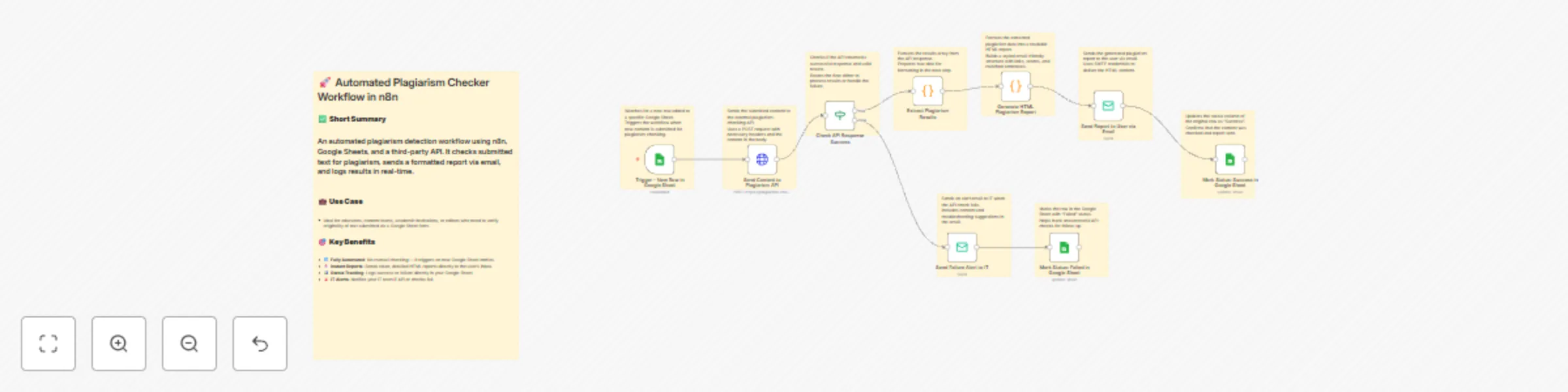
Original n8n.io sourceThis powerful no-code workflow automates plagiarism detection using Plagiarism Checker AI Powered. Users submit text through Google Sheets. The system checks for duplication using the API, sends a detailed HTML report via email, and logs the results — all without human intervention.
| Node Name | Purpose |
|---|---|
Trigger - New Row in Google Sheet |
Watches for new rows added to a connected Google Sheet. |
Send Content to Plagiarism API |
Sends the user-submitted content to the Plagiarism Checker AI Powered API via POST. |
Check API Response Success |
Verifies if the API responded successfully and returned results. |
Extract Plagiarism Results |
Extracts matched results (if any) from the API response. |
Generate HTML Plagiarism Report |
Creates a styled HTML report with similarity scores, links, and matched content. |
Send Report to User via Email |
Sends the plagiarism report to the user using SMTP. |
Mark Status: Success in Google Sheet |
Updates the Google Sheet with a "Success" status once the email is sent. |
Send Failure Alert to IT |
If the API check fails, sends an alert email to IT for investigation. |
Mark Status: Failed in Google Sheet |
Updates the Google Sheet with a "Failed" status if the process doesn’t complete successfully. |
| Column Name | Description |
|---|---|
Content |
The text to be checked for plagiarism |
Status |
Workflow result (Success / Failed) |
Make sure these column headers exist in Row 1 of your Google Sheet.
Create a new Google Sheet.
In n8n, use the Google Sheets Trigger node:
Sheet1 or use gid=0).Use Google Sheets (service account) credential type for writing updates.
x-rapidapi-key and paste it into the Send Content to Plagiarism API node's header.This catalog entry is organized from the workflow JSON. The node-level section below shows the executable blocks available for review before importing the template.
| Workflow | Automated plagiarism detection with email reports using RapidAPI & Google Sheets |
|---|---|
| Complexity | advanced |
| Nodes | 19 |
| Categories | Document Extraction, AI Summarization |
| Author | Sk developer |
| Published | 29 Sept 2025 |
Use the JSON export at /data/workflows/9067/9067.json as the source template for this automation.
Open n8n, import the downloaded JSON, and review each node before activating the workflow.
Replace placeholder credentials, API keys, webhook URLs, account IDs, and environment-specific values with your own settings.
Run the workflow manually or in a staging workspace, inspect node output, and confirm downstream systems receive the expected data.
Enable the workflow only after testing, then monitor executions, errors, and rate limits during the first production runs.
Review imported nodes carefully before activation. This catalog entry is intended to help you inspect the workflow structure, understand required services, and find related templates faster.
Node names, credentials, schedules, webhook paths, and external service limits may need adjustment for your workspace.
Automated Plagiarism Checker Using Rapid API & Google Sheet logging Description This powerful no code workflow automates plagiarism detection using [Plagiarism Checker AI Powered](https://rap...
Review the workflow JSON, configure any required credentials in n8n, and test the automation in a safe workspace before using it in production.
Yes. Use the block-by-block analysis and the downloadable JSON to inspect each node, then adjust credentials, prompts, schedules, filters, or destinations for your Document Extraction, AI Summarization use case.