Automated multi-tier expense approval & reimbursement with Jotform.
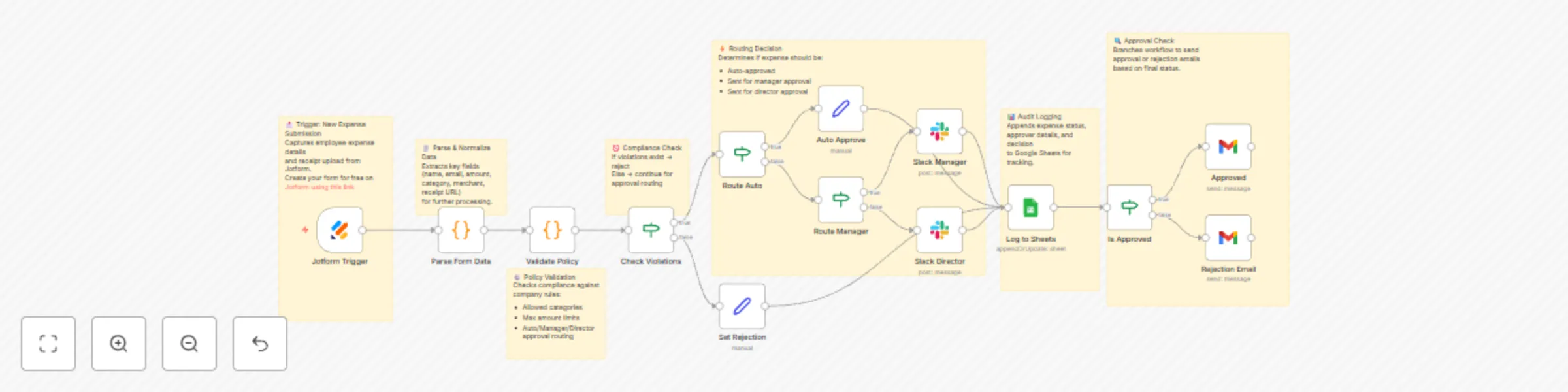
Workflow preview


 Early Deal
DISCOUNT 20%

Important notice
This workflow is provided as-is. Please review and test before using in production.
Overview
Eliminate weeks of waiting and mountains of paperwork with intelligent expense automation that processes reimbursements in 72 hours instead of 2–3 weeks — delivering 90% reduction in manual processing time.
What This Workflow Does
Transforms your expense reimbursement process from bureaucratic nightmare to seamless automation:
📝 Captures Expenses – Jotform intake with receipt upload and expense details
⚙️ Policy Validation – Automatically validates against company rules (categories, amount limits)
🚦 Smart Routing – Intelligent approval workflow based on expense amount:
< $100 → Auto-approve instantly (compliant expenses only)
$100–$500 → Manager approval via Slack notification
$500+ → Finance Director approval via Slack notification
🚫 Violation Detection – Flags policy violations with clear rejection reasons
📊 Audit Trail – Complete expense history logged to Google Sheets
✉️ Automated Communication – Professional approval/rejection emails automatically sent
Key Features
Policy Compliance Engine – Configurable rules for expense categories and amount limits
Three-Tier Approval System – Auto-approve, manager review, and director approval paths
Real-Time Violation Flagging – Instant detection of non-compliant expenses
Comprehensive Audit Logging – Every expense tracked with timestamps and approver details
Professional Email Templates – Branded communication for every outcome
Slack Integration – Real-time notifications with expense context for quick decisions
Zero Manual Processing – Seamless automation from submission to reimbursement
Perfect For
Finance Teams – Processing 50–200+ expense reports monthly
Growing Startups – Scaling operations without adding finance headcount
Remote-First Companies – Distributed teams needing async approval workflows
Compliance-Focused Organizations – Requiring complete audit trails and policy enforcement
SMBs & Enterprises – Companies spending 10–20 hours/week on manual expense processing
What You’ll Need
Required Integrations
Jotform – Expense submission form (free tier works)
Create your form for free on Jotform using this link
Google Sheets – Audit trail and expense database
Gmail – Automated approval/rejection email communication
Slack – Manager and Director approval notifications
Optional Enhancements
QuickBooks/Xero – Automatic expense posting for approved items
Google Cloud Vision – OCR for automatic receipt data extraction
OpenAI – AI-powered receipt parsing and merchant detection
Payment APIs – Direct deposit or check issuance automation
Quick Start
Import Template – Copy JSON and import into n8n
Create Jotform – Build form with fields:
Employee name, email, ID, amount, category, merchant, date, description, receipt upload
Add Credentials – Jotform, Google Sheets, Gmail, Slack
Configure Google Sheet – Replace YOUR_GOOGLE_SHEET_ID with your spreadsheet ID
Set Slack Channels – Update manager and director channel IDs in Slack nodes
Customize Policies – Edit “Validate Policy” node with your company’s rules:
Category limits (meals: $75, travel: $500, office supplies: $200, etc.)
Auto-approve threshold (default: $100)
Manager approval threshold (default: $500)
Test Workflow – Submit test expenses for all scenarios (auto-approve, manager, director, rejection)
Deploy & Share – Activate workflow and distribute Jotform link to employees
Customization Options
1.Adjust Approval Thresholds – Modify auto-approve limits and escalation amounts
2.Add Approval Levels – Insert additional routing nodes for VP or C-suite approvals
3.Department-Based Routing – Route to different managers based on department
4.Receipt OCR Integration – Add Google Vision + OpenAI for receipt data extraction
5.Accounting System Sync – Connect QuickBooks/Xero for automatic expense posting
6.Duplicate Detection – Flag potential duplicate submissions
7.Budget Monitoring – Add monthly/quarterly budget checks
8.Multi-Currency Support – Add conversion & validation for international expenses
9.Mobile-Optimized Forms – Enhance Jotform for easy phone camera uploads
10.Custom Email Branding – Update templates with your company’s logo and styling
Expected Results
⏱️ 72-hour reimbursement vs 2–3 weeks
📉 90% reduction in manual processing time
🧾 100% audit compliance with timestamps & approvers
🗂️ Zero lost receipts – all stored digitally
🧠 Instant policy enforcement – violations caught automatically
😀 Happier employees – fast and transparent reimbursement
🕒 10–15 hours saved weekly for finance teams
🏆 Use Cases 🧑💻 Technology Companies
Process developer or engineering expenses (software, conferences) with auto-approval under $100.
💼 Sales Organizations
Handle high-volume travel expenses — auto-approve meals under $75, route hotels/flights for approval, flag entertainment violations.
🧾 Consulting Firms
Manage client reimbursables with project-based routing and full audit trails for client invoicing.
🏥 Healthcare Organizations
Track medical reimbursements with department-specific approvals and compliance documentation.
🌍 Remote-First Teams
Process global expenses 24/7 with async Slack approvals and instant notifications.
Pro Tips
Start Conservative – Begin with $50 auto-approve limit, raise later
Monthly Policy Reviews – Adjust limits based on expense trends
Employee Training – Include policy link in all automated emails
Enhanced Slack Approvals – Use Block Kit for approve/reject buttons
Receipt Quality Standards – Enforce minimum image resolution
Backup Approvers – Add fallback if manager unavailable
Executive Dashboard – Connect Sheets → Looker/Tableau
Tax Categorization – Align with tax reporting for year-end
Benchmark Data – Track average processing time & approval rates
Learning Resources
This workflow demonstrates:
Multi-condition routing with nested IF nodes
Policy enforcement using JavaScript logic
Audit logging with Google Sheets append/update
Async Slack approvals with messaging nodes
Email automation using dynamic HTML templates
Data normalization for varied Jotform inputs
Error handling for invalid submissions
Perfect for learning enterprise-grade n8n automation patterns 🎯
Workflow Structure Visualization
📝 Jotform Submission ↓ 🧾 Parse Form Data (Normalize fields) ↓ ⚙️ Validate Against Policy (Check rules) ↓ 🚫 Check Violations? ├─ YES → Set Rejection → Log to Sheets → 📧 Send Rejection Email └─ NO → Route Auto-Approve? ├─ YES (< $100) → ✅ Auto Approve → Log to Sheets → 📧 Send Approval Email └─ NO → Route Manager? ├─ YES ($100-$500) → 📱 Slack Manager → Log to Sheets → ⏳ Await Approval └─ NO ($500+) → 📱 Slack Director → Log to Sheets → ⏳ Await Approval
Compliance & Security Features
🧾 Complete Audit Trail – Every expense logged with timestamps
🛡️ Policy Enforcement – Non-compliant submissions blocked early
🔒 Data Privacy – PII secured via n8n credential system
☁️ Receipt Storage – SOC 2–compliant Jotform cloud
👥 Role-Based Access – Slack channel permissions enforced
⚖️ Separation of Duties – Multi-level approval reduces fraud
🚀 Advanced Features to Add
🧠 Receipt OCR with AI – Google Vision + OpenAI for merchant/amount extraction
💵 Accounting Integration – QuickBooks/Xero for GL posting
🏦 Payment Automation – ACH/direct deposit API integration
📱 Mobile App Interface – On-the-go submissions
📈 Budget Monitoring – Real-time spending alerts
📊 Expense Analytics – Automated monthly summaries
🧾 Vendor Management – Flag new vendors for approval
🚗 Mileage Calculator – IRS-compliant reimbursement
💳 Corporate Card Sync – Match credit card transactions
🌐 Per Diem Automation – Geo-based per diem calculation
Ready to Transform Your Expense Process?
Import this template and start processing reimbursements in hours instead of weeks. Your finance team and employees will thank you! 🎉
Questions or customization needs? The workflow includes detailed sticky notes explaining each section and decision point.