Automated local business lead generation with Google Maps & GPT-4

Workflow preview

Workflow preview
100%
Automated local business lead generation with Google Maps & GPT-4 preview
Open on n8n.io

Important notice

This workflow is provided as-is. Please review and test before using in production.

1. Workflow Overview

AI Powered Local Lead Generation Workflow with n8n This workflow solves one of the biggest pain points for freelancers , agencies , and SaaS founders —finding accurate local business leads at scale...

Best for

  • Lead Generation automation workflows
  • Multimodal AI automation workflows
  • advanced n8n builders looking for reusable templates

Tools used

n8n-nodes-base.manualtrigger, @n8n/n8n-nodes-langchain.chainllm, @n8n/n8n-nodes-langchain.outputparserstructured, @n8n/n8n-nodes-langchain.lmchatopenai, n8n-nodes-base.splitout, n8n-nodes-base.set, n8n-nodes-base.splitinbatches, n8n-nodes-base.limit

Source and attribution

This workflow is cataloged by N8N Workflows and links back to its original n8n.io source page by Shahrukh.

Original n8n.io source

1.1 Workflow description

Title
Automated local business lead generation with Google Maps & GPT-4
Workflow name
Automated local business lead generation with Google Maps & GPT-4

AI-Powered Local Lead Generation Workflow with n8n

This workflow solves one of the biggest pain points for freelancers, agencies, and SaaS founders—finding accurate local business leads at scale without manual copy-pasting or unreliable scraping tools.

Traditional lead generation is time-consuming and prone to errors.
This template automates the entire process so you can focus on outreach, not data gathering.


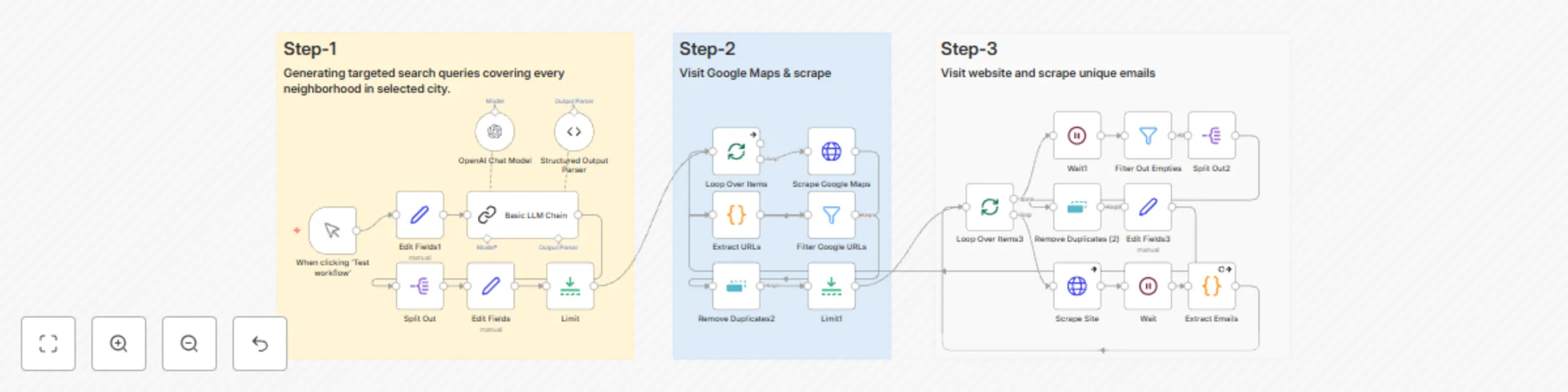
✅ What the Workflow Does

  • Accepts a business type (e.g., plumbers) and city (e.g., Los Angeles) as input
  • Uses AI to generate hyperlocal search terms for full neighborhood coverage
  • Scrapes Google Maps results to extract business details and websites
  • Filters out junk, Google-owned links, and duplicates
  • Scrapes homepage HTML for each business and extracts valid emails using Regex
  • Outputs a clean, deduplicated lead list with business names, websites, and emails

🛠 Everything Runs Inside n8n With:

  • OpenAI for AI-driven query generation
  • Zyte API for reliable scraping
  • JavaScript functions for email extraction
  • Built-in filtering and batching for clean results

👥 Who is This For?

  • Marketing agencies doing local outreach
  • Freelancers offering SEO, design, or lead gen services
  • SaaS founders targeting SMBs
  • Sales teams scaling outbound campaigns

✅ Requirements

  • n8n account (Cloud or self-hosted)
  • OpenAI API key (stored in n8n credentials)
  • Zyte API key (stored securely)
  • Basic familiarity with Google Sheets if you want to export results

⚙️ How to Set Up

  1. Import the workflow JSON into n8n
  2. Go to Credentials in n8n and add OpenAI and Zyte API keys
  3. Replace placeholder credential references in the HTTP Request nodes
  4. Set your search parameters (business type and city) in the designated Set node
  5. Test the workflow with a single search to confirm scraping and email extraction steps
  6. Configure batching if you plan to scrape multiple neighborhoods
  7. Add an output step (Google Sheets, Airtable, or CRM) to store your leads

🔧 How to Customize

  • Update the OpenAI prompt for different search formats (e.g., service + zip code)
  • Adjust the Regex pattern in the JavaScript node for additional email validation rules
  • Add extra filtering logic for niche-specific keywords
  • Integrate with Instantly, HubSpot, or any email-sending tool for full automation

1.2 Logical Blocks

This catalog entry is organized from the workflow JSON. The node-level section below shows the executable blocks available for review before importing the template.

2. Block-by-Block Analysis

Block 1 - When clicking ‘Test workflow’

Type / Role
n8n-nodes-base.manualTrigger - manualTrigger
Config choices
Version 1

Block 2 - Basic LLM Chain

Type / Role
@n8n/n8n-nodes-langchain.chainLlm - chainLlm
Config choices
Version 1.5

Block 3 - Structured Output Parser

Type / Role
@n8n/n8n-nodes-langchain.outputParserStructured - outputParserStructured
Config choices
Version 1.2

Block 4 - OpenAI Chat Model

Type / Role
@n8n/n8n-nodes-langchain.lmChatOpenAi - lmChatOpenAi
Config choices
Version 1.2

Block 5 - Split Out

Type / Role
n8n-nodes-base.splitOut - splitOut
Config choices
Version 1

Block 6 - Edit Fields

Type / Role
n8n-nodes-base.set - set
Config choices
Version 3.4

Block 7 - Loop Over Items

Type / Role
n8n-nodes-base.splitInBatches - splitInBatches
Config choices
Version 3

Block 8 - Edit Fields3

Type / Role
n8n-nodes-base.set - set
Config choices
Version 3.4

Block 9 - Limit

Type / Role
n8n-nodes-base.limit - limit
Config choices
Version 1

Block 10 - Wait

Type / Role
n8n-nodes-base.wait - wait
Config choices
Version 1.1

Block 11 - Wait1

Type / Role
n8n-nodes-base.wait - wait
Config choices
Version 1.1

Block 12 - Extract Emails

Type / Role
n8n-nodes-base.code - code
Config choices
Version 2

Block 13 - Extract URLs

Type / Role
n8n-nodes-base.code - code
Config choices
Version 2

Block 14 - Scrape Site

Type / Role
n8n-nodes-base.httpRequest - httpRequest
Config choices
Version 4.2

Block 15 - Filter Out Empties

Type / Role
n8n-nodes-base.filter - filter
Config choices
Version 2.2

Block 16 - Filter Google URLs

Type / Role
n8n-nodes-base.filter - filter
Config choices
Version 2.2

Block 17 - Remove Duplicates (2)

Type / Role
n8n-nodes-base.removeDuplicates - removeDuplicates
Config choices
Version 2

Block 18 - Remove Duplicates2

Type / Role
n8n-nodes-base.removeDuplicates - removeDuplicates
Config choices
Version 2

Block 19 - Loop Over Items3

Type / Role
n8n-nodes-base.splitInBatches - splitInBatches
Config choices
Version 3

Block 20 - Limit1

Type / Role
n8n-nodes-base.limit - limit
Config choices
Version 1

Block 21 - Split Out2

Type / Role
n8n-nodes-base.splitOut - splitOut
Config choices
Version 1

Block 22 - Edit Fields1

Type / Role
n8n-nodes-base.set - set
Config choices
Version 3.4

Block 23 - Sticky Note

Type / Role
n8n-nodes-base.stickyNote - stickyNote
Config choices
Version 1

Block 24 - Scrape Google Maps

Type / Role
n8n-nodes-base.httpRequest - httpRequest
Config choices
Version 4.2

Showing the first 24 of 26 workflow blocks. Download the JSON for the full node graph.

3. Summary Table

Workflow Automated local business lead generation with Google Maps & GPT-4
Complexity advanced
Nodes 26
Categories Lead Generation, Multimodal AI
Author Shahrukh
Published 05 Jul 2025

4. Reproducing the Workflow from Scratch

  1. 1. Download the workflow JSON

    Use the JSON export at /data/workflows/5701/5701.json as the source template for this automation.

  2. 2. Import the template into n8n

    Open n8n, import the downloaded JSON, and review each node before activating the workflow.

  3. 3. Configure credentials and variables

    Replace placeholder credentials, API keys, webhook URLs, account IDs, and environment-specific values with your own settings.

  4. 4. Test with sample data

    Run the workflow manually or in a staging workspace, inspect node output, and confirm downstream systems receive the expected data.

  5. 5. Activate and monitor

    Enable the workflow only after testing, then monitor executions, errors, and rate limits during the first production runs.

5. General Notes & Resources

Review imported nodes carefully before activation. This catalog entry is intended to help you inspect the workflow structure, understand required services, and find related templates faster.

Node names, credentials, schedules, webhook paths, and external service limits may need adjustment for your workspace.

Frequently asked questions

What does Automated local business lead generation with Google Maps & GPT-4 do?

AI Powered Local Lead Generation Workflow with n8n This workflow solves one of the biggest pain points for freelancers , agencies , and SaaS founders —finding accurate local business leads at scale...

What do I need before importing this workflow?

Review the workflow JSON, configure any required credentials in n8n, and test the automation in a safe workspace before using it in production.

Can I customize this workflow?

Yes. Use the block-by-block analysis and the downloadable JSON to inspect each node, then adjust credentials, prompts, schedules, filters, or destinations for your Lead Generation, Multimodal AI use case.