S

Shahrukh

3
Workflows

Workflows by Shahrukh

Workflow preview: Automated website audit & personalized outreach with Lighthouse and GPT-4
Free advanced

Automated website audit & personalized outreach with Lighthouse and GPT-4

# Create AI-Driven Website Audits & Personalized Outreach with Lighthouse and GPT-4 ## Who is this for? This workflow is perfect for **marketing agencies**, **SEO consultants**, and **growth specialists** who need to scale personalized outreach without spending hours on manual research. --- ## What problem does it solve? Traditional cold outreach feels **generic** and gets ignored. This template automates website audits and personalized email creation, making your outreach look **deeply researched and relevant—at scale**. --- ## What this workflow does - Pulls business details from a **Google Sheet** (which you can fill via tools like Google Maps scrapers) - Finds company emails using an **AI-powered scraper** - Captures a **screenshot** of the business homepage - Runs a **Lighthouse audit** (Performance, SEO, Accessibility, Best Practices) - Performs **UI analysis** to spot design gaps using GPT-4 - Generates a **personalized outreach email** that references real site data, tone, and scores **Result:** You end up with dozens of qualified leads, each with a **full audit report** and a **ready-to-send outreach email**. --- ## Requirements - **n8n account** (self-hosted or cloud) - **Google Sheets credentials** (use n8n’s built-in credential manager) - **OpenAI API key** (stored securely in n8n credentials) - **Lighthouse node installed** --- ## How to Set Up 1. **Connect Google Sheets** → Use it as your lead source 2. Add your **OpenAI** and **Google credentials** via n8n credential manager 3. Replace **placeholder variables** in the “Set” nodes for your campaign 4. Enable the **Lighthouse node** for audits 5. Run the workflow **manually** or **schedule it** --- ## How to Customize - Change the **email prompt** in the OpenAI node to match your tone - Modify the **Google Sheet structure** for different niches - Add extra steps (e.g., push to a **CRM** or email sender like **Instantly**) *Feel Free to drop me an email if you need help with building a custom automation for your business at : [email protected]*

S
Shahrukh
Lead Nurturing
14 Jul 2025
1309
0
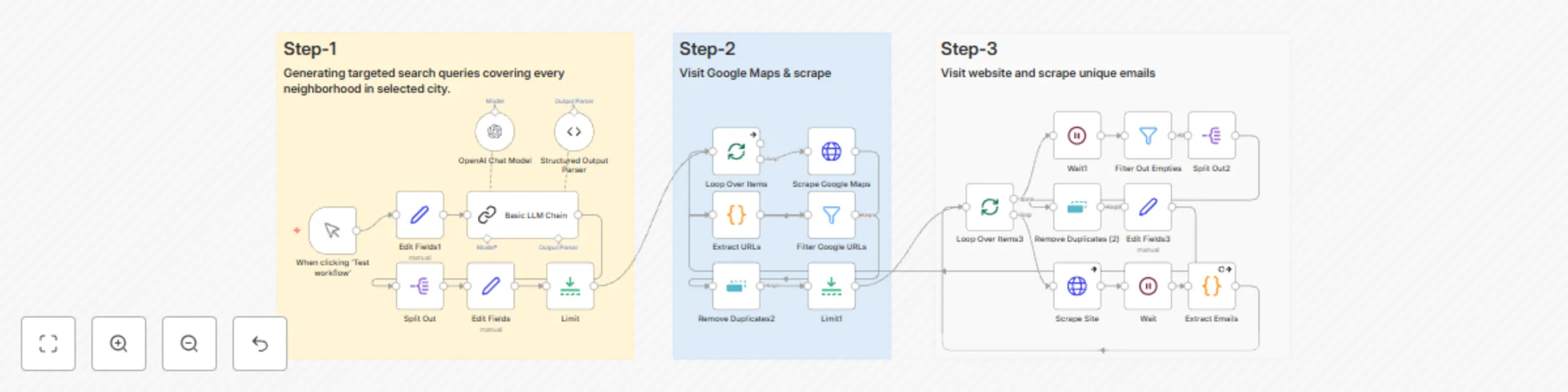
Workflow preview: Automated local business lead generation with Google Maps & GPT-4
Free advanced

Automated local business lead generation with Google Maps & GPT-4

# AI-Powered Local Lead Generation Workflow with n8n This workflow solves one of the biggest pain points for **freelancers**, **agencies**, and **SaaS founders**—finding accurate local business leads at scale without manual copy-pasting or unreliable scraping tools. Traditional lead generation is **time-consuming** and **prone to errors**. This template automates the entire process so you can **focus on outreach, not data gathering**. --- ## ✅ What the Workflow Does - Accepts a **business type** (e.g., `plumbers`) and **city** (e.g., `Los Angeles`) as input - Uses **AI to generate hyperlocal search terms** for full neighborhood coverage - Scrapes **Google Maps results** to extract business details and websites - Filters out **junk, Google-owned links, and duplicates** - Scrapes **homepage HTML** for each business and extracts valid emails using **Regex** - Outputs a **clean, deduplicated lead list** with business names, websites, and emails --- ## 🛠 Everything Runs Inside n8n With: - **OpenAI** for AI-driven query generation - **Zyte API** for reliable scraping - **JavaScript functions** for email extraction - **Built-in filtering and batching** for clean results --- ## 👥 Who is This For? - **Marketing agencies** doing local outreach - **Freelancers** offering SEO, design, or lead gen services - **SaaS founders** targeting SMBs - **Sales teams** scaling outbound campaigns --- ## ✅ Requirements - **n8n account** (Cloud or self-hosted) - **OpenAI API key** (stored in n8n credentials) - **Zyte API key** (stored securely) - Basic familiarity with **Google Sheets** if you want to export results --- ## ⚙️ How to Set Up 1. Import the **workflow JSON** into n8n 2. Go to **Credentials** in n8n and add **OpenAI** and **Zyte API keys** 3. Replace **placeholder credential references** in the HTTP Request nodes 4. Set your **search parameters** (business type and city) in the designated Set node 5. Test the workflow with a **single search** to confirm scraping and email extraction steps 6. Configure **batching** if you plan to scrape multiple neighborhoods 7. Add an **output step** (Google Sheets, Airtable, or CRM) to store your leads --- ## 🔧 How to Customize - Update the **OpenAI prompt** for different search formats (e.g., `service + zip code`) - Adjust the **Regex pattern** in the JavaScript node for additional email validation rules - Add extra **filtering logic** for niche-specific keywords - Integrate with **Instantly, HubSpot**, or any email-sending tool for full automation

S
Shahrukh
Lead Generation
6 Jul 2025
1810
0

Workflow preview: Automatically reply to cold emails with GPT-4 & Instantly.ai
Free intermediate

Automatically reply to cold emails with GPT-4 & Instantly.ai

# AI-Powered Workflow for Auto-Responding to Positive Cold Email Replies This workflow is designed for **agencies**, **freelancers**, and **sales teams** who want to turn **positive cold email replies into booked meetings automatically**—without hiring VAs or spending hours on manual responses. --- ## ❓ The Problem Most teams waste time **replying manually** or **pay for virtual assistants**, leading to **delays and missed opportunities**. This template eliminates that bottleneck. --- ## ✅ What the Workflow Does - Detects **positive replies** from **Instantly.ai campaigns** - Uses **AI to analyze intent** and craft **natural, human-like responses** - Adds **personalization** to keep replies authentic - Includes **Calendly links, product docs, or FAQs** based on the lead’s intent - Sends **responses instantly**—so you **never miss a hot lead again** **No robotic AI text.** Just **smooth, human-style emails** that get booked calls faster. --- ## 👥 Who is This For? - **Agencies** running Instantly.ai or similar outbound tools - **Founders** handling their own cold email outreach - **Sales teams** looking to automate follow-up and booking - Anyone who gets **5–20 positive replies a week** and wants to **2x–4x conversions** --- ## ✅ Requirements - **n8n** (Cloud or self-hosted) - **Instantly.ai account** with API access - **OpenAI API key** (stored securely in n8n credentials) - *(Optional)* Calendly or booking link, Notion or Google Docs for resources --- ## ⚙️ How to Set Up 1. Import the **workflow** into n8n 2. Add your **Instantly.ai API credentials** and **OpenAI key** using n8n’s credential manager 3. Customize the **AI prompt** for your tone, CTA, and offer 4. Insert your **Calendly or booking link** in the response template 5. Test with **one positive reply** to confirm filtering and response quality 6. Activate the workflow to **auto-reply in real time** --- ## 🔧 How to Customize - Adjust the **filtering logic** for different keywords or intent signals - Add **branching** for multiple booking links (e.g., based on region or service type) - Push **responses to a CRM** for tracking - Include extra resources like **case studies or pricing docs**

S
Shahrukh
Lead Nurturing
6 Jul 2025
1342
0