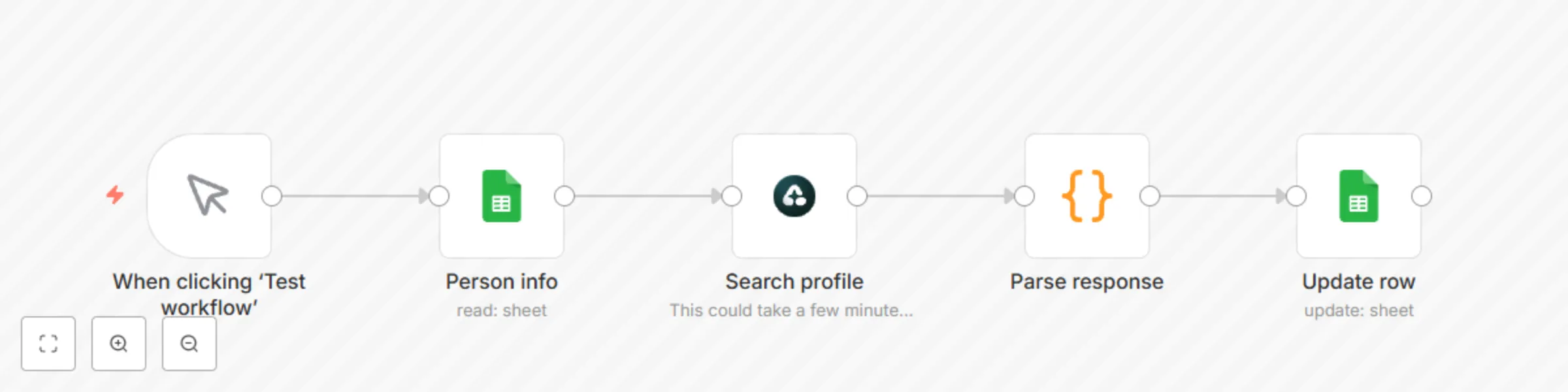
Block 1 - When clicking ‘Test workflow’
- Type / Role
- n8n-nodes-base.manualTrigger - manualTrigger
- Config choices
- Version 1


 Early Deal
This workflow is provided as-is. Please review and test before using in production.
About The LinkedIn Profile Discovery Automation Are you tired of manually searching for LinkedIn profiles or paying expensive data providers for often outdated information? If you spend countless h...
n8n-nodes-base.manualtrigger, n8n-nodes-base.googlesheets, n8n-nodes-base.airtop, n8n-nodes-base.code
This workflow is cataloged by N8N Workflows and links back to its original n8n.io source page by Airtop.
Original n8n.io sourceAre you tired of manually searching for LinkedIn profiles or paying expensive data providers for often outdated information? If you spend countless hours trying to find accurate LinkedIn URLs for your prospects or candidates, this automation will change your workflow forever. Just give this workflow the information you have about a contact, and it will automatically augment it with a LinkedIn profile.
In this guide, you'll learn how to automate LinkedIn profile link discovery using Airtop's built-in node in n8n. Using this automation, you'll have a fully automated workflow that saves you hours of manual searching while providing accurate, validated LinkedIn URLs.
This automation leverages the power of intelligent search algorithms combined with LinkedIn validation to ensure accuracy. Here's how it works:
Getting started with this automation is straightforward:
While the default setup uses Google Sheets, this automation is highly flexible:
This automation has the potential to transform how we organizations handle profile enrichment.
With this automation, a recruiting firm could save hundreds of dollars a month in data enrichment fees, achieve better accuracy, and eliminate subscription costs. They would also be able to process thousands of profiles weekly with near-perfect accuracy.
A B2B sales team could integrate this automation with their CRM, automatically enriching new leads with validated LinkedIn profiles and saving their SDRs hours per week on manual research.
To maximize the accuracy of your results:
Now that you've automated LinkedIn profile discovery, consider exploring related automations:
This catalog entry is organized from the workflow JSON. The node-level section below shows the executable blocks available for review before importing the template.
| Workflow | Automated LinkedIn profile discovery with Airtop and Google Search |
|---|---|
| Complexity | intermediate |
| Nodes | 5 |
| Categories | Lead Generation |
| Author | Airtop |
| Published | 08 Apr 2025 |
Use the JSON export at /data/workflows/3477/3477.json as the source template for this automation.
Open n8n, import the downloaded JSON, and review each node before activating the workflow.
Replace placeholder credentials, API keys, webhook URLs, account IDs, and environment-specific values with your own settings.
Run the workflow manually or in a staging workspace, inspect node output, and confirm downstream systems receive the expected data.
Enable the workflow only after testing, then monitor executions, errors, and rate limits during the first production runs.
Review imported nodes carefully before activation. This catalog entry is intended to help you inspect the workflow structure, understand required services, and find related templates faster.
Node names, credentials, schedules, webhook paths, and external service limits may need adjustment for your workspace.
About The LinkedIn Profile Discovery Automation Are you tired of manually searching for LinkedIn profiles or paying expensive data providers for often outdated information? If you spend countless h...
Review the workflow JSON, configure any required credentials in n8n, and test the automation in a safe workspace before using it in production.
Yes. Use the block-by-block analysis and the downloadable JSON to inspect each node, then adjust credentials, prompts, schedules, filters, or destinations for your Lead Generation use case.