Block 1 - 0. Webhook (Lead Capture)
- Type / Role
- n8n-nodes-base.webhook - webhook
- Config choices
- Version 1


 Early Deal
This workflow is provided as-is. Please review and test before using in production.
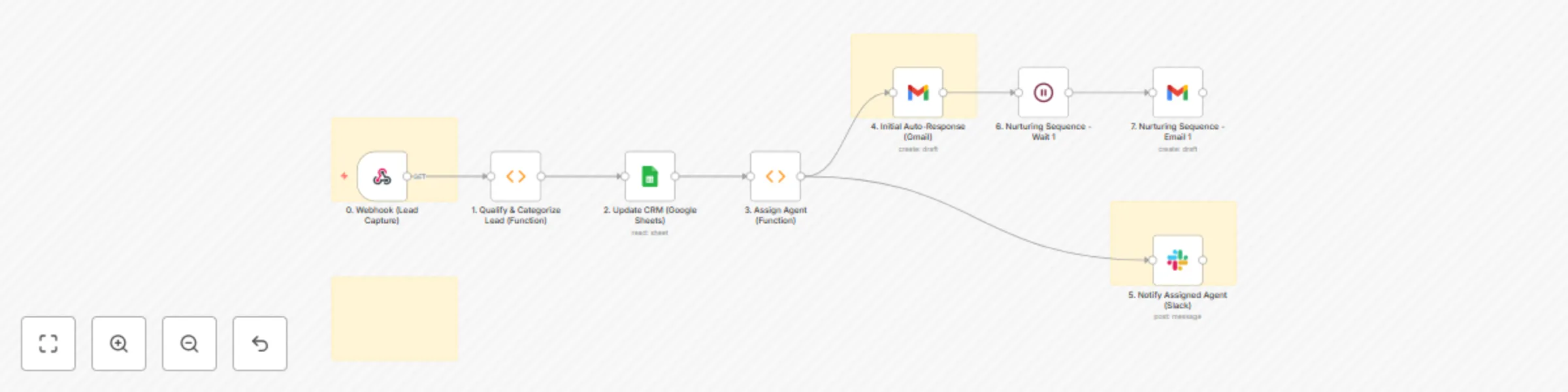
How It Works ️ This workflow automates the entire lead management lifecycle, from initial capture and qualification to agent assignment and personalized nurturing, ensuring no lead is left behind ...
n8n-nodes-base.webhook, n8n-nodes-base.function, n8n-nodes-base.googlesheets, n8n-nodes-base.gmail, n8n-nodes-base.slack, n8n-nodes-base.wait, n8n-nodes-base.stickynote
This workflow is cataloged by N8N Workflows and links back to its original n8n.io source page by Marth.
Original n8n.io sourceThis workflow automates the entire lead management lifecycle, from initial capture and qualification to agent assignment and personalized nurturing, ensuring no lead is left behind and agents focus on high-potential prospects.
Setting up this comprehensive workflow requires careful configuration of each node and understanding of your lead management rules.
Import Workflow JSON:
Prepare Your Data Sources & Tools:
Configure 0. Webhook (Lead Capture):
Configure 1. Qualify & Categorize Lead (Function):
functionCode within this node.lead.name, lead.email, lead.phone, lead.message, lead.source to accurately match the field names coming from your webhook trigger.if (message.toLowerCase().includes('buy'))) to fit your specific lead types and scoring criteria.leadCategory and leadScore.Configure 2. Update CRM (Google Sheets):
YOUR_CRM_SPREADSHEET_ID with the ID of your Google Sheet serving as your CRM.Leads).Append.name, email, phone, message, source, leadCategory, leadScore, captureDate, assignedAgentEmail, assignedAgentName, Status) to the corresponding column headers in your Google Sheet. Ensure the column names in the JSON match your sheet exactly.Configure 3. Assign Agent (Function):
functionCode.Google Sheets node before this function) or an internal database.assignedAgentEmail and assignedAgentName.Configure 4. Initial Auto-Response (Gmail):
[email protected] with your actual sending email address.={{ $json.email }} (the lead's email from the incoming data).{{ $json.name }} for personalization. Remember to replace [YOUR_WEBSITE_LINK] with your actual website link.Configure 5. Notify Assigned Agent (Slack):
YOUR_SLACK_CHANNEL_ID_OR_NAME with the Slack channel where you want notifications (e.g., #new-leads or a specific agent's channel if you have one per agent).[CRM_LINK_HERE] with a direct link to your CRM where the agent can view the lead.Configure 6. Nurturing Sequence - Wait 1:
amount (e.g., 3) and unit (e.g., days) to define the waiting period before the first nurturing email.Configure 7. Nurturing Sequence - Email 1 (Gmail):
[email protected] with your actual sending email.={{ $json.email }}.{{ $json.name }}. You can add more nurturing steps by adding more 'Wait' and 'Gmail' nodes, potentially with 'If' nodes to branch based on lead engagement.Review and Activate:
YOUR_... and example emails) are replaced with your actual information.This catalog entry is organized from the workflow JSON. The node-level section below shows the executable blocks available for review before importing the template.
| Workflow | Automated lead nurturing & qualification with Gmail, Google Sheets & Slack |
|---|---|
| Complexity | intermediate |
| Nodes | 12 |
| Categories | Lead Nurturing |
| Author | Marth |
| Published | 25 Jul 2025 |
Use the JSON export at /data/workflows/6414/6414.json as the source template for this automation.
Open n8n, import the downloaded JSON, and review each node before activating the workflow.
Replace placeholder credentials, API keys, webhook URLs, account IDs, and environment-specific values with your own settings.
Run the workflow manually or in a staging workspace, inspect node output, and confirm downstream systems receive the expected data.
Enable the workflow only after testing, then monitor executions, errors, and rate limits during the first production runs.
Review imported nodes carefully before activation. This catalog entry is intended to help you inspect the workflow structure, understand required services, and find related templates faster.
Node names, credentials, schedules, webhook paths, and external service limits may need adjustment for your workspace.
How It Works ️ This workflow automates the entire lead management lifecycle, from initial capture and qualification to agent assignment and personalized nurturing, ensuring no lead is left behind ...
Review the workflow JSON, configure any required credentials in n8n, and test the automation in a safe workspace before using it in production.
Yes. Use the block-by-block analysis and the downloadable JSON to inspect each node, then adjust credentials, prompts, schedules, filters, or destinations for your Lead Nurturing use case.