Block 1 - JotForm Trigger
- Type / Role
- n8n-nodes-base.jotFormTrigger - jotFormTrigger
- Config choices
- Version 1


 Early Deal
This workflow is provided as-is. Please review and test before using in production.
Youtube Explanation: https://youtu.be/KgmNiV7SwkU This n8n workflow is designed to automate the initial intake and scheduling for a law firm. It's split into two ma...
n8n-nodes-base.jotformtrigger, n8n-nodes-base.googlesheets, @n8n/n8n-nodes-langchain.agent, @n8n/n8n-nodes-langchain.lmchatgooglegemini, n8n-nodes-base.whatsapptrigger, n8n-nodes-base.if, n8n-nodes-base.googlecalendartool, @n8n/n8n-nodes-langchain.memorypostgreschat
This workflow is cataloged by N8N Workflows and links back to its original n8n.io source page by iamvaar.
Original n8n.io sourceYoutube Explanation: https://youtu.be/KgmNiV7SwkU
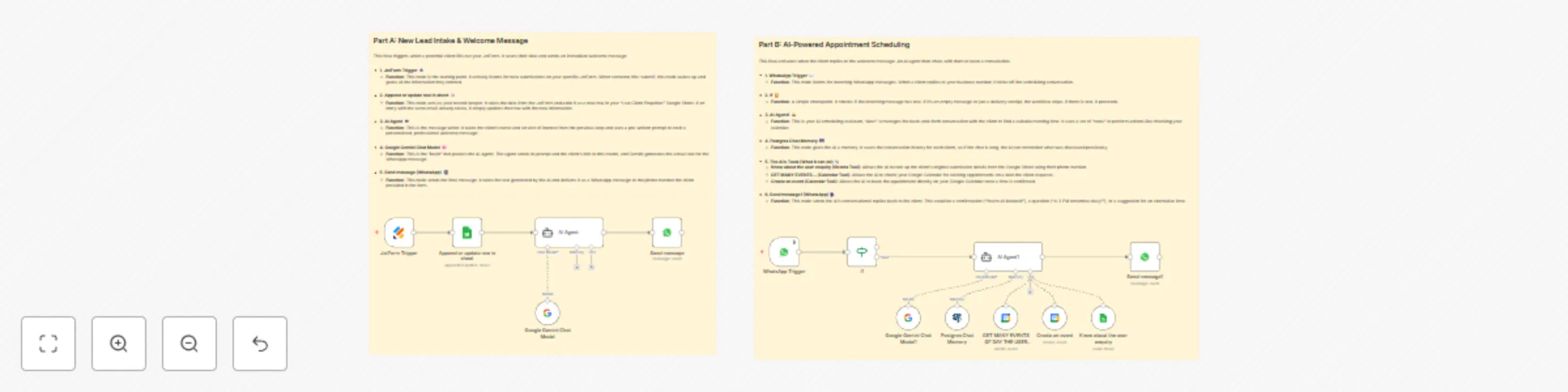
This n8n workflow is designed to automate the initial intake and scheduling for a law firm. It's split into two main parts:
Here’s a detailed breakdown of the prerequisites and each node.
Before building this workflow, you'll need accounts and some setup for each of the following services:
Full Name, Email Address, Phone Number, I am a..., Legal Service of Interest, Brief Message, and How Did You Hear About Us?.Full Name, Email Address, Phone Number, client type, Legal Service of Interest, Brief Message, How Did You Hear About Us?.[email protected]).The workflow is divided into two distinct logical flows.
This part triggers when a new client submits your form.
JotForm Trigger
Form ID: 252801824783057).Append or update row in sheet (Google Sheets)
appendOrUpdate operation. It tries to find a row where the "Email Address" column matches the email from the form. If it finds a match, it updates that row; otherwise, it appends a new row at the bottom.AI Agent
Google Gemini Chat Model.Send message (WhatsApp)
AI Agent to the client.Phone Number column) and the AI-generated text (output from the AI Agent node) to send the message via the WhatsApp Business API.This part triggers when the client replies to the initial message.
WhatsApp Trigger
If node
AI Agent1
Google Gemini Chat Model1: The language model that does the thinking.Postgres Chat Memory: Remembers the conversation history with a specific user (keyed by their WhatsApp ID), so the user doesn't have to repeat themselves.Know about the user enquiry, GET MANY EVENTS..., and Create an event.AI Agent Tools (What the AI can do)
Know about the user enquiry (Google Sheets Tool): When the AI needs to know who it's talking to, it uses this tool. It takes the user's phone number and looks up their original enquiry details in the "Law Client Enquiries" sheet.GET MANY EVENTS... (Google Calendar Tool): When a client suggests a date, the AI uses this tool to check your Google Calendar for any existing events on that day to see if you're free.Create an event (Google Calendar Tool): Once a time is agreed upon, the AI uses this tool to create the event in your Google Calendar, adding the client as an attendee.Send message1 (WhatsApp)
output text from AI Agent1 to the client's WhatsApp ID, continuing the conversation.This catalog entry is organized from the workflow JSON. The node-level section below shows the executable blocks available for review before importing the template.
| Workflow | Automated law firm lead management & scheduling with AI, Jotform & Calendar |
|---|---|
| Complexity | advanced |
| Nodes | 16 |
| Categories | Lead Nurturing, AI Chatbot |
| Author | iamvaar |
| Published | 08 Oct 2025 |
Use the JSON export at /data/workflows/9383/9383.json as the source template for this automation.
Open n8n, import the downloaded JSON, and review each node before activating the workflow.
Replace placeholder credentials, API keys, webhook URLs, account IDs, and environment-specific values with your own settings.
Run the workflow manually or in a staging workspace, inspect node output, and confirm downstream systems receive the expected data.
Enable the workflow only after testing, then monitor executions, errors, and rate limits during the first production runs.
Review imported nodes carefully before activation. This catalog entry is intended to help you inspect the workflow structure, understand required services, and find related templates faster.
Node names, credentials, schedules, webhook paths, and external service limits may need adjustment for your workspace.
Youtube Explanation: https://youtu.be/KgmNiV7SwkU This n8n workflow is designed to automate the initial intake and scheduling for a law firm. It's split into two ma...
Review the workflow JSON, configure any required credentials in n8n, and test the automation in a safe workspace before using it in production.
Yes. Use the block-by-block analysis and the downloadable JSON to inspect each node, then adjust credentials, prompts, schedules, filters, or destinations for your Lead Nurturing, AI Chatbot use case.