Block 1 - Check Every 5 Minutes
- Type / Role
- n8n-nodes-base.scheduleTrigger - scheduleTrigger
- Config choices
- Version 1.2


 Early Deal
This workflow is provided as-is. Please review and test before using in production.
Enhance your hiring pipeline by automating interview management post screening. This workflow runs every 5 minutes to scan upcoming Google Calendar events, filter relevant interviews, send timely e...
n8n-nodes-base.scheduletrigger, n8n-nodes-base.googlecalendar, n8n-nodes-base.filter, n8n-nodes-base.googlesheets, n8n-nodes-base.gmail, n8n-nodes-base.webhook, n8n-nodes-base.if, n8n-nodes-base.stickynote
This workflow is cataloged by N8N Workflows and links back to its original n8n.io source page by Oneclick AI Squad.
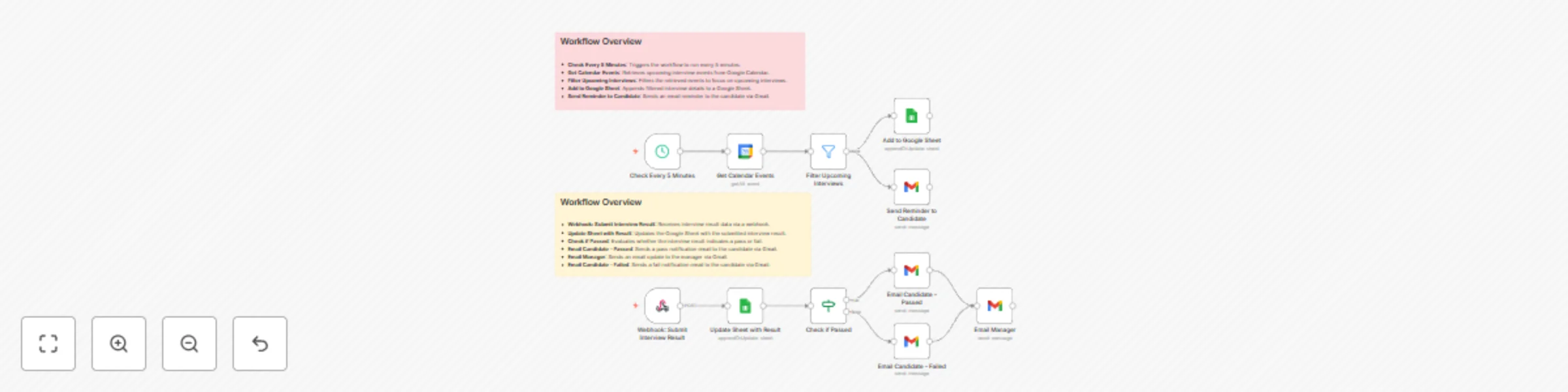
Original n8n.io sourceEnhance your hiring pipeline by automating interview management post-screening. This workflow runs every 5 minutes to scan upcoming Google Calendar events, filter relevant interviews, send timely email reminders to candidates and internal teams, and handle result submissions via webhook — updating statuses in Google Sheets and notifying via Gmail based on pass/fail outcomes. Ensure no interviews slip through the cracks with proactive reminders and instant feedback loops.
Step 1: Triggers every 5 minutes to proactively check for upcoming interviews.
Step 2: Fetches all Google Calendar Events and identifies interview-related ones.
Step 3: Filters Upcoming Interviews based on event details (e.g., candidate name, role).
Step 4: Sends Reminder Emails to candidates and interviewers via Gmail for preparation.
Step 5: Receives Webhook Submission of interview results (pass/fail) post-event.
Step 6: Updates Google Sheet with result data, including feedback and updated status.
Step 7: Branches on result:
→ Passed: Sends congratulatory Email to Candidate and advances status.
→ Failed: Sends polite Failure Notification and closes the loop.
✅ Reduces no-shows with automated reminders
✅ Centralizes interview tracking in Google Sheets
✅ Instant Gmail notifications for pass/fail decisions
✅ Minimizes manual status updates
✅ Improves candidate experience with timely communication
✅ Ensures audit-ready logs of all interactions
Google Sheet Structure:
Set up Google Sheet
→ Create sheet with the specified columns: Candidate Email, Interview Link, Status, Result, Meet Link, Feedback, and Updated At.
→ Replace YOUR_SHEET_ID in the workflow with your actual Sheet ID.
Configure Calendar Integration
→ Connect Google Calendar OAuth2 and select the relevant calendar (e.g., [email protected]).
Define Event Filters
→ In the "Filter Upcoming Interviews" node, set keywords (e.g., "Candidate Interview") to match event titles/descriptions.
Customize Reminders
→ Edit the "Send Reminder to Candidate" template (e.g., include interview link and prep tips).
→ Set reminder offset (e.g., 1 day before event).
Set Up Webhook for Results
→ Generate and expose the webhook URL for your interview form/tool to submit pass/fail data.
Connect Gmail
→ Enable Gmail OAuth2.
→ Define sender email and customize pass/fail templates.
Test the Flow
→ Create a test calendar event for an upcoming interview.
→ Wait 5 minutes or trigger manually → Verify reminder email.
→ Submit test webhook result → Check sheet update and notification email.
Go Live
→ Enable the 5-minute cron trigger.
→ Monitor sheet for real entries on Thursday, October 23, 2025, or your next interview day.
This catalog entry is organized from the workflow JSON. The node-level section below shows the executable blocks available for review before importing the template.
| Workflow | Automated Interview Tracker with Google Calendar, Sheets & Gmail Alerts |
|---|---|
| Complexity | intermediate |
| Nodes | 13 |
| Categories | HR |
| Author | Oneclick AI Squad |
| Published | 23 Oct 2025 |
Use the JSON export at /data/workflows/10081/10081.json as the source template for this automation.
Open n8n, import the downloaded JSON, and review each node before activating the workflow.
Replace placeholder credentials, API keys, webhook URLs, account IDs, and environment-specific values with your own settings.
Run the workflow manually or in a staging workspace, inspect node output, and confirm downstream systems receive the expected data.
Enable the workflow only after testing, then monitor executions, errors, and rate limits during the first production runs.
Review imported nodes carefully before activation. This catalog entry is intended to help you inspect the workflow structure, understand required services, and find related templates faster.
Node names, credentials, schedules, webhook paths, and external service limits may need adjustment for your workspace.
Enhance your hiring pipeline by automating interview management post screening. This workflow runs every 5 minutes to scan upcoming Google Calendar events, filter relevant interviews, send timely e...
Review the workflow JSON, configure any required credentials in n8n, and test the automation in a safe workspace before using it in production.
Yes. Use the block-by-block analysis and the downloadable JSON to inspect each node, then adjust credentials, prompts, schedules, filters, or destinations for your HR use case.