Block 1 - Google Sheets Trigger
- Type / Role
- n8n-nodes-base.googleSheetsTrigger - googleSheetsTrigger
- Config choices
- Version 1


 Early Deal
This workflow is provided as-is. Please review and test before using in production.
Streamline your email list hygiene with this automated validation workflow that monitors Google Sheets for new email entries and instantly verifies their deliverability. Perfect for maintaining cle...
n8n-nodes-base.googlesheetstrigger, n8n-nodes-base.httprequest, n8n-nodes-base.filter, n8n-nodes-base.set, n8n-nodes-base.googlesheets, n8n-nodes-base.hunter, n8n-nodes-base.stickynote
This workflow is cataloged by N8N Workflows and links back to its original n8n.io source page by Khair Ahammed.
Original n8n.io sourceStreamline your email list hygiene with this automated validation workflow that monitors Google Sheets for new email entries and instantly verifies their deliverability. Perfect for maintaining clean contact databases, reducing bounce rates, and ensuring successful email marketing campaigns.
📊 Real-Time Processing
Monitors Google Sheets for new email entries every minute Automatic validation triggers when emails are added Instant deliverability status updates in the same spreadsheet
🔍 Dual Validation Sources
Hunter.io API for comprehensive email verification EmailValidation.io API as backup validation service Cross-verification for higher accuracy
✅ Smart Filtering
Skips empty email cells to prevent unnecessary API calls Processes only valid email formats Handles bulk email list uploads efficiently
📈 Seamless Integration
Updates original spreadsheet with validation results Preserves existing data while adding deliverability status No manual intervention required after setup
Processing Flow:
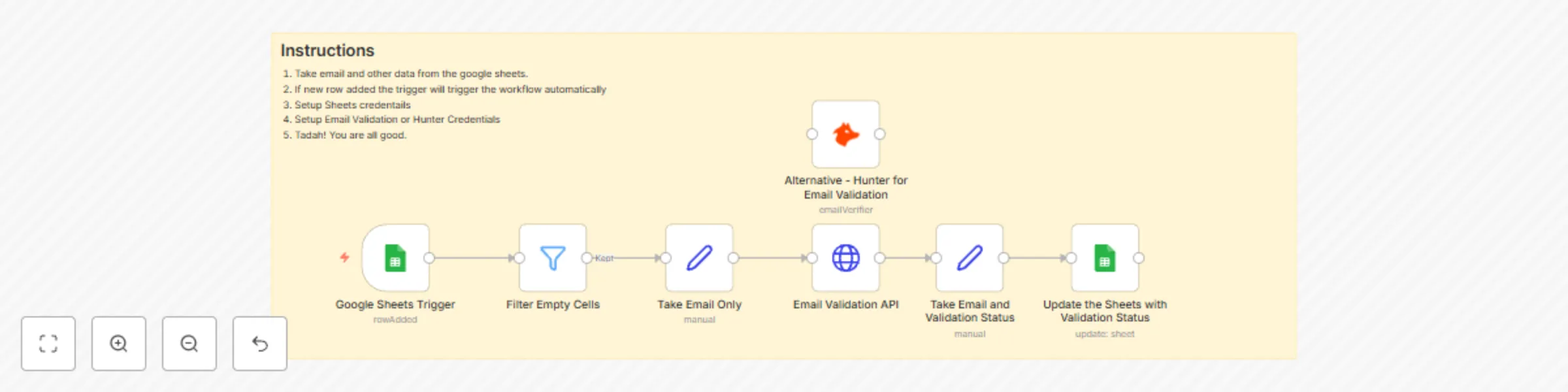
Google Sheets Trigger monitors for new rows Filter removes empty email entries Email extraction and formatting Dual API validation (Hunter + EmailValidation.io) Status processing and formatting Automatic spreadsheet updates
Use Cases
Email Marketing: Clean lists before campaigns Lead Generation: Validate new prospect emails Database Maintenance: Regular email hygiene checks CRM Integration: Ensure contact data quality
Required:
Google Sheets with email column Hunter.io API key EmailValidation.io API key Google Sheets OAuth2 credentials
Benefits:
Reduce email bounce rates Improve sender reputation Save costs on invalid email sends Maintain clean contact databases
This workflow transforms manual email validation into an automated process, ensuring your email lists stay clean and deliverable without any manual effort. Tags: email-validation, google-sheets, hunter-io, data-cleaning, automation
This catalog entry is organized from the workflow JSON. The node-level section below shows the executable blocks available for review before importing the template.
| Workflow | Automated email validation with Google Sheets, Hunter.io and EmailValidation.io |
|---|---|
| Complexity | intermediate |
| Nodes | 8 |
| Categories | Lead Generation |
| Author | Khair Ahammed |
| Published | 02 Sept 2025 |
Use the JSON export at /data/workflows/8198/8198.json as the source template for this automation.
Open n8n, import the downloaded JSON, and review each node before activating the workflow.
Replace placeholder credentials, API keys, webhook URLs, account IDs, and environment-specific values with your own settings.
Run the workflow manually or in a staging workspace, inspect node output, and confirm downstream systems receive the expected data.
Enable the workflow only after testing, then monitor executions, errors, and rate limits during the first production runs.
Review imported nodes carefully before activation. This catalog entry is intended to help you inspect the workflow structure, understand required services, and find related templates faster.
Node names, credentials, schedules, webhook paths, and external service limits may need adjustment for your workspace.
Streamline your email list hygiene with this automated validation workflow that monitors Google Sheets for new email entries and instantly verifies their deliverability. Perfect for maintaining cle...
Review the workflow JSON, configure any required credentials in n8n, and test the automation in a safe workspace before using it in production.
Yes. Use the block-by-block analysis and the downloadable JSON to inspect each node, then adjust credentials, prompts, schedules, filters, or destinations for your Lead Generation use case.