K

Khair Ahammed

3
Workflows

Workflows by Khair Ahammed
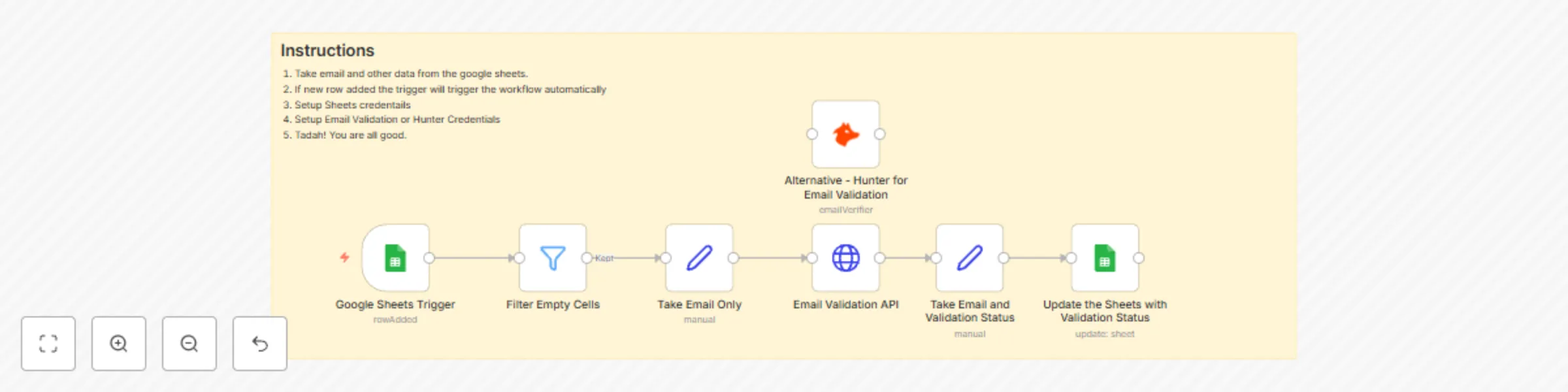
Workflow preview: Automated email validation with Google Sheets, Hunter.io and EmailValidation.io
Free intermediate

Automated email validation with Google Sheets, Hunter.io and EmailValidation.io

Streamline your email list hygiene with this automated validation workflow that monitors Google Sheets for new email entries and instantly verifies their deliverability. Perfect for maintaining clean contact databases, reducing bounce rates, and ensuring successful email marketing campaigns. ## Key Features **📊 Real-Time Processing** Monitors Google Sheets for new email entries every minute Automatic validation triggers when emails are added Instant deliverability status updates in the same spreadsheet **🔍 Dual Validation Sources** Hunter.io API for comprehensive email verification EmailValidation.io API as backup validation service Cross-verification for higher accuracy **✅ Smart Filtering** Skips empty email cells to prevent unnecessary API calls Processes only valid email formats Handles bulk email list uploads efficiently **📈 Seamless Integration** Updates original spreadsheet with validation results Preserves existing data while adding deliverability status No manual intervention required after setup ## Workflow Components **Processing Flow:** Google Sheets Trigger monitors for new rows Filter removes empty email entries Email extraction and formatting Dual API validation (Hunter + EmailValidation.io) Status processing and formatting Automatic spreadsheet updates **Use Cases** Email Marketing: Clean lists before campaigns Lead Generation: Validate new prospect emails Database Maintenance: Regular email hygiene checks CRM Integration: Ensure contact data quality ## Setup Requirements **Required:** Google Sheets with email column Hunter.io API key EmailValidation.io API key Google Sheets OAuth2 credentials **Benefits:** Reduce email bounce rates Improve sender reputation Save costs on invalid email sends Maintain clean contact databases This workflow transforms manual email validation into an automated process, ensuring your email lists stay clean and deliverable without any manual effort. Tags: email-validation, google-sheets, hunter-io, data-cleaning, automation

K
Khair Ahammed
Lead Generation
3 Sep 2025
160
0
Workflow preview: Personal assistant for calendar & tasks with GPT-4o-mini and Telegram
Free advanced

Personal assistant for calendar & tasks with GPT-4o-mini and Telegram

Meet **Troy**, your intelligent personal assistant that seamlessly manages your Google Calendar and Tasks through Telegram. This workflow combines AI-powered natural language processing with MCP (Model Context Protocol) integration to provide a conversational interface for scheduling meetings, managing tasks, and organizing your digital life. Key Features 📅 **Smart Calendar Management** Create single and recurring events with conflict detection Support for multiple attendees (1-2 attendee variants) Automatic time zone handling (Bangladesh Standard Time) Weekly recurring event scheduling Event retrieval, updates, and deletion ✅ **Task Management** Create, update, and delete tasks in Google Tasks Mark tasks as completed Retrieve task lists with completion status Task repositioning and organization Parent-child task relationships 🤖**Intelligent Processing** Natural language understanding for scheduling requests Automatic conflict detection before event creation Context-aware responses with conversation memory Error handling with fallback messages 📱 **Telegram Interface** Real-time chat interaction Simple commands and natural language Instant confirmations and updates Error notifications ## Workflow Components **Core Architecture:** Telegram Trigger for user messages AI Agent with GPT-4o-mini processing MCP Client Tools for Google services Conversation memory for context Error handling with backup responses **MCP Integrations:** Google Calendar MCP Server (6 specialized tools) Google Tasks MCP Server (5 task operations) Custom HTTP tool for advanced task positioning ## Use Cases **Calendar Scenarios:** "Schedule a meeting tomorrow at 3 PM with [email protected]" "Set up weekly team standup every Monday at 10 AM" "Check my calendar for conflicts this afternoon" "Delete the meeting with ID xyz123" **Task Management:** "Add a task to buy groceries" "Mark the project report task as completed" "Update my presentation task due date to Friday" "Show me all pending tasks" ## Setup Requirements **Required Credentials:** Google Calendar OAuth2 Google Tasks OAuth2 OpenAI API key Telegram Bot token ** MCP Configuration:** Two MCP server endpoints for Google services Proper webhook configurations SSL-enabled n8n instance for MCP triggers ## Business Benefits **Productivity:** Voice-to-action task and calendar management **Efficiency: **Eliminate app switching with chat interface **Intelligence:** AI prevents scheduling conflicts automatically **Accessibility:** Simple Telegram commands for complex operations ## Technical Specifications **Components:** 1 Telegram trigger 1 AI Agent with memory 2 MCP triggers (Calendar & Tasks) 13 Google service tools Error handling flows **Response Time:** Sub-second for most operations **Memory: **Session-based conversation context **Timezone:** Automatic Bangladesh Standard Time conversion This personal assistant transforms how you interact with Google services, making scheduling and task management as simple as sending a text message to Troy on Telegram. Tags: personal-assistant, mcp-integration, google-calendar, google-tasks, telegram-bot, ai-agent, productivity

K
Khair Ahammed
Personal Productivity
3 Sep 2025
957
0

Workflow preview: Automated customer support system with Gmail, GPT-4 & vector knowledge base
Free advanced

Automated customer support system with Gmail, GPT-4 & vector knowledge base

Transform your customer support with this intelligent Gmail-based automation system that combines AI analysis, vector knowledge bases, and smart escalation workflows. This comprehensive solution automatically processes incoming support emails, provides contextual responses using your knowledge base, and seamlessly escalates complex issues to human agents. ## Key Features 🤖 **Advanced AI Analysis** GPT-4 powered email categorization (technical, billing, general, complaint) Automatic priority assignment (high, medium, low) with SLA tracking Smart escalation detection based on complexity and customer sentiment Context-aware responses using vector knowledge base integration 📧 **Gmail Integration** Real-time email monitoring with unread message triggers Automatic reply generation and sending Thread history analysis for contextual conversations Smart labeling system for automated organization Reply detection to prevent infinite loops 🧠 **Knowledge Base Integration** Qdrant vector store for semantic search capabilities Mistral Cloud embeddings for accurate content matching Tool-based knowledge retrieval during AI analysis Contextual responses based on your support documentation 📊 **Comprehensive Tracking** Google Sheets logging with detailed ticket information SLA tracking with automatic due date calculation Priority-based response time management Complete conversation history preservation 📱 **Team Notifications** Telegram alerts for escalated tickets Status updates with priority indicators Rich formatting with emojis and structured messages Real-time team coordination ## Workflow Components **Core Processing Flow:** Gmail Trigger monitors incoming emails Email filtering prevents reply loops and internal processing Data extraction captures customer information Thread history analysis for reply context AI agent analyzes with knowledge base access Smart routing based on escalation needs Automated responses or human escalation Comprehensive logging and notifications **Advanced Features:** Conversation context preservation Multi-source knowledge base queries Structured JSON output parsing Dynamic SLA assignment Conditional escalation workflows ## Required Integrations **APIs & Services:** Gmail OAuth2 (email processing) OpenAI GPT-4 (AI analysis) Qdrant (vector knowledge base) Mistral Cloud (embeddings) Google Sheets (logging) Telegram Bot (notifications) **Setup Requirements:** Gmail account with API access OpenAI API key Qdrant vector database Mistral Cloud account Google Sheets document Telegram bot token ##Use Cases **Perfect for:** SaaS companies with high support volume E-commerce businesses needing 24/7 support Service providers requiring categorized ticket handling Teams wanting to reduce response times Organizations needing SLA compliance tracking **Industries:** Software & Technology E-commerce & Retail Financial Services Healthcare & Medical Education & Training ## Business Benefits **Efficiency Gains:** 80% reduction in manual email processing Instant response to common inquiries Automatic priority and SLA assignment Reduced human agent workload **Quality Improvements:** Consistent response quality Knowledge base-powered accuracy Context-aware conversation handling Professional tone maintenance **Operational Excellence:** Complete audit trail in Google Sheets Real-time team notifications Escalation workflow automation Performance metrics tracking ## Technical Specifications **Node Types Used:** Gmail Trigger & Actions (5 nodes) LangChain AI Agent (2 nodes) Vector Store Integration (2 nodes) Data Processing (6 nodes) Conditional Logic (2 nodes) Notification Systems (1 node) **Data Flow:** Input: Gmail unread emails Processing: AI analysis with knowledge base Output: Automated replies or escalations Logging: Google Sheets with full details Notifications: Telegram status updates ## Installation & Setup **Quick Start:** Import workflow JSON Configure Gmail OAuth2 credentials Set up OpenAI API connection Connect Qdrant vector database Configure Google Sheets logging Set Telegram bot notifications Test with sample emails **Customization Options:** Modify AI prompts for your business Adjust escalation criteria Customize response templates Configure SLA timeframes Add additional knowledge sources

K
Khair Ahammed
Support Chatbot
3 Sep 2025
65
0