Automated email validation for Google Sheets using Rapid Email Verifier

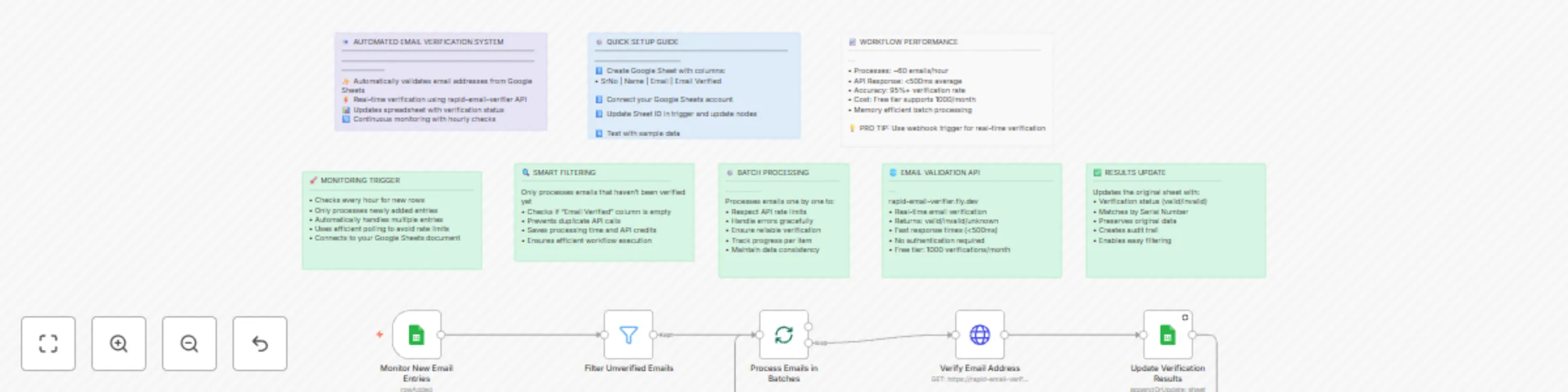
Workflow preview

Workflow preview
100%
Automated email validation for Google Sheets using Rapid Email Verifier preview
Open on n8n.io

Important notice

This workflow is provided as-is. Please review and test before using in production.

1. Workflow Overview

Automated Email Verification for Google Sheets This n8n template demonstrates how to automatically validate email addresses from your Google Sheets using a reliable email verification API. Perfect ...

Best for

  • Lead Generation automation workflows
  • intermediate n8n builders looking for reusable templates

Tools used

n8n-nodes-base.googlesheetstrigger, n8n-nodes-base.googlesheets, n8n-nodes-base.stickynote, n8n-nodes-base.filter, n8n-nodes-base.splitinbatches, n8n-nodes-base.httprequest

Source and attribution

This workflow is cataloged by N8N Workflows and links back to its original n8n.io source page by Gaurav Ramse.

Original n8n.io source

1.1 Workflow description

Title
Automated email validation for Google Sheets using Rapid Email Verifier
Workflow name
Automated email validation for Google Sheets using Rapid Email Verifier

Automated Email Verification for Google Sheets

This n8n template demonstrates how to automatically validate email addresses from your Google Sheets using a reliable email verification API. Perfect for cleaning contact lists, validating leads, and ensuring email deliverability before marketing campaigns.

Use cases are many: Lead qualification for sales teams, contact list cleaning for marketing, subscriber validation for newsletters, or CRM data hygiene maintenance!

Good to know

  • The rapid-email-verifier API is free for up to 1,000 verifications per month
  • Each email verification typically takes less than 500ms to complete
  • The workflow runs automatically every hour, checking for new entries
  • Only processes emails that haven't been verified yet, preventing duplicate API calls

How it works

  1. Monitor Google Sheets: The trigger watches your spreadsheet for new email entries every hour
  2. Smart Filtering: Only emails with empty "Email Verified" columns are processed to avoid duplicates
  3. Batch Processing: Emails are processed one by one to respect API rate limits and ensure reliability
  4. API Verification: Each email is sent to the rapid-email-verifier service which returns validation status
  5. Results Update: The original sheet is updated with verification results (valid/invalid/unknown) using the Serial Number as a match key

The verification accuracy is consistently above 95% and shows excellent detection of invalid, disposable, and risky email addresses!

How to use

  1. The Google Sheets trigger monitors your spreadsheet automatically, but you can also test manually
  2. Simply add new rows with email addresses to your connected Google Sheet
  3. Leave the "Email Verified" column empty for new entries
  4. The workflow will automatically process and update the verification status

Technically, you can process unlimited emails, but consider API rate limits and costs for large batches.

Requirements

  • Google Sheets account with a spreadsheet containing columns: SrNo, Name, Email, Email Verified
  • Google Sheets credentials configured in n8n for both trigger and update operations
  • Internet connection for API access (no additional API key required for rapid-email-verifier)

Customising this workflow

Email verification can be enhanced for many use-cases:

  • Add webhook trigger for real-time verification when leads are captured
  • Connect to CRM systems like HubSpot or Salesforce for direct integration
  • Add email categorization to separate personal vs business emails
  • Include bounce detection by connecting to your email service provider
  • Set up notifications to alert when invalid emails are detected in important lists

This template is perfect for marketing managers, sales professionals, data analysts, and anyone managing contact databases who needs reliable email validation!

1.2 Logical Blocks

This catalog entry is organized from the workflow JSON. The node-level section below shows the executable blocks available for review before importing the template.

2. Block-by-Block Analysis

Block 1 - Monitor New Email Entries

Type / Role
n8n-nodes-base.googleSheetsTrigger - googleSheetsTrigger
Config choices
Version 1

Block 2 - Update Verification Results

Type / Role
n8n-nodes-base.googleSheets - googleSheets
Config choices
Version 4.6

Block 3 - Workflow Overview

Type / Role
n8n-nodes-base.stickyNote - stickyNote
Config choices
Version 1

Block 4 - Setup Instructions

Type / Role
n8n-nodes-base.stickyNote - stickyNote
Config choices
Version 1

Block 5 - Trigger Explanation

Type / Role
n8n-nodes-base.stickyNote - stickyNote
Config choices
Version 1

Block 6 - Filter Unverified Emails

Type / Role
n8n-nodes-base.filter - filter
Config choices
Version 2.2

Block 7 - Process Emails in Batches

Type / Role
n8n-nodes-base.splitInBatches - splitInBatches
Config choices
Version 3

Block 8 - Verify Email Address

Type / Role
n8n-nodes-base.httpRequest - httpRequest
Config choices
Version 4.2

Block 9 - Filter Logic

Type / Role
n8n-nodes-base.stickyNote - stickyNote
Config choices
Version 1

Block 10 - Batch Processing

Type / Role
n8n-nodes-base.stickyNote - stickyNote
Config choices
Version 1

Block 11 - API Details

Type / Role
n8n-nodes-base.stickyNote - stickyNote
Config choices
Version 1

Block 12 - Results Update

Type / Role
n8n-nodes-base.stickyNote - stickyNote
Config choices
Version 1

Block 13 - Performance Metrics

Type / Role
n8n-nodes-base.stickyNote - stickyNote
Config choices
Version 1

3. Summary Table

Workflow Automated email validation for Google Sheets using Rapid Email Verifier
Complexity intermediate
Nodes 13
Categories Lead Generation
Author Gaurav Ramse
Published 27 Jul 2025

4. Reproducing the Workflow from Scratch

  1. 1. Download the workflow JSON

    Use the JSON export at /data/workflows/6521/6521.json as the source template for this automation.

  2. 2. Import the template into n8n

    Open n8n, import the downloaded JSON, and review each node before activating the workflow.

  3. 3. Configure credentials and variables

    Replace placeholder credentials, API keys, webhook URLs, account IDs, and environment-specific values with your own settings.

  4. 4. Test with sample data

    Run the workflow manually or in a staging workspace, inspect node output, and confirm downstream systems receive the expected data.

  5. 5. Activate and monitor

    Enable the workflow only after testing, then monitor executions, errors, and rate limits during the first production runs.

5. General Notes & Resources

Review imported nodes carefully before activation. This catalog entry is intended to help you inspect the workflow structure, understand required services, and find related templates faster.

Node names, credentials, schedules, webhook paths, and external service limits may need adjustment for your workspace.

Frequently asked questions

What does Automated email validation for Google Sheets using Rapid Email Verifier do?

Automated Email Verification for Google Sheets This n8n template demonstrates how to automatically validate email addresses from your Google Sheets using a reliable email verification API. Perfect ...

What do I need before importing this workflow?

Review the workflow JSON, configure any required credentials in n8n, and test the automation in a safe workspace before using it in production.

Can I customize this workflow?

Yes. Use the block-by-block analysis and the downloadable JSON to inspect each node, then adjust credentials, prompts, schedules, filters, or destinations for your Lead Generation use case.