G

Gaurav Ramse

2
Workflows

Workflows by Gaurav Ramse

Workflow preview: Hotel guest journey automation with Gmail & Google Sheets
Free advanced

Hotel guest journey automation with Gmail & Google Sheets

**Automate your entire guest communication journey from booking to post-stay with personalized welcome emails, review requests, and daily operational reports.** Perfect for hotels, B&Bs, and short-term rental properties looking to enhance guest experience while reducing manual work and improving operational efficiency. ## How it works 1. **Pre-arrival welcome emails** - Automatically sends personalized welcome emails 1-2 days before guest check-in with reservation details, hotel amenities, and contact information 2. **Post-stay review requests** - Sends automated review request emails 24 hours after checkout with Google Reviews links and return guest discount codes 3. **Daily staff reports** - Generates comprehensive arrival/departure reports every morning at 6 AM for front desk, housekeeping, and management teams 4. **Smart tracking** - Prevents duplicate emails by automatically updating tracking status in your Google Sheets database 5. **Professional templates** - Uses responsive HTML email templates that work across all devices and email clients ## Set up steps 1. **Connect Google Sheets** - Link your hotel reservation spreadsheet (must include columns for guest details, check-in/out dates, and email tracking) 2. **Configure Gmail account** - Set up Gmail credentials for sending automated emails 3. **Customize hotel information** - Update hotel name, contact details, and branding in the "Edit Fields" nodes 4. **Set staff email addresses** - Configure recipient addresses for daily operational reports 5. **Adjust timing** - Modify schedule triggers if you want different timing for emails and reports (currently set to every 6 hours for guest emails and 6 AM daily for staff reports) **Time investment:** ~30 minutes for initial setup, then fully automated operation.

G
Gaurav Ramse
Social Media
29 Jul 2025
1185
0
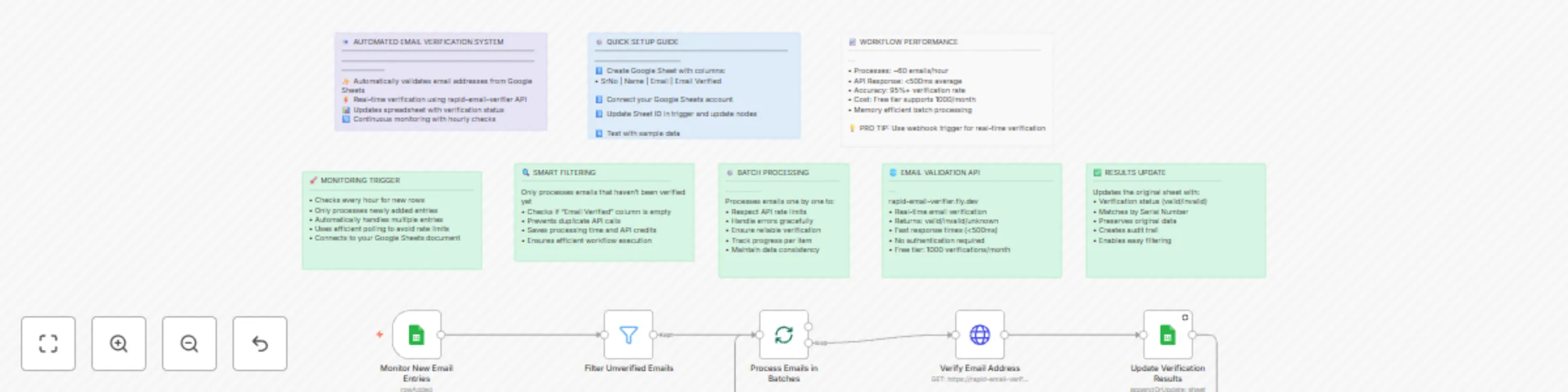
Workflow preview: Automated email validation for Google Sheets using Rapid Email Verifier
Free intermediate

Automated email validation for Google Sheets using Rapid Email Verifier

# **Automated Email Verification for Google Sheets** This n8n template demonstrates how to automatically validate email addresses from your Google Sheets using a reliable email verification API. Perfect for cleaning contact lists, validating leads, and ensuring email deliverability before marketing campaigns. Use cases are many: Lead qualification for sales teams, contact list cleaning for marketing, subscriber validation for newsletters, or CRM data hygiene maintenance! ## **Good to know** - The rapid-email-verifier API is free for up to 1,000 verifications per month - Each email verification typically takes less than 500ms to complete - The workflow runs automatically every hour, checking for new entries - Only processes emails that haven't been verified yet, preventing duplicate API calls ## **How it works** 1. **Monitor Google Sheets**: The trigger watches your spreadsheet for new email entries every hour 2. **Smart Filtering**: Only emails with empty "Email Verified" columns are processed to avoid duplicates 3. **Batch Processing**: Emails are processed one by one to respect API rate limits and ensure reliability 4. **API Verification**: Each email is sent to the rapid-email-verifier service which returns validation status 5. **Results Update**: The original sheet is updated with verification results (valid/invalid/unknown) using the Serial Number as a match key The verification accuracy is consistently above 95% and shows excellent detection of invalid, disposable, and risky email addresses! ## **How to use** 1. The Google Sheets trigger monitors your spreadsheet automatically, but you can also test manually 2. Simply add new rows with email addresses to your connected Google Sheet 3. Leave the "Email Verified" column empty for new entries 4. The workflow will automatically process and update the verification status Technically, you can process unlimited emails, but consider API rate limits and costs for large batches. ## **Requirements** - **Google Sheets account** with a spreadsheet containing columns: SrNo, Name, Email, Email Verified - **Google Sheets credentials** configured in n8n for both trigger and update operations - **Internet connection** for API access (no additional API key required for rapid-email-verifier) ## **Customising this workflow** Email verification can be enhanced for many use-cases: - **Add webhook trigger** for real-time verification when leads are captured - **Connect to CRM systems** like HubSpot or Salesforce for direct integration - **Add email categorization** to separate personal vs business emails - **Include bounce detection** by connecting to your email service provider - **Set up notifications** to alert when invalid emails are detected in important lists This template is perfect for marketing managers, sales professionals, data analysts, and anyone managing contact databases who needs reliable email validation!

G
Gaurav Ramse
Lead Generation
27 Jul 2025
222
0