Block 1 - Loop Over Items2
- Type / Role
- n8n-nodes-base.splitInBatches - splitInBatches
- Config choices
- Version 3


 Early Deal
This workflow is provided as-is. Please review and test before using in production.
SharePoint → Supabase → Google Drive Sync Workflow Overview This workflow is a multi system document synchronization pipeline built in n8n , designed to automatically sync and back up files between...
n8n-nodes-base.splitinbatches, n8n-nodes-base.httprequest, n8n-nodes-base.scheduletrigger, n8n-nodes-base.comparedatasets, n8n-nodes-base.supabase, n8n-nodes-base.postgres, n8n-nodes-base.googledrive, n8n-nodes-base.stickynote
This workflow is cataloged by N8N Workflows and links back to its original n8n.io source page by DIGITAL BIZ TECH.
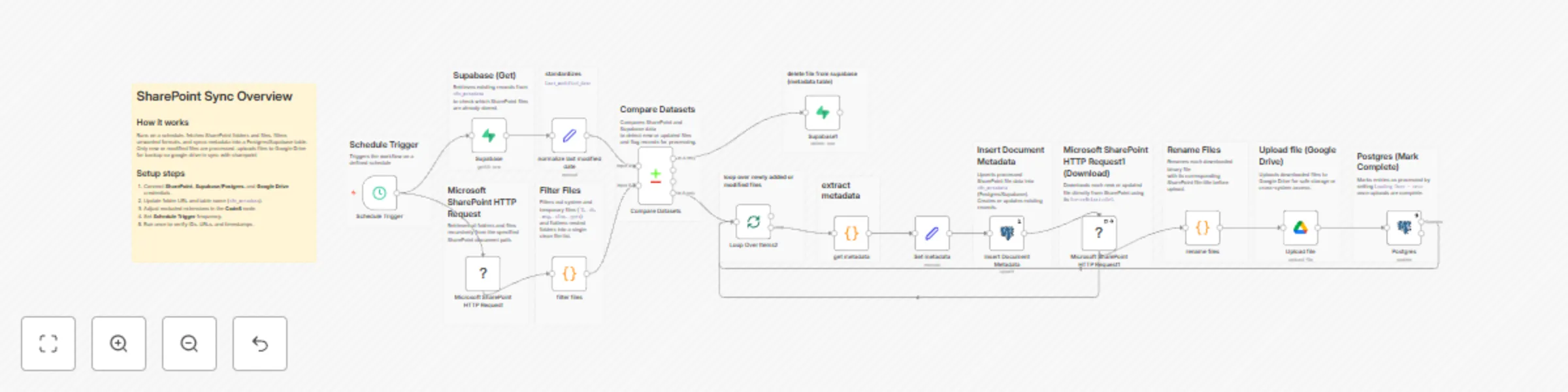
Original n8n.io sourceThis workflow is a multi-system document synchronization pipeline built in n8n, designed to automatically sync and back up files between Microsoft SharePoint, Supabase/Postgres, and Google Drive.
It runs on a scheduled trigger, compares SharePoint file metadata against your Supabase table, downloads new or updated files, uploads them to Google Drive, and marks records as completed — keeping your databases and storage systems perfectly in sync.
Trigger: Schedule Trigger
Runs at fixed intervals (customizable) to start synchronization.
Fetch Files: Microsoft SharePoint HTTP Request
Recursively retrieves folders and files using SharePoint’s REST API:/GetFolderByServerRelativeUrl(...)?$expand=Files,Folders,Folders/Files,Folders/Folders/Folders/Files
Filter Files: filter files
A Code node that flattens nested folders and filters unwanted file types:
~$) .db, .msg, .xlsx, .xlsm, .pptxNormalize Metadata: normalize last modified date
Ensures consistent Last_modified_date format for accurate comparison.
Fetch Existing Records: Supabase (Get)
Retrieves current entries from n8n_metadata to compare against SharePoint files.
Compare Datasets: Compare Datasets
Detects new or modified files based on UniqueId, Last_modified_date, and Exists.
Routes only changed entries forward for processing.
Loop: Loop Over Items2
Iterates through each new or updated file detected.
Build Metadata: get metadata and Set metadata
Constructs final metadata fields:
file_id, file_title, file_url, file_type, foldername, last_modified_datefileUrl using UniqueId and ServerRelativeUrl if missing.Upsert Metadata: Insert Document Metadata
Inserts or updates file records in Supabase/Postgres (n8n_metadata table).
Operation: upsert with id as the primary matching key.
Download File: Microsoft SharePoint HTTP Request1
Fetches the binary file directly from SharePoint using its ServerRelativeUrl.
Rename File: rename files
Renames each downloaded binary file to its original file_title before upload.
Upload File: Upload file
Uploads the renamed file to Google Drive (My Drive → root folder).
Mark Complete: Postgres
Updates the Supabase/Postgres record setting Loading Done = true.
Optional Cleanup: Supabase1
Deletes obsolete or invalid metadata entries when required.
| Service | Purpose | Credential |
|---|---|---|
| Microsoft SharePoint | File retrieval and download | microsoftSharePointOAuth2Api |
| Supabase / Postgres | Metadata storage and synchronization | Supabase account 6 ayan |
| Google Drive | File backup and redundancy | Google Drive account 6 rn dbt |
| n8n Core | Flow control, dataset comparison, batch looping | Native |
> “You are a SharePoint document synchronization workflow.
Fetch all files, compare them to database entries, and only process new or modified files.
Download files, rename correctly, upload to Google Drive, and mark as completed in Supabase.”
Workflow rule summary:
> “Maintain data integrity, prevent duplicates, handle retries gracefully, and continue on errors.
Skip excluded file types and ensure reliable backups between all connected systems.”
> A reliable, SharePoint-to-Google Drive synchronization workflow built with n8n, integrating Supabase/Postgres for metadata management.
It automates file fetching, filtering, downloading, uploading, and marking as completed — ensuring your data stays mirrored across platforms.
Perfect for enterprises managing document automation, backup systems, or cross-cloud data synchronization.
Want to customize this workflow for your organization?
Our team at Digital Biz Tech can extend it for enterprise-scale document automation, RAGs and social media automation.
We can help you set it up for free — from connecting credentials to deploying it live.
Contact: [email protected]
Website: https://www.digitalbiz.tech
LinkedIn: https://www.linkedin.com/company/digital-biz-tech/
You can also DM us on LinkedIn for any help.
This catalog entry is organized from the workflow JSON. The node-level section below shows the executable blocks available for review before importing the template.
Showing the first 24 of 30 workflow blocks. Download the JSON for the full node graph.
| Workflow | Automated document sync between SharePoint and Google Drive with Supabase |
|---|---|
| Complexity | advanced |
| Nodes | 30 |
| Categories | File Management |
| Author | DIGITAL BIZ TECH |
| Published | 12 Nov 2025 |
Use the JSON export at /data/workflows/10749/10749.json as the source template for this automation.
Open n8n, import the downloaded JSON, and review each node before activating the workflow.
Replace placeholder credentials, API keys, webhook URLs, account IDs, and environment-specific values with your own settings.
Run the workflow manually or in a staging workspace, inspect node output, and confirm downstream systems receive the expected data.
Enable the workflow only after testing, then monitor executions, errors, and rate limits during the first production runs.
Review imported nodes carefully before activation. This catalog entry is intended to help you inspect the workflow structure, understand required services, and find related templates faster.
Node names, credentials, schedules, webhook paths, and external service limits may need adjustment for your workspace.
SharePoint → Supabase → Google Drive Sync Workflow Overview This workflow is a multi system document synchronization pipeline built in n8n , designed to automatically sync and back up files between...
Review the workflow JSON, configure any required credentials in n8n, and test the automation in a safe workspace before using it in production.
Yes. Use the block-by-block analysis and the downloadable JSON to inspect each node, then adjust credentials, prompts, schedules, filters, or destinations for your File Management use case.