Automated DHL shipment tracking bot for web forms and email inquiries

Workflow preview

Workflow preview
100%
Automated DHL shipment tracking bot for web forms and email inquiries preview
Open on n8n.io

Important notice

This workflow is provided as-is. Please review and test before using in production.

1. Workflow Overview

This n8n template automates responses to customer inquiries about DHL shipment status, handling requests from both web forms and emails. Use cases Automate Customer Support : Provide 24/7 instant a...

Best for

  • Support Chatbot automation workflows
  • AI Chatbot automation workflows
  • advanced n8n builders looking for reusable templates

Tools used

n8n-nodes-base.stickynote, n8n-nodes-base.webhook, n8n-nodes-base.gmailtrigger, n8n-nodes-base.merge, n8n-nodes-base.code, n8n-nodes-base.httprequest, n8n-nodes-base.if, n8n-nodes-base.respondtowebhook

Source and attribution

This workflow is cataloged by N8N Workflows and links back to its original n8n.io source page by Yusuke Yamamoto.

Original n8n.io source

1.1 Workflow description

Title
Automated DHL shipment tracking bot for web forms and email inquiries
Workflow name
Automated DHL shipment tracking bot for web forms and email inquiries

This n8n template automates responses to customer inquiries about DHL shipment status, handling requests from both web forms and emails.

Use cases

  • Automate Customer Support: Provide 24/7 instant answers to the common "Where is my order?" question without human intervention.
  • Reduce Support Tickets: Decrease the volume of repetitive tracking inquiries by providing customers with immediate, self-service information.
  • Enhance Customer Experience: Offer a consistent and rapid response across multiple channels (your website and email), allowing customers to use their preferred method of contact.

Good to know

  • DHL API Key is required: You'll need to register on the DHL Developer Portal to get your API key.
  • This workflow requires Gmail credentials (OAuth2) to monitor incoming emails and send replies.
  • The webhook URL must be configured in your website's contact or tracking form to receive submissions.

How it works

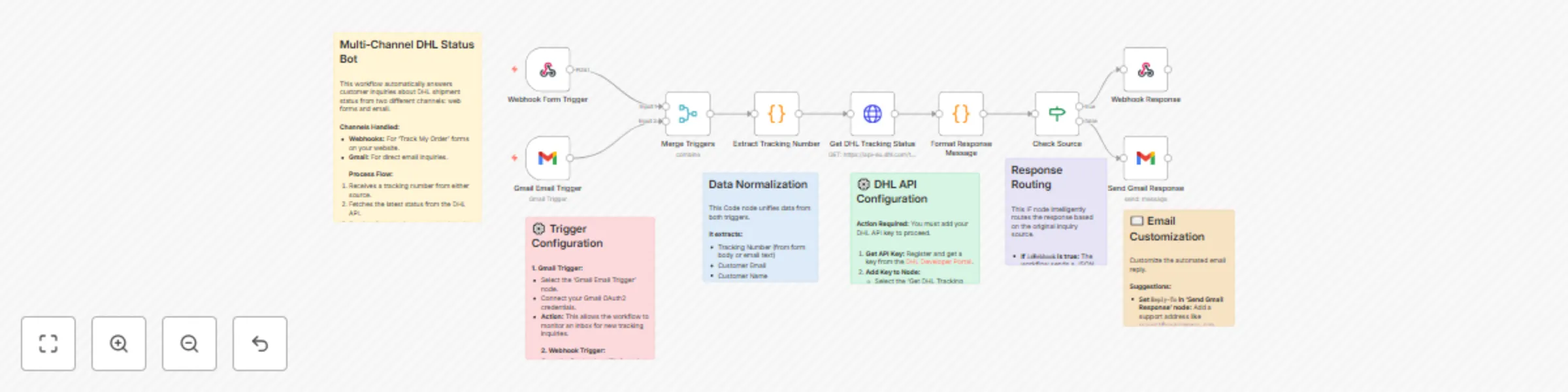
  1. The workflow is initiated by one of two triggers: a Webhook (from a website form) or a Gmail Trigger (when a new email arrives).
  2. A Merge node combines the data from both triggers into a single, unified flow.
  3. The "Extract Tracking Number" Code node intelligently parses the tracking number from either the form data or the email body. It also extracts the customer's name and email address.
  4. The HTTP Request node sends the extracted tracking number to the DHL API to fetch the latest shipment status.
  5. The "Format Response Message" Code node takes the API response and composes a user-friendly message for the customer. It also handles cases where tracking information is not found.
  6. An If node checks the original source of the inquiry to determine whether it came from the webhook or email.
  7. If the request came from the webhook, a Respond to Webhook node sends the tracking data back as a JSON response.
  8. If the request came from an email, the Gmail node sends the formatted message as an email reply to the customer.

How to use

  1. Configure the Triggers:

    • Webhook Trigger: Copy the Test URL and set it as the action endpoint for your web form. Once you activate the workflow, use the Production URL.
      Webhook URL: https://your-n8n-instance.com/webhook/dhl-tracking-inquiry
      
    • Gmail Trigger: Connect your Gmail account using OAuth2 credentials and set the desired filter conditions (e.g., unread emails with a specific subject).
  2. Set up the DHL API:

    • Open the "Get DHL Tracking Status" (HTTP Request) node and navigate to the "Headers" tab.
    • Replace YOUR_DHL_API_KEY with your actual DHL API key.
      {
        "DHL-API-Key": "YOUR_DHL_API_KEY"
      }
      
  3. Configure the Gmail Send Node:

    • Connect the same Gmail credentials to the "Send Gmail Response" node.
    • Customize options like the replyTo address as needed.
  4. Activate the workflow.

Requirements

  • A DHL Developer Portal account to obtain an API key.
  • A Gmail account configured with OAuth2 in n8n.

Customising this workflow

  • Add More Carriers: Duplicate the HTTP Request node and response formatting logic to support other shipping carriers like FedEx or UPS.
  • Log Inquiries: Add a node to save inquiry details (tracking number, customer email, status) to a Google Sheet or database for analytics.
  • Advanced Error Handling: Implement more robust error handling, such as sending a Slack notification to your support team if the DHL API is down or returns an unexpected error.

1.2 Logical Blocks

This catalog entry is organized from the workflow JSON. The node-level section below shows the executable blocks available for review before importing the template.

2. Block-by-Block Analysis

Block 1 - Workflow Overview

Type / Role
n8n-nodes-base.stickyNote - stickyNote
Config choices
Version 1

Block 2 - Webhook Form Trigger

Type / Role
n8n-nodes-base.webhook - webhook
Config choices
Version 2

Block 3 - Gmail Email Trigger

Type / Role
n8n-nodes-base.gmailTrigger - gmailTrigger
Config choices
Version 1.1

Block 4 - Trigger Setup

Type / Role
n8n-nodes-base.stickyNote - stickyNote
Config choices
Version 1

Block 5 - Merge Triggers

Type / Role
n8n-nodes-base.merge - merge
Config choices
Version 3

Block 6 - Extract Tracking Number

Type / Role
n8n-nodes-base.code - code
Config choices
Version 2

Block 7 - Extraction Logic

Type / Role
n8n-nodes-base.stickyNote - stickyNote
Config choices
Version 1

Block 8 - Get DHL Tracking Status

Type / Role
n8n-nodes-base.httpRequest - httpRequest
Config choices
Version 4.2

Block 9 - DHL API Configuration

Type / Role
n8n-nodes-base.stickyNote - stickyNote
Config choices
Version 1

Block 10 - Format Response Message

Type / Role
n8n-nodes-base.code - code
Config choices
Version 2

Block 11 - Check Source

Type / Role
n8n-nodes-base.if - if
Config choices
Version 2

Block 12 - Response Routing

Type / Role
n8n-nodes-base.stickyNote - stickyNote
Config choices
Version 1

Block 13 - Webhook Response

Type / Role
n8n-nodes-base.respondToWebhook - respondToWebhook
Config choices
Version 1.1

Block 14 - Send Gmail Response

Type / Role
n8n-nodes-base.gmail - gmail
Config choices
Version 2.1

Block 15 - Email Setup

Type / Role
n8n-nodes-base.stickyNote - stickyNote
Config choices
Version 1

3. Summary Table

Workflow Automated DHL shipment tracking bot for web forms and email inquiries
Complexity advanced
Nodes 15
Categories Support Chatbot, AI Chatbot
Author Yusuke Yamamoto
Published 19 Oct 2025

4. Reproducing the Workflow from Scratch

  1. 1. Download the workflow JSON

    Use the JSON export at /data/workflows/9876/9876.json as the source template for this automation.

  2. 2. Import the template into n8n

    Open n8n, import the downloaded JSON, and review each node before activating the workflow.

  3. 3. Configure credentials and variables

    Replace placeholder credentials, API keys, webhook URLs, account IDs, and environment-specific values with your own settings.

  4. 4. Test with sample data

    Run the workflow manually or in a staging workspace, inspect node output, and confirm downstream systems receive the expected data.

  5. 5. Activate and monitor

    Enable the workflow only after testing, then monitor executions, errors, and rate limits during the first production runs.

5. General Notes & Resources

Review imported nodes carefully before activation. This catalog entry is intended to help you inspect the workflow structure, understand required services, and find related templates faster.

Node names, credentials, schedules, webhook paths, and external service limits may need adjustment for your workspace.

Frequently asked questions

What does Automated DHL shipment tracking bot for web forms and email inquiries do?

This n8n template automates responses to customer inquiries about DHL shipment status, handling requests from both web forms and emails. Use cases Automate Customer Support : Provide 24/7 instant a...

What do I need before importing this workflow?

Review the workflow JSON, configure any required credentials in n8n, and test the automation in a safe workspace before using it in production.

Can I customize this workflow?

Yes. Use the block-by-block analysis and the downloadable JSON to inspect each node, then adjust credentials, prompts, schedules, filters, or destinations for your Support Chatbot, AI Chatbot use case.