Automate user creation & access group assignment in Curseduca

Workflow preview

Workflow preview
100%
Automate user creation & access group assignment in Curseduca preview
Open on n8n.io

Important notice

This workflow is provided as-is. Please review and test before using in production.

1. Workflow Overview

Curseduca – User Creation & Access Group Assignment How it works This workflow automates the process of creating a new user in Curseduca and granting them access to a specific acces...

Best for

  • HR automation workflows
  • beginner n8n builders looking for reusable templates

Tools used

n8n-nodes-base.webhook, n8n-nodes-base.httprequest, n8n-nodes-base.stickynote

Source and attribution

This workflow is cataloged by N8N Workflows and links back to its original n8n.io source page by curseduca.com.

Original n8n.io source

1.1 Workflow description

Title
Automate user creation & access group assignment in Curseduca
Workflow name
Automate user creation & access group assignment in Curseduca

📘 Curseduca – User Creation & Access Group Assignment

How it works

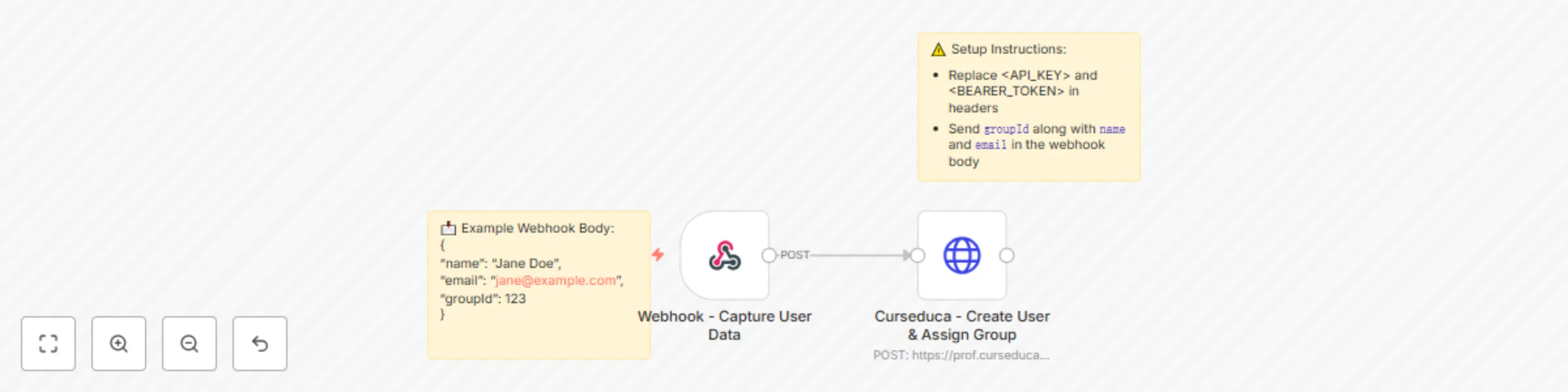
This workflow automates the process of creating a new user in Curseduca and granting them access to a specific access group.

It works in two main steps:

  1. Webhook – Captures user details (name, email, and group information).
  2. HTTP Request – Sends the data to the Curseduca API, creating the user, assigning them to the correct access group, and sending an email notification.

Setup steps

  1. Deploy the workflow

    • Copy the webhook URL generated by n8n.
    • Send a POST request with the required fields:
      • name
      • email
      • groupId
  2. Configure API access

    • Add your API Key and Bearer token in the HTTP Request node headers (replaCurseducace placeholders).
    • Replace <GroupId> in the body with the correct group ID.
  3. Notifications

    • By default, the workflow will trigger an email notification to the user once their account is created.

Example use cases

  • Landing pages: Automatically register leads who sign up on a product landing page and grant them immediate access to a course, training, or bundle.
  • Product bundles: Offer multiple products or services together and instantly give access to the correct group after purchase.
  • Chatbot integration: Connect tools like Manychat to capture name and email via chatbot conversations and create the user directly in Curseduca.

📘 Curseduca – Criação de Usuário e Liberação de Grupo de Acesso

Como funciona

Este fluxo de trabalho automatiza o processo de criação de um novo usuário no Curseduca e a liberação de acesso a um grupo específico.

Ele funciona em duas etapas principais:

  1. Webhook – Captura os dados do usuário (nome, e-mail e informações de grupo).
  2. HTTP Request – Envia os dados para a API do Curseduca, criando o usuário, atribuindo-o ao grupo correto e disparando uma notificação por e-mail.

Passos de configuração

  1. Publicar o workflow

    • Copie a URL do webhook gerada pelo n8n.
    • Envie uma requisição POST com os campos obrigatórios:
      • name
      • email
      • groupId
  2. Configurar o acesso à API

    • Adicione sua API Key e Bearer token nos headers do nó HTTP Request (substitua os placeholders).
    • Substitua <GroupId> no corpo da requisição pelo ID correto do grupo.
  3. Notificações

    • Por padrão, o fluxo dispara uma notificação por e-mail para o usuário assim que a conta é criada.

Casos de uso

  • Landing pages: Registre automaticamente leads que se inscrevem em uma landing page de produto e libere acesso imediato a um curso, treinamento ou pacote.
  • Pacotes de produtos: Ofereça múltiplos produtos ou serviços em conjunto e conceda acesso instantâneo ao grupo correto após a compra.
  • Integração com chatbots: Conecte ferramentas como o Manychat para capturar nome e e-mail em conversas e criar o usuário diretamente no Curseduca.

1.2 Logical Blocks

This catalog entry is organized from the workflow JSON. The node-level section below shows the executable blocks available for review before importing the template.

2. Block-by-Block Analysis

Block 1 - Webhook - Capture User Data

Type / Role
n8n-nodes-base.webhook - webhook
Config choices
Version 2.1

Block 2 - Curseduca - Create User & Assign Group

Type / Role
n8n-nodes-base.httpRequest - httpRequest
Config choices
Version 4.2

Block 3 - ⚠️ Setup Instructions

Type / Role
n8n-nodes-base.stickyNote - stickyNote
Config choices
Version 1

Block 4 - 📩 Example Payload

Type / Role
n8n-nodes-base.stickyNote - stickyNote
Config choices
Version 1

3. Summary Table

Workflow Automate user creation & access group assignment in Curseduca
Complexity beginner
Nodes 4
Categories HR
Author curseduca.com
Published 03 Sept 2025

4. Reproducing the Workflow from Scratch

  1. 1. Download the workflow JSON

    Use the JSON export at /data/workflows/8201/8201.json as the source template for this automation.

  2. 2. Import the template into n8n

    Open n8n, import the downloaded JSON, and review each node before activating the workflow.

  3. 3. Configure credentials and variables

    Replace placeholder credentials, API keys, webhook URLs, account IDs, and environment-specific values with your own settings.

  4. 4. Test with sample data

    Run the workflow manually or in a staging workspace, inspect node output, and confirm downstream systems receive the expected data.

  5. 5. Activate and monitor

    Enable the workflow only after testing, then monitor executions, errors, and rate limits during the first production runs.

5. General Notes & Resources

Review imported nodes carefully before activation. This catalog entry is intended to help you inspect the workflow structure, understand required services, and find related templates faster.

Node names, credentials, schedules, webhook paths, and external service limits may need adjustment for your workspace.

Frequently asked questions

What does Automate user creation & access group assignment in Curseduca do?

Curseduca – User Creation & Access Group Assignment How it works This workflow automates the process of creating a new user in Curseduca and granting them access to a specific acces...

What do I need before importing this workflow?

Review the workflow JSON, configure any required credentials in n8n, and test the automation in a safe workspace before using it in production.

Can I customize this workflow?

Yes. Use the block-by-block analysis and the downloadable JSON to inspect each node, then adjust credentials, prompts, schedules, filters, or destinations for your HR use case.