Block 1 - When clicking ‘Test workflow’
- Type / Role
- n8n-nodes-base.manualTrigger - manualTrigger
- Config choices
- Version 1


 Early Deal
This workflow is provided as-is. Please review and test before using in production.
Automated Workflow: Scrape Travel Agent Contacts and Send Personalized Survey Emails This workflow is designed to automate the process of scraping travel agent contact data, standardizing the in...
n8n-nodes-base.manualtrigger, n8n-nodes-base.stickynote, n8n-nodes-base.splitout, n8n-nodes-base.emailsend, n8n-nodes-base.googlesheets, @n8n/n8n-nodes-langchain.openai, n8n-nodes-base.httprequest
This workflow is cataloged by N8N Workflows and links back to its original n8n.io source page by Mohan Gopal.
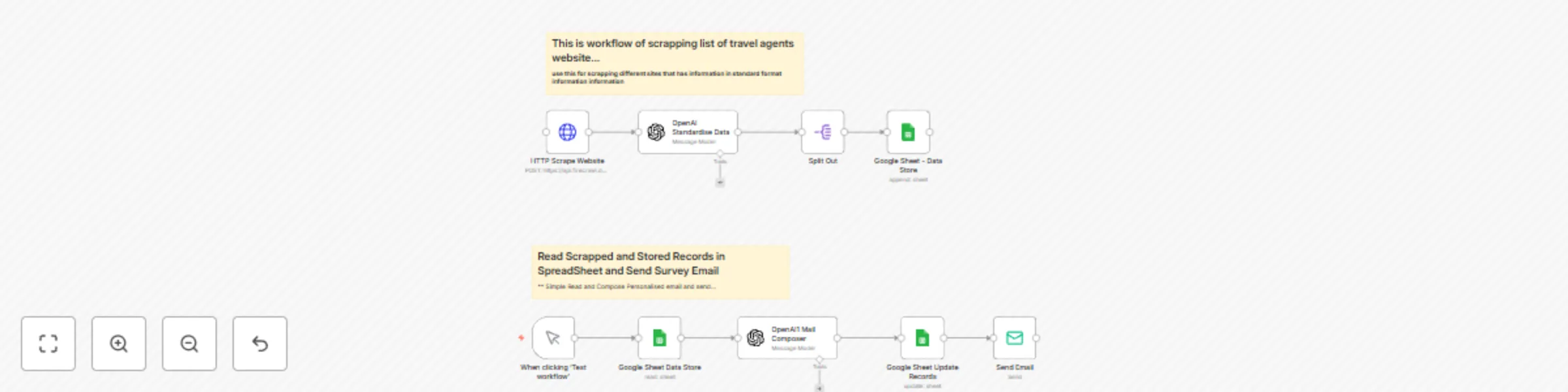
Original n8n.io source🔧 Automated Workflow: Scrape Travel Agent Contacts and Send Personalized Survey Emails This workflow is designed to automate the process of scraping travel agent contact data, standardizing the information, storing it, and then sending out personalized survey emails using AI. It’s especially useful for outreach campaigns, research, or lead generation.
⚙️ Workflow Breakdown 📍 Part 1: Scraping and Storing Travel Agent Data
Function: Calls a third-party scraping API (https://api.firecrawl.dev...) to scrape data from a travel agent listing site.
Purpose: Extract raw HTML or structured data from a website containing contact info.
Function: Uses AI to clean and standardize the raw scraped data into structured JSON (e.g., name, email, agency, location).
Purpose: Ensures uniformity in formatting, making data easier to process downstream.
Function: Splits the standardized array of agent records into individual items.
Purpose: Allows appending each agent as a separate row in Google Sheets.
Function: Stores each individual record in a spreadsheet.
Purpose: Maintains a centralized and accessible log of scraped and processed contacts.
📍 Part 2: Read Records and Send Personalized Survey Emails Triggered Manually – when “Test Workflow” button is clicked.
Function: Starts the second part of the workflow manually.
Use Case: Testing or running the outreach email process on demand.
Function: Reads the stored travel agent records from the spreadsheet.
Purpose: Retrieves contact details and context for personalized messaging.
Function: Generates a custom email for each agent using their details.
Purpose: Creates human-like, engaging emails that include a survey link (optional input).
Function: Optionally marks the record as "emailed" or logs the date of outreach.
Purpose: Prevents duplicate outreach and helps track campaign status.
Function: Sends the personalized email generated by OpenAI.
Purpose: Delivers the survey to each travel agent with contextually relevant messaging.
🧠 Use Case: Targeted email outreach to travel agents.
Collect insights or feedback via survey links.
Use personalized messaging to improve response rates.
📌 Benefits: ✅ Fully automated scraping and processing.
✅ Personalized at scale using OpenAI.
✅ Easily repeatable for different domains or campaigns.
✅ Centralized recordkeeping in Google Sheets.
🛠️ Tech Stack: n8n: Automation and workflow management
OpenAI: AI-based text standardization and email generation
Firecrawl (or similar): Web scraping API
Google Sheets: Data storage and tracking
Email Node: Survey email delivery
This catalog entry is organized from the workflow JSON. The node-level section below shows the executable blocks available for review before importing the template.
| Workflow | Automate travel agent outreach with web scraping, OpenAI, and Google Sheets |
|---|---|
| Complexity | intermediate |
| Nodes | 11 |
| Categories | Lead Generation, Multimodal AI |
| Author | Mohan Gopal |
| Published | 02 Jun 2025 |
Use the JSON export at /data/workflows/4606/4606.json as the source template for this automation.
Open n8n, import the downloaded JSON, and review each node before activating the workflow.
Replace placeholder credentials, API keys, webhook URLs, account IDs, and environment-specific values with your own settings.
Run the workflow manually or in a staging workspace, inspect node output, and confirm downstream systems receive the expected data.
Enable the workflow only after testing, then monitor executions, errors, and rate limits during the first production runs.
Review imported nodes carefully before activation. This catalog entry is intended to help you inspect the workflow structure, understand required services, and find related templates faster.
Node names, credentials, schedules, webhook paths, and external service limits may need adjustment for your workspace.
Automated Workflow: Scrape Travel Agent Contacts and Send Personalized Survey Emails This workflow is designed to automate the process of scraping travel agent contact data, standardizing the in...
Review the workflow JSON, configure any required credentials in n8n, and test the automation in a safe workspace before using it in production.
Yes. Use the block-by-block analysis and the downloadable JSON to inspect each node, then adjust credentials, prompts, schedules, filters, or destinations for your Lead Generation, Multimodal AI use case.