Block 1 - Wait
- Type / Role
- n8n-nodes-base.wait - wait
- Config choices
- Version 1.1


 Early Deal
This workflow is provided as-is. Please review and test before using in production.
What if your quote requests managed themselves? Every quote request is a potential deal — but only if it's handled quickly, properly, and without things falling through the cracks. What if instead ...
n8n-nodes-base.wait, n8n-nodes-base.webhook, n8n-nodes-base.gmail, n8n-nodes-base.set, n8n-nodes-base.airtable, n8n-nodes-base.slack, n8n-nodes-base.stickynote
This workflow is cataloged by N8N Workflows and links back to its original n8n.io source page by Baptiste Fort.
Original n8n.io sourceEvery quote request is a potential deal — but only if it's handled quickly, properly, and without things falling through the cracks. What if instead of copy-pasting emails and pinging teammates manually, your entire process just... ran itself?
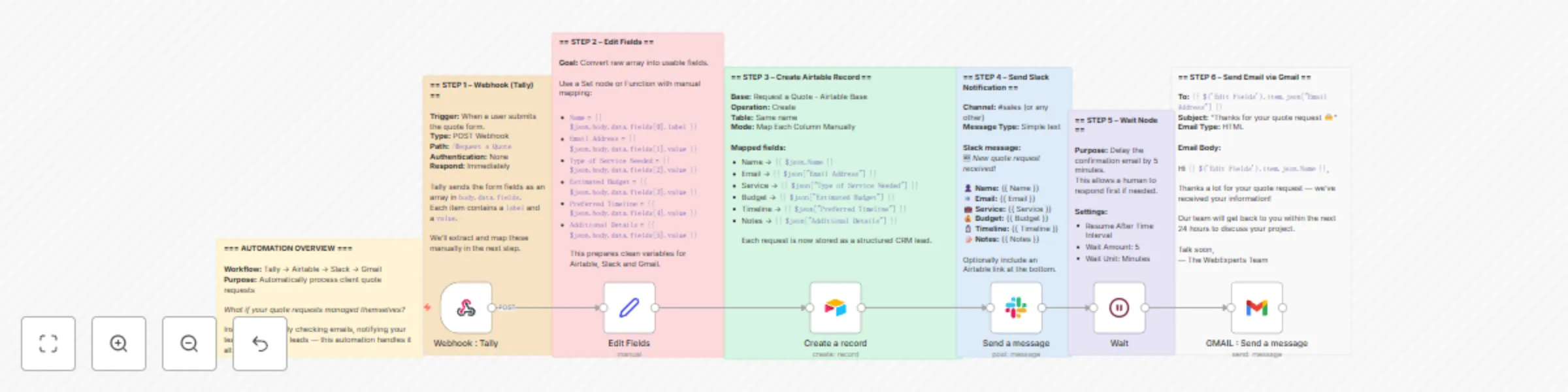
This automation makes it happen: it captures form submissions, notifies your sales team on Slack, stores leads in Airtable, and sends an email confirmation to the client — all in one seamless n8n flow.
This node listens for incoming quote requests from the Tally form.
The data arrives as an array inside body.data.fields. Each field has a label and a value that we’ll need to map manually.
This step extracts usable values from the raw form data.
Example mapping:
Name = {{ $json.body.data.fields[0].label }}
Email Address = {{ $json.body.data.fields[1].value }}
Type of Service Needed = {{ $json.body.data.fields[2].value }}
Estimated Budget = {{ $json.body.data.fields[3].value }}
Preferred Timeline = {{ $json.body.data.fields[4].value }}
Additional Details or Questions = {{ $json.body.data.fields[5].value }}
We send the cleaned fields into a database (CRM) in Airtable.
Each quote submission becomes a new record with all project details.
This node notifies your sales team immediately in a Slack channel.
Message format:
:new: *New quote request received!*

👤 Name: {{ $json.fields.Name }}
📧 Email: {{ $json.fields.Email }}
💼 Service: {{ $json.fields["Type of Service"] }}
💰 Budget: {{ $json.fields["Estimated Budget (€)"] }}
⏱️ Timeline: {{ $json.fields["Preferred Timeline"] }}
📝 Notes: {{ $json.fields["Additional Details"] }}
This node simply delays the email by 5 minutes. Why? To give a human salesperson time to reach out manually before the automated confirmation goes out. It adds a personal buffer.
Message body:
Hi {{ $('Edit Fields').item.json.Name }},

Thanks a lot for your quote request — we’ve received your information!

Our team will get back to you within the next 24 hours to discuss your project.

Talk soon,
— The WebExperts Team
With this automation in place:
All this without writing a single line of backend code. It’s fast, scalable, and business-ready.
This catalog entry is organized from the workflow JSON. The node-level section below shows the executable blocks available for review before importing the template.
| Workflow | Automate quote request processing with Tally, Airtable, Slack, and Gmail |
|---|---|
| Complexity | intermediate |
| Nodes | 13 |
| Categories | Lead Generation |
| Author | Baptiste Fort |
| Published | 29 Jun 2025 |
Use the JSON export at /data/workflows/5458/5458.json as the source template for this automation.
Open n8n, import the downloaded JSON, and review each node before activating the workflow.
Replace placeholder credentials, API keys, webhook URLs, account IDs, and environment-specific values with your own settings.
Run the workflow manually or in a staging workspace, inspect node output, and confirm downstream systems receive the expected data.
Enable the workflow only after testing, then monitor executions, errors, and rate limits during the first production runs.
Review imported nodes carefully before activation. This catalog entry is intended to help you inspect the workflow structure, understand required services, and find related templates faster.
Node names, credentials, schedules, webhook paths, and external service limits may need adjustment for your workspace.
What if your quote requests managed themselves? Every quote request is a potential deal — but only if it's handled quickly, properly, and without things falling through the cracks. What if instead ...
Review the workflow JSON, configure any required credentials in n8n, and test the automation in a safe workspace before using it in production.
Yes. Use the block-by-block analysis and the downloadable JSON to inspect each node, then adjust credentials, prompts, schedules, filters, or destinations for your Lead Generation use case.