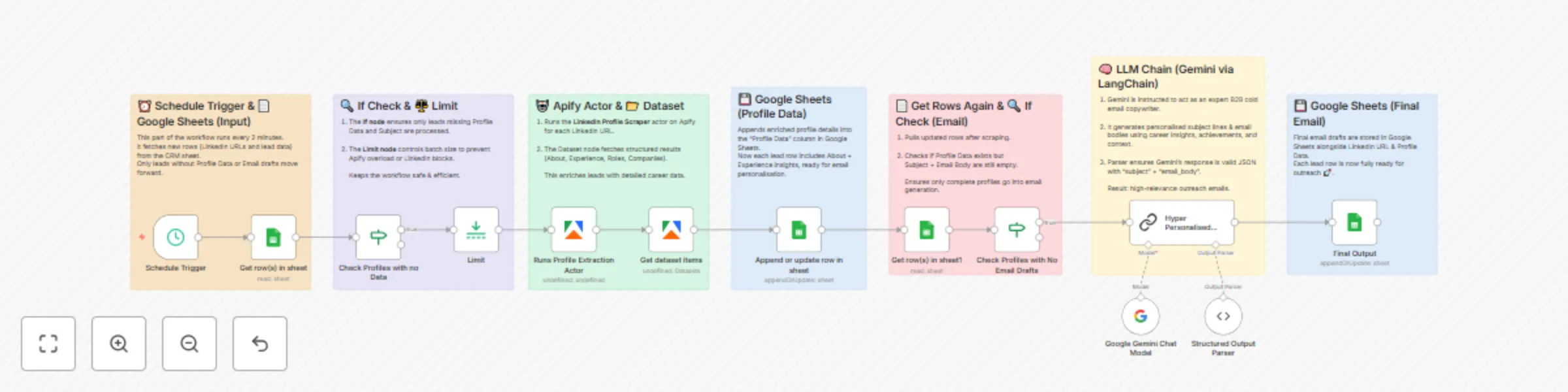
Automate LinkedIn profile research & email outreach with Apify, Gemini & Sheets

Workflow preview

Workflow preview
100%
Automate LinkedIn profile research & email outreach with Apify, Gemini & Sheets preview
Open on n8n.io

Important notice

This workflow is provided as-is. Please review and test before using in production.

1. Workflow Overview

This n8n template from Intuz provides a complete and automated solution for deep dive lead research and hyper personalized email generation. It transforms a basic list of ...

Best for

  • Lead Generation automation workflows
  • advanced n8n builders looking for reusable templates

Tools used

n8n-nodes-base.googlesheets, n8n-nodes-base.limit, @apify/n8n-nodes-apify.apify, @n8n/n8n-nodes-langchain.outputparserstructured, @n8n/n8n-nodes-langchain.lmchatgooglegemini, n8n-nodes-base.scheduletrigger, n8n-nodes-base.stickynote, n8n-nodes-base.if

Source and attribution

This workflow is cataloged by N8N Workflows and links back to its original n8n.io source page by Intuz .

Original n8n.io source

1.1 Workflow description

Title
Automate LinkedIn profile research & email outreach with Apify, Gemini & Sheets
Workflow name
Automate LinkedIn profile research & email outreach with Apify, Gemini & Sheets

This n8n template from Intuz provides a complete and automated solution for deep-dive lead research and hyper-personalized email generation.

It transforms a basic list of LinkedIn profiles into a campaign-ready database by first enriching contacts with detailed career data and then using AI to craft unique, context-aware emails based on each individual's professional journey.

Who's this workflow for?

  • Sales Development Representatives (SDRs)
  • Account Executives (AEs)
  • B2B Marketers & Growth Hackers
  • Recruiters & Talent Acquisition Specialists
  • Startup Founders

How it works

1. Scheduled Data Fetch: The workflow runs automatically on a schedule, fetching a list of leads (containing LinkedIn URLs) from a Google Sheet.

2. Enrich Profiles with Apify: For each lead that hasn't been processed, it uses an Apify actor to scrape their LinkedIn profile, extracting key information like their "About" section and detailed work experience.

3. Update Central Database: The scraped career history is saved back into a "Profile Data" column in the original Google Sheet, creating a rich, centralized lead profile.

4. AI Email Personalization: The workflow sends the complete, enriched profile data to a Google Gemini AI model via LangChain, using a sophisticated prompt that instructs it to act as an expert B2B copywriter.

5. Craft a Unique Hook: The AI analyzes the lead's entire career journey to find unique "nuggets"—like long tenure, specific achievements, or unusual career paths—and uses them to write a compelling opening line.

6. Save the Final Email Draft: The AI-generated subject line and personalized email body are saved back into the Google Sheet, leaving you with a ready-to-send, hyper-personalized outreach campaign.

Setup Instructions

1. Google Sheets Setup:

  • Connect your Google Sheets account to n8n.
  • In all three Google Sheets nodes, select your credentials and update the Document ID and Sheet Name to match your lead list.
  • Populate your sheet with initial lead data, including at least their LinkedIn URL.

2. Apify Connection:

  • Connect your Apify account in the Runs Profile Extraction Actor node.

3. Google Gemini AI Connection:

  • Connect your Google Gemini (PaLM) API account in the Google Gemini Chat Model node.

4. Configure the Schedule:

  • In the Schedule Trigger node, set the interval for how often you want the workflow to run and process new leads.

5. Activate Workflow:

  • Save the workflow and toggle the "Active" switch to ON. Your automated research and personalization engine is now active.

Key Requirements to Use This Template

  • n8n Instance: An active n8n account (Cloud or self-hosted).
  • Google Account & Sheet: A pre-made Google Sheet with columns for First Name, Last Name, LinkedIn, Profile Data, Subject, and Email Body.
  • Apify Account: An active Apify account with a plan that supports the LinkedIn Profile Scraper actor.
  • Google Gemini AI Account: A Google Cloud account with the Vertex AI API (for Gemini models) enabled and an associated API Key.

Connect with us

For Custom Worflow Automation

Click here- Get Started

1.2 Logical Blocks

This catalog entry is organized from the workflow JSON. The node-level section below shows the executable blocks available for review before importing the template.

2. Block-by-Block Analysis

Block 1 - Get row(s) in sheet

Type / Role
n8n-nodes-base.googleSheets - googleSheets
Config choices
Version 4.7

Block 2 - Limit

Type / Role
n8n-nodes-base.limit - limit
Config choices
Version 1

Block 3 - Get dataset items

Type / Role
@apify/n8n-nodes-apify.apify - apify
Config choices
Version 1

Block 4 - Append or update row in sheet

Type / Role
n8n-nodes-base.googleSheets - googleSheets
Config choices
Version 4.7

Block 5 - Get row(s) in sheet1

Type / Role
n8n-nodes-base.googleSheets - googleSheets
Config choices
Version 4.7

Block 6 - Structured Output Parser

Type / Role
@n8n/n8n-nodes-langchain.outputParserStructured - outputParserStructured
Config choices
Version 1.3

Block 7 - Google Gemini Chat Model

Type / Role
@n8n/n8n-nodes-langchain.lmChatGoogleGemini - lmChatGoogleGemini
Config choices
Version 1

Block 8 - Schedule Trigger

Type / Role
n8n-nodes-base.scheduleTrigger - scheduleTrigger
Config choices
Version 1.2

Block 9 - Sticky Note

Type / Role
n8n-nodes-base.stickyNote - stickyNote
Config choices
Version 1

Block 10 - Sticky Note1

Type / Role
n8n-nodes-base.stickyNote - stickyNote
Config choices
Version 1

Block 11 - Sticky Note2

Type / Role
n8n-nodes-base.stickyNote - stickyNote
Config choices
Version 1

Block 12 - Sticky Note3

Type / Role
n8n-nodes-base.stickyNote - stickyNote
Config choices
Version 1

Block 13 - Sticky Note4

Type / Role
n8n-nodes-base.stickyNote - stickyNote
Config choices
Version 1

Block 14 - Sticky Note5

Type / Role
n8n-nodes-base.stickyNote - stickyNote
Config choices
Version 1

Block 15 - Sticky Note6

Type / Role
n8n-nodes-base.stickyNote - stickyNote
Config choices
Version 1

Block 16 - Check Profiles with no Data

Type / Role
n8n-nodes-base.if - if
Config choices
Version 2.2

Block 17 - Runs Profile Extraction Actor

Type / Role
@apify/n8n-nodes-apify.apify - apify
Config choices
Version 1

Block 18 - Check Profiles with No Email Drafts

Type / Role
n8n-nodes-base.if - if
Config choices
Version 2.2

Block 19 - Hyper Personalised Email Generator

Type / Role
@n8n/n8n-nodes-langchain.chainLlm - chainLlm
Config choices
Version 1.7

Block 20 - Final Output

Type / Role
n8n-nodes-base.googleSheets - googleSheets
Config choices
Version 4.7

3. Summary Table

Workflow Automate LinkedIn profile research & email outreach with Apify, Gemini & Sheets
Complexity advanced
Nodes 20
Categories Lead Generation
Author Intuz
Published 29 Aug 2025

4. Reproducing the Workflow from Scratch

  1. 1. Download the workflow JSON

    Use the JSON export at /data/workflows/8012/8012.json as the source template for this automation.

  2. 2. Import the template into n8n

    Open n8n, import the downloaded JSON, and review each node before activating the workflow.

  3. 3. Configure credentials and variables

    Replace placeholder credentials, API keys, webhook URLs, account IDs, and environment-specific values with your own settings.

  4. 4. Test with sample data

    Run the workflow manually or in a staging workspace, inspect node output, and confirm downstream systems receive the expected data.

  5. 5. Activate and monitor

    Enable the workflow only after testing, then monitor executions, errors, and rate limits during the first production runs.

5. General Notes & Resources

Review imported nodes carefully before activation. This catalog entry is intended to help you inspect the workflow structure, understand required services, and find related templates faster.

Node names, credentials, schedules, webhook paths, and external service limits may need adjustment for your workspace.

Frequently asked questions

What does Automate LinkedIn profile research & email outreach with Apify, Gemini & Sheets do?

This n8n template from Intuz provides a complete and automated solution for deep dive lead research and hyper personalized email generation. It transforms a basic list of ...

What do I need before importing this workflow?

Review the workflow JSON, configure any required credentials in n8n, and test the automation in a safe workspace before using it in production.

Can I customize this workflow?

Yes. Use the block-by-block analysis and the downloadable JSON to inspect each node, then adjust credentials, prompts, schedules, filters, or destinations for your Lead Generation use case.