Automate LinkedIn candidates sourcing with Google X-ray Boolean search
Workflow preview

$20/month : Unlimited workflows
2500 executions/month

THE #1 IN WEB SCRAPING
Scrape any website without limits
HOSTINGER  Early Deal
DISCOUNT 20% Try free
Early DealDISCOUNT 20%
Self-hosted n8n
Unlimited workflows - from $4.99/mo

#1 hub for scraping, AI & automation
6000+ actors - $5 credits/mo
Important notice
This workflow is provided as-is. Please review and test before using in production.
Overview
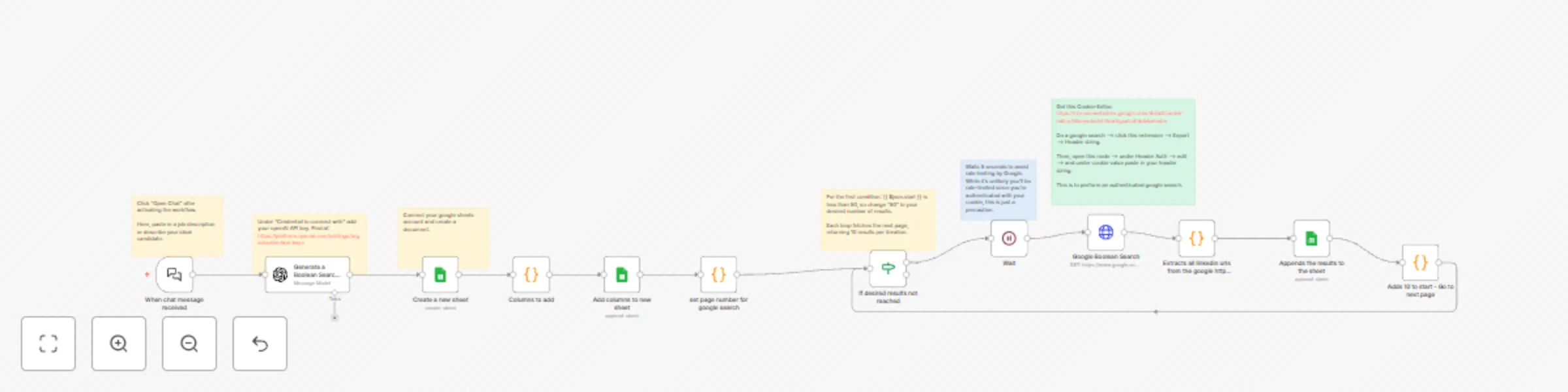
Auto Source LinkedIn Candidates with GPT-4 Boolean Search & Google X-ray
How It Works:
User Input:
- The user pastes a job description or ideal candidate specifications into the workflow.
Boolean Search String Generation:
- OpenAI processes the input and generates a precise LinkedIn Boolean search string formatted as:
site:linkedin.com/in ("Job Title" AND "Skill1" AND "Skill2") - This search string is optimized to find relevant LinkedIn profiles matching the provided criteria.
- OpenAI processes the input and generates a precise LinkedIn Boolean search string formatted as:
Google Sheet Creation:
- A new Google Sheet is automatically created within a specified document to store extracted LinkedIn profile URLs.
Google Search Execution:
- The workflow sends a search request to Google using an HTTP node with the generated Boolean string.
Iterative Search & Data Extraction:
- The workflow retrieves the first 10 results from Google.
- If the desired number of LinkedIn profiles has not been reached, the workflow loops, fetching the next set of 10 results until the if condition is met.
Data Storage:
- The workflow extracts LinkedIn profile URLs from the search results and saves them to the newly created Google Sheet for further review.
Setup Steps:
1. API Key Configuration
- Under "Credentials", add your OpenAI API key from your OpenAI account settings.
- This key is used to generate the LinkedIn Boolean search string.
2. Adjust Search Parameters
- Navigate to the "If" node and update the condition to define the desired number of LinkedIn profiles to extract.
- The default is 50, but you can set it to any number based on your needs.
3. Establish Google Sheets Connection
- Connect your Google Sheets account to the workflow.
- Create a document to store the sourced LinkedIn profiles.
- The workflow automatically creates a new sheet for each new search, so no manual setup is needed.
4. Authenticate Google Search
- Google search requires authentication for better results.
- Use the Cookie-Editor browser extension to export your header string and enable authenticated Google searches within the workflow.
5. Run the Workflow
- Execute the workflow and monitor the Google Sheet for newly added LinkedIn profiles.
Benefits:
✅ Automates profile sourcing, reducing manual search time.
✅ Generates precise LinkedIn Boolean search strings tailored to job descriptions.
✅ Extracts and saves LinkedIn profiles efficiently for recruitment efforts.
This solution leverages OpenAI and advanced search techniques to enhance your talent sourcing process, making it faster and more accurate! 🚀