Block 1 - Webhook
- Type / Role
- n8n-nodes-base.webhook - webhook
- Config choices
- Version 2.1


 Early Deal
This workflow is provided as-is. Please review and test before using in production.
Landing Page Lead Intake via Webhook to Zoho CRM, Jira Task & Slack Alerts This n8n workflow captures lead data from a landing page webhook, validates required fields and then processes the lead by...
n8n-nodes-base.webhook, n8n-nodes-base.if, n8n-nodes-base.zohocrm, n8n-nodes-base.jira, n8n-nodes-base.slack, n8n-nodes-base.stickynote
This workflow is cataloged by N8N Workflows and links back to its original n8n.io source page by WeblineIndia.
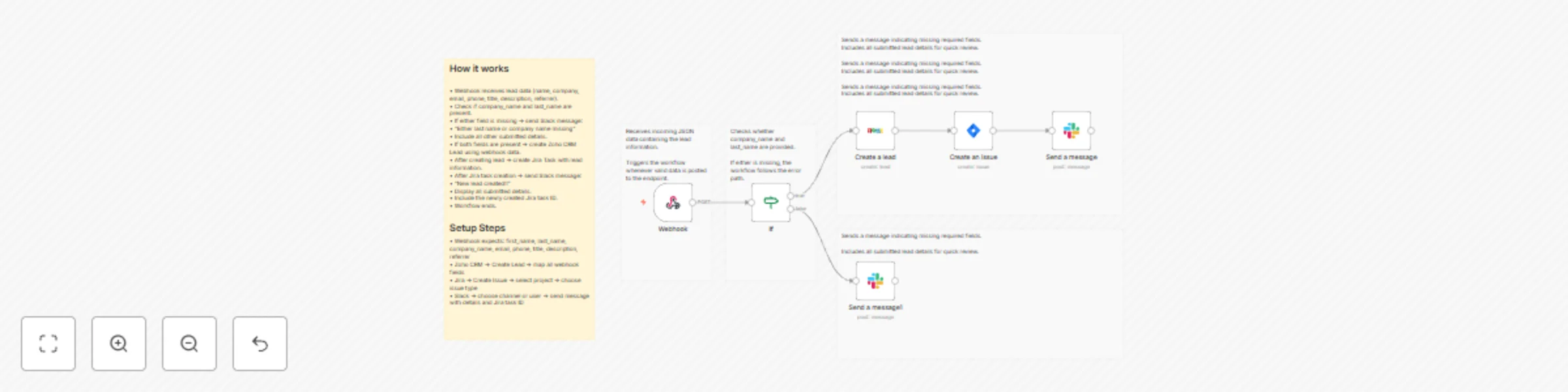
Original n8n.io sourceThis n8n workflow captures lead data from a landing-page webhook, validates required fields and then processes the lead by creating a Zoho CRM Lead, generating a Jira Task and notifying a Slack channel. If required fields are missing, the workflow skips CRM + Jira creation and instead notifies Slack with available lead details.
This workflow works as an automated lead pipeline. When the landing page sends JSON to the webhook, the workflow checks if last_name and company_name are present. If both fields exist, it proceeds to create a Zoho CRM lead, then generates a Jira task using the same data. A detailed Slack message is then posted with all lead information and the newly created Jira task ID.
If any of the required fields are missing, the workflow does not create CRM or Jira entries. Instead, it sends a Slack notification with available details so teams can intervene manually without incorrect CRM data entry.
Go to n8n → Workflows → Import workflow JSON.
Add your credentials in:
Copy the Webhook URL from the Webhook node and configure your landing page to send POST JSON to it.
The If node checks:
If both exist → CRM + Jira + Slack
If missing → Slack-only alert
Send sample JSON using your landing page or Postman.
Check Zoho CRM, Jira task creation, and Slack messages.
Enable workflow after verification.
(And many more possible use cases.)
| Issue | Possible Cause | Solution |
|---|---|---|
| Webhook not triggered | Wrong webhook URL or wrong HTTP method | Check URL and ensure POST is used |
| Zoho lead not created | Invalid credentials or missing required mapping | Reconnect Zoho credentials and verify fields |
| Jira task not created | Wrong project/issue/assignee config | Verify project, issue type & permissions |
| Slack message not sent | Token expired or incorrect channel ID | Re-authenticate Slack and confirm channel |
| Workflow stops at If node | last_name or company_name missing | Update landing page form to include fields |
| Slack message missing values | Wrong field names in payload | Ensure JSON fields match expected structure |
For assistance with setup, customization or building enhanced automation workflows, our n8n team at WeblineIndia can help you build & optimize your automations.
We support:
This catalog entry is organized from the workflow JSON. The node-level section below shows the executable blocks available for review before importing the template.
| Workflow | Automate lead processing from landing pages with Zoho CRM, Jira & Slack |
|---|---|
| Complexity | intermediate |
| Nodes | 11 |
| Categories | Lead Generation |
| Author | WeblineIndia |
| Published | 10 Dec 2025 |
Use the JSON export at /data/workflows/11650/11650.json as the source template for this automation.
Open n8n, import the downloaded JSON, and review each node before activating the workflow.
Replace placeholder credentials, API keys, webhook URLs, account IDs, and environment-specific values with your own settings.
Run the workflow manually or in a staging workspace, inspect node output, and confirm downstream systems receive the expected data.
Enable the workflow only after testing, then monitor executions, errors, and rate limits during the first production runs.
Review imported nodes carefully before activation. This catalog entry is intended to help you inspect the workflow structure, understand required services, and find related templates faster.
Node names, credentials, schedules, webhook paths, and external service limits may need adjustment for your workspace.
Landing Page Lead Intake via Webhook to Zoho CRM, Jira Task & Slack Alerts This n8n workflow captures lead data from a landing page webhook, validates required fields and then processes the lead by...
Review the workflow JSON, configure any required credentials in n8n, and test the automation in a safe workspace before using it in production.
Yes. Use the block-by-block analysis and the downloadable JSON to inspect each node, then adjust credentials, prompts, schedules, filters, or destinations for your Lead Generation use case.