Block 1 - Sticky Note
- Type / Role
- n8n-nodes-base.stickyNote - stickyNote
- Config choices
- Version 1


 Early Deal
This workflow is provided as-is. Please review and test before using in production.
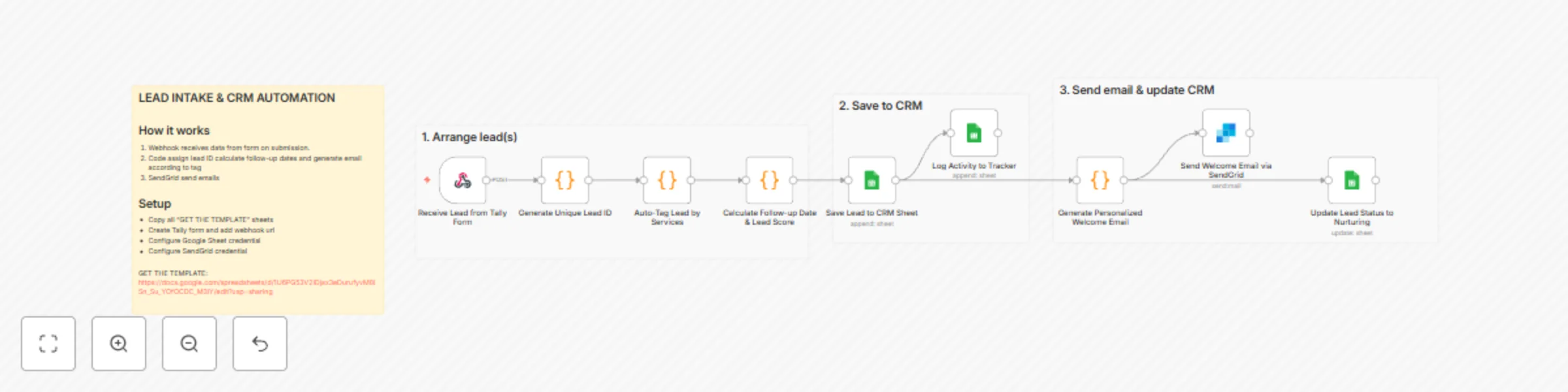
Capture leads from Tally forms to Google Sheets CRM This workflow automates lead intake by capturing form submissions, enriching them with smart tags and scores, storing them in a Google Sheets CRM...
n8n-nodes-base.stickynote, n8n-nodes-base.webhook, n8n-nodes-base.code, n8n-nodes-base.googlesheets, n8n-nodes-base.sendgrid
This workflow is cataloged by N8N Workflows and links back to its original n8n.io source page by Gilbert Onyebuchi.
Original n8n.io sourceThis workflow automates lead intake by capturing form submissions, enriching them with smart tags and scores, storing them in a Google Sheets CRM, and sending personalized welcome emails.
This template is perfect for solopreneurs, small agencies, and marketing consultants who need a simple yet powerful CRM system without paying for expensive tools like HubSpot or Salesforce. If you're collecting leads through forms and manually copying data to spreadsheets, this automation will save you hours every week.
When someone submits your Tally lead capture form, this workflow automatically:
Apps & Services:
Setup needed:
Modify service tags: Edit the serviceTagMap object in the "Auto-Tag Lead" node to match your specific services.
Adjust lead scoring: Change the scoring logic in "Calculate Initial Dates & Score" to prioritize different interest levels or sources.
Personalize emails: Update the email templates in "Generate Welcome Email" to match your brand voice and add specific resources or links.
Add more integrations: Extend the workflow with Slack notifications, SMS alerts via Twilio, or sync to other tools like Notion or Airtable.
Change follow-up timing: Modify the daysToAdd calculation to adjust when leads receive their next touchpoint.
Add conditional paths: Use IF nodes to route different lead types to different email sequences or team members.
This catalog entry is organized from the workflow JSON. The node-level section below shows the executable blocks available for review before importing the template.
| Workflow | Automate lead intake & CRM with Tally Forms to Google Sheets and SendGrid emails |
|---|---|
| Complexity | intermediate |
| Nodes | 13 |
| Categories | Lead Generation, AI Summarization |
| Author | Gilbert Onyebuchi |
| Published | 25 Nov 2025 |
Use the JSON export at /data/workflows/11233/11233.json as the source template for this automation.
Open n8n, import the downloaded JSON, and review each node before activating the workflow.
Replace placeholder credentials, API keys, webhook URLs, account IDs, and environment-specific values with your own settings.
Run the workflow manually or in a staging workspace, inspect node output, and confirm downstream systems receive the expected data.
Enable the workflow only after testing, then monitor executions, errors, and rate limits during the first production runs.
Review imported nodes carefully before activation. This catalog entry is intended to help you inspect the workflow structure, understand required services, and find related templates faster.
Node names, credentials, schedules, webhook paths, and external service limits may need adjustment for your workspace.
Capture leads from Tally forms to Google Sheets CRM This workflow automates lead intake by capturing form submissions, enriching them with smart tags and scores, storing them in a Google Sheets CRM...
Review the workflow JSON, configure any required credentials in n8n, and test the automation in a safe workspace before using it in production.
Yes. Use the block-by-block analysis and the downloadable JSON to inspect each node, then adjust credentials, prompts, schedules, filters, or destinations for your Lead Generation, AI Summarization use case.