Block 1 - Gmail Trigger
- Type / Role
- n8n-nodes-base.gmailTrigger - gmailTrigger
- Config choices
- Version 1.3


 Early Deal
This workflow is provided as-is. Please review and test before using in production.
What problem does this workflow solve? Order processing often involves manual invoice reading, stock checking, and back and forth communication between procurement and operations teams. This work...
n8n-nodes-base.gmailtrigger, n8n-nodes-base.extractfromfile, @n8n/n8n-nodes-langchain.outputparserstructured, @n8n/n8n-nodes-langchain.lmchatopenai, n8n-nodes-base.gmail, @n8n/n8n-nodes-langchain.agent, n8n-nodes-base.googlesheets, n8n-nodes-base.if
This workflow is cataloged by N8N Workflows and links back to its original n8n.io source page by InfyOm Technologies.
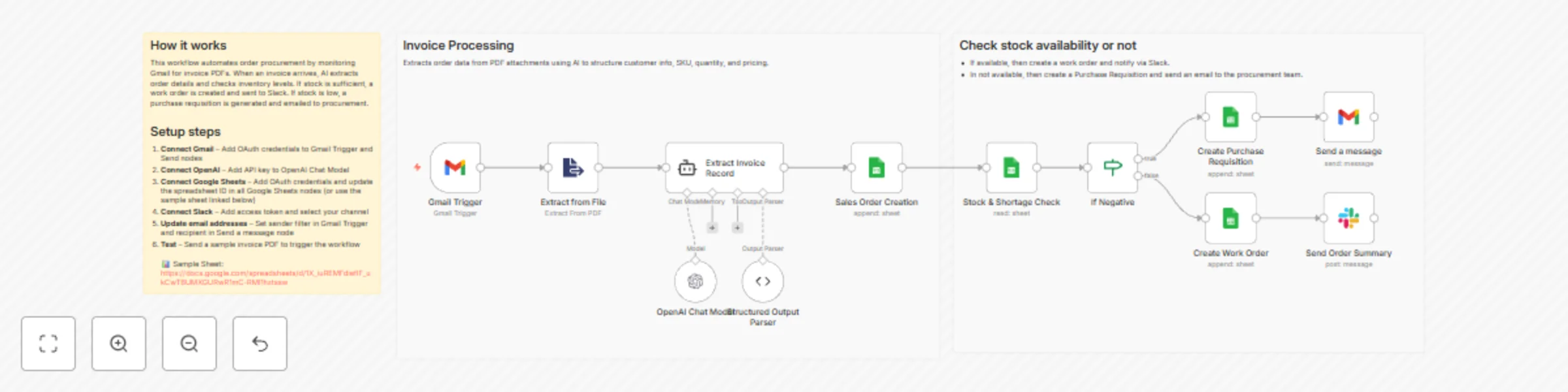
Original n8n.io sourceOrder processing often involves manual invoice reading, stock checking, and back-and-forth communication between procurement and operations teams. This workflow automates the entire procurement decision flow — from reading incoming order emails to extracting structured data, checking stock, and creating either a purchase requisition or a work order automatically.
The workflow begins when a new email arrives at a specific email address.
The invoice file is automatically downloaded for processing.
The attached invoice is processed using OCR or a document extraction tool.
Raw details such as:
are extracted for further processing.
OpenAI structures the extracted fields into a clean and consistent format:
order_id item_code quantity customer_nameThis ensures all data is normalised before stock validation.
The workflow checks inventory data stored in Google Sheets.
It compares:
If stock is insufficient, it triggers the purchase requisition path.
If stock is available, it initiates the work order path.
This ensures teams are notified instantly, and work continues without delays.
Every step — extracted data, PR created, WO created, notifications sent — is logged in Google Sheets.
This provides a full audit trail for procurement and operations teams.
Ideal for:
This catalog entry is organized from the workflow JSON. The node-level section below shows the executable blocks available for review before importing the template.
| Workflow | Automate invoice processing & stock management with AI, Gmail, Sheets & Slack |
|---|---|
| Complexity | advanced |
| Nodes | 15 |
| Categories | Invoice Processing, AI Summarization |
| Author | InfyOm Technologies |
| Published | 11 Dec 2025 |
Use the JSON export at /data/workflows/11678/11678.json as the source template for this automation.
Open n8n, import the downloaded JSON, and review each node before activating the workflow.
Replace placeholder credentials, API keys, webhook URLs, account IDs, and environment-specific values with your own settings.
Run the workflow manually or in a staging workspace, inspect node output, and confirm downstream systems receive the expected data.
Enable the workflow only after testing, then monitor executions, errors, and rate limits during the first production runs.
Review imported nodes carefully before activation. This catalog entry is intended to help you inspect the workflow structure, understand required services, and find related templates faster.
Node names, credentials, schedules, webhook paths, and external service limits may need adjustment for your workspace.
What problem does this workflow solve? Order processing often involves manual invoice reading, stock checking, and back and forth communication between procurement and operations teams. This work...
Review the workflow JSON, configure any required credentials in n8n, and test the automation in a safe workspace before using it in production.
Yes. Use the block-by-block analysis and the downloadable JSON to inspect each node, then adjust credentials, prompts, schedules, filters, or destinations for your Invoice Processing, AI Summarization use case.