Automate image portfolio organization with GPT-4o Vision, Google Drive and Notion
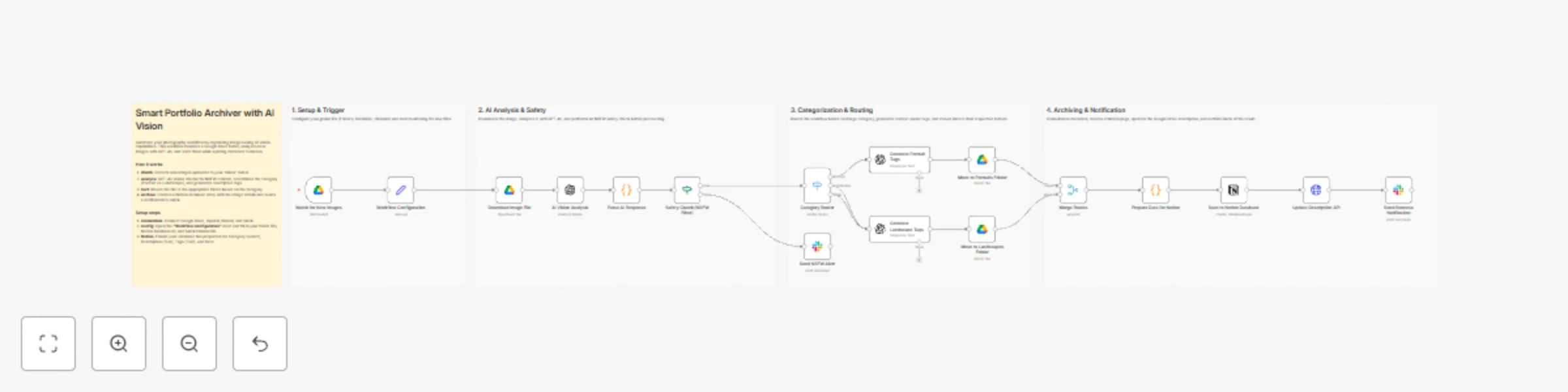
Workflow preview

$20/month : Unlimited workflows
2500 executions/month

THE #1 IN WEB SCRAPING
Scrape any website without limits
HOSTINGER  Early Deal
DISCOUNT 20% Try free
Early DealDISCOUNT 20%
Self-hosted n8n
Unlimited workflows - from $4.99/mo

#1 hub for scraping, AI & automation
6000+ actors - $5 credits/mo
Important notice
This workflow is provided as-is. Please review and test before using in production.
Overview
Overview
This template is ideal for photographers, graphic designers, and creative professionals who manage large volumes of visual assets. It is also perfect for Digital Asset Managers looking for a customizable, automated solution to organize files without manual tagging.
What it does
When a new image is uploaded to a designated "Inbox" folder in Google Drive, the workflow performs the following actions:
- AI Analysis: Uses GPT-4o to analyze the image content, generating a description, extracting dominant colors, and determining the category (e.g., Portrait vs. Landscape).
- Safety Check: Runs an AI-based NSFW filter. If inappropriate content is detected, the process stops, and a warning is sent to Slack.
- Smart Sorting: Automatically moves the file into the correct subfolder based on its category.
- Contextual Tagging: Generates specific tags (e.g., "smile, natural light" for portraits) and updates the file metadata.
- Archiving: Creates a comprehensive entry in a Notion Database with the image link, tags, and description.
- Notification: Sends a success alert to Slack with a summary of the archived asset.
How to set up
This workflow is designed to be plug-and-play using a central configuration node.
- Credentials: Connect your Google Drive, OpenAI, Notion, and Slack accounts in n8n.
- Set Variables: Open the node named "Workflow Configuration". Replace the placeholder IDs with your actual Folder IDs (for Inbox, Portraits, and Landscapes), Notion Database ID, and Slack Channel ID.
- Prepare Notion: Create a Database in Notion with the following properties:
- Category (Select)
- Description (Rich Text)
- Image URL (URL)
- Tags (Rich Text)
- Date (Date)
Requirements
- n8n Version: 1.0 or later.
- OpenAI API: Access to the gpt-4o model is recommended for accurate vision analysis.
- Google Drive: A specific folder structure (Inbox, Portraits, Landscapes).
- Notion: A dedicated database for the portfolio.
- Slack: A channel for notifications.
How to customize
- Add Categories: You can expand the "Category Router" (Switch node) to include more specific genres like "Architecture," "Macro," or "Street," and add corresponding paths.
- Adjust Prompts: Modify the system prompts in the AI nodes to change the language of the output or the style of the generated tags.
- Change Output: Connect to Airtable or Excel instead of Notion if you prefer a different database system.