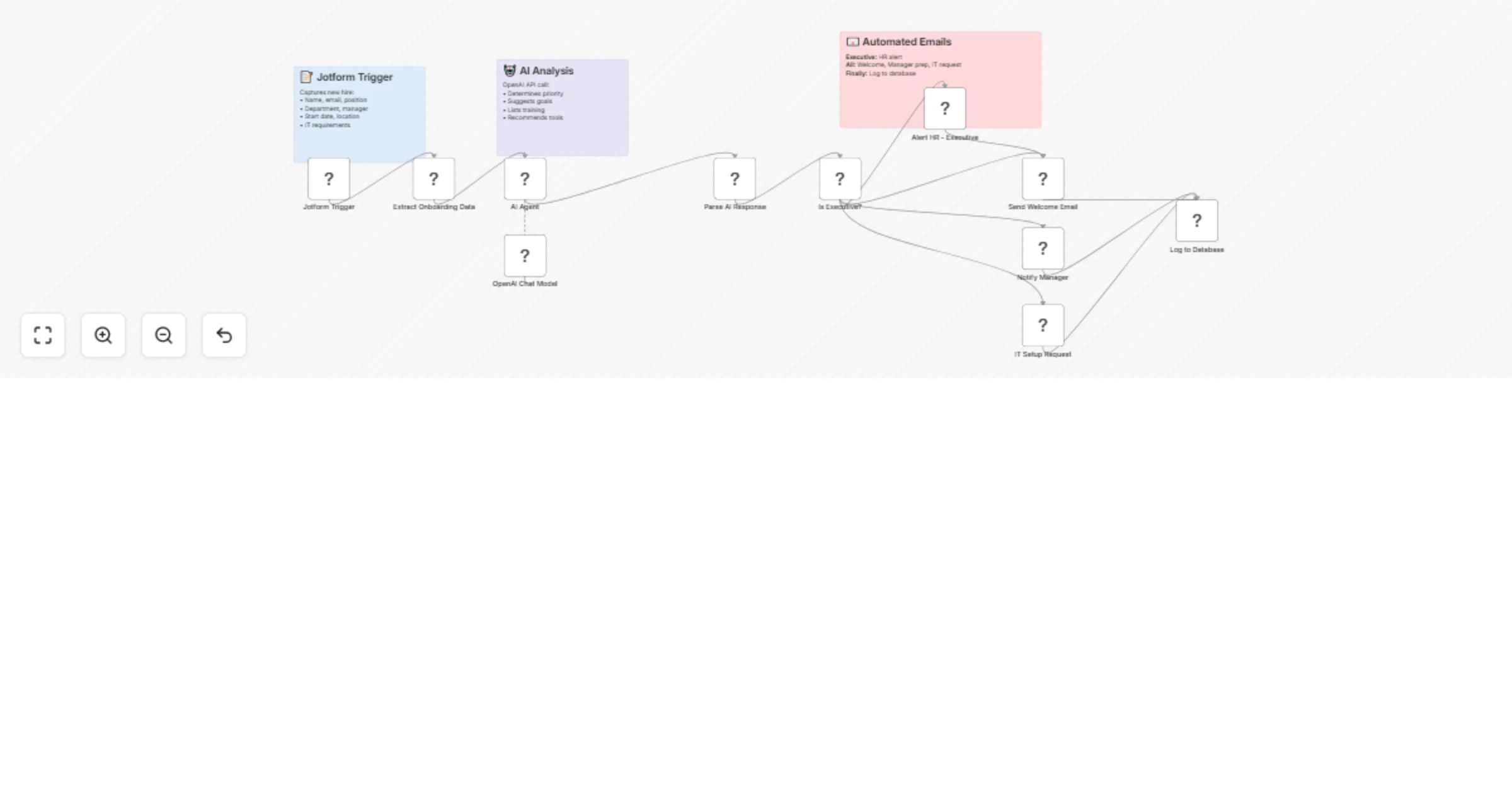
Automate employee onboarding with Jotform, GPT-4o-mini & Google Workspace

Workflow preview

Workflow preview
100%
Automate employee onboarding with Jotform, GPT-4o-mini & Google Workspace preview
Open on n8n.io

Important notice

This workflow is provided as-is. Please review and test before using in production.

1. Workflow Overview

1. Who's It For HR teams managing multiple new hires monthly. Small to medium businesses automating onboarding processes. Companies wanting consistent onboarding experiences. Remote first teams nee...

Best for

  • HR automation workflows
  • AI Chatbot automation workflows
  • intermediate n8n builders looking for reusable templates

Tools used

n8n-nodes-base.set, n8n-nodes-base.code, n8n-nodes-base.if, n8n-nodes-base.gmail, n8n-nodes-base.googlesheets, n8n-nodes-base.stickynote, @n8n/n8n-nodes-langchain.agent, @n8n/n8n-nodes-langchain.lmchatopenai

Source and attribution

This workflow is cataloged by N8N Workflows and links back to its original n8n.io source page by Jitesh Dugar.

Original n8n.io source

1.1 Workflow description

Title
Automate employee onboarding with Jotform, GPT-4o-mini & Google Workspace
Workflow name
Automate employee onboarding with Jotform, GPT-4o-mini & Google Workspace

1. Who's It For

  • HR teams managing multiple new hires monthly.
  • Small-to-medium businesses automating onboarding processes.
  • Companies wanting consistent onboarding experiences.
  • Remote-first teams needing streamlined provisioning.
  • Growing startups scaling their hiring operations.
  • Organizations seeking data-driven onboarding insights.

2. How It Works

  • Captures new hire data via Jotform (name, email, position, department, start date).
  • Extracts employee information including IT requirements and preferences.
  • Analyzes role with AI Agent (GPT-4o-mini) for intelligent profiling.
  • Determines priority level: standard, high, or executive.
  • Generates personalized onboarding goals and training recommendations.
  • Routes executive hires to HR alert path for VIP treatment.
  • Sends welcome email to new employee with personalized plan.
  • Notifies manager with prep checklist and onboarding goals.
  • Creates IT setup request with hardware and software requirements.
  • Logs all data to Google Sheets for tracking and analytics.
  • Offers: AI-powered planning, smart routing, automated notifications, centralized tracking.

3. How to Set Up

    1. Create Jotform with required fields (employee name, email, position, department, start date, manager, laptop type, experience level).
    1. Import workflow JSON to n8n via Workflows → Import from File.
    1. Add credentials: Jotform API, OpenAI API, Gmail OAuth2, Google Sheets.
    1. Update Jotform Trigger node with your form ID.
    1. Configure Extract Onboarding Data node field mappings to match your form.
    1. Add OpenAI API key to OpenAI Chat Model node.
    1. Update email addresses in Gmail nodes (welcome email, manager notification, IT request, HR alert).
    1. Create Google Sheet with columns matching the Log to Database node.
    1. Connect Google Sheets node to your spreadsheet.
    1. Customize AI Agent system prompt for your company culture.
    1. Test workflow with sample Jotform submission.
    1. Activate workflow and monitor executions.

Requirements

  • n8n instance (cloud or self-hosted with LangChain support).
  • Credentials: Jotform API key, OpenAI API key, Gmail OAuth2, Google Sheets access.
  • Jotform account for employee onboarding forms.
  • Google Workspace for email and spreadsheet integration.
  • OpenAI API credits (~$0.01-0.03 per employee with gpt-4o-mini).

Core Features

  • AI-Powered Analysis: Intelligent role assessment and priority classification.
  • Smart Routing: Executive hires get VIP treatment with HR alerts.
  • Personalized Welcome Emails: Customized onboarding plans with goals and training.
  • Manager Preparation: Automated prep checklist with employee details and expectations.
  • IT Provisioning: Detailed setup requests with hardware and software needs.
  • Database Logging: Complete audit trail in Google Sheets for analytics.
  • Flexible Configuration: Easy customization for different company needs.
  • Scalable Processing: Handles unlimited onboarding submissions automatically.

Use Cases & Applications

  • HR Departments: Automate repetitive onboarding tasks for all new hires.
  • Remote Companies: Streamline equipment shipping and virtual onboarding.
  • Fast-Growing Startups: Scale hiring without increasing HR headcount.
  • IT Teams: Reduce equipment provisioning turnaround time.
  • Managers: Get standardized prep instructions for every new team member.
  • Executive Hiring: VIP onboarding path for leadership positions.

Key Benefits

  • Time Savings: 15+ hours saved per hire on manual coordination.
  • Consistency: Every employee gets the same high-quality onboarding experience.
  • Personalization: AI tailors plans based on role, department, and experience.
  • Visibility: Real-time tracking of all onboarding activities in one place.
  • Scalability: Handle 1 or 100 hires per month with zero additional effort.
  • Compliance: Ensure all required steps are completed and documented.
  • Employee Experience: New hires feel welcomed and prepared from day one.
  • Data Insights: Track onboarding metrics and identify improvement areas.

Customization Options

  • Adjust AI priority classification logic for your org structure.
  • Add custom fields to Jotform (team size, remote/office, security clearance).
  • Modify email templates with company branding and messaging.
  • Create department-specific onboarding workflows.
  • Add Slack notifications for real-time alerts.
  • Integrate with HRIS systems via HTTP Request nodes.
  • Build custom reporting dashboards from Google Sheets data.
  • Add follow-up sequences (day 7, day 30, day 90 check-ins).
  • Include document signing workflows (offer letters, NDAs).
  • Schedule calendar events automatically for first day and orientations.

Important Disclaimers

  • Requires n8n with LangChain support for AI Agent functionality.
  • Test thoroughly before deploying to production onboarding.
  • Ensure GDPR/CCPA compliance when collecting employee data.
  • Monitor OpenAI API costs based on monthly hiring volume.
  • Verify email deliverability and avoid spam filters.
  • Keep employee data secure with proper access controls.
  • Review AI-generated content for accuracy and appropriateness.
  • Customize for your specific company policies and culture.
  • Backup Google Sheets data regularly for compliance.
  • Update manager and IT team email addresses before activation.

1.2 Logical Blocks

This catalog entry is organized from the workflow JSON. The node-level section below shows the executable blocks available for review before importing the template.

2. Block-by-Block Analysis

Block 1 - Extract Onboarding Data

Type / Role
n8n-nodes-base.set - set
Config choices
Version 3.4

Block 2 - Parse AI Response

Type / Role
n8n-nodes-base.code - code
Config choices
Version 2

Block 3 - Is Executive?

Type / Role
n8n-nodes-base.if - if
Config choices
Version 2.2

Block 4 - Alert HR - Executive

Type / Role
n8n-nodes-base.gmail - gmail
Config choices
Version 2.1

Block 5 - Send Welcome Email

Type / Role
n8n-nodes-base.gmail - gmail
Config choices
Version 2.1

Block 6 - Notify Manager

Type / Role
n8n-nodes-base.gmail - gmail
Config choices
Version 2.1

Block 7 - IT Setup Request

Type / Role
n8n-nodes-base.gmail - gmail
Config choices
Version 2.1

Block 8 - Log to Database

Type / Role
n8n-nodes-base.googleSheets - googleSheets
Config choices
Version 4.5

Block 9 - Sticky Note1

Type / Role
n8n-nodes-base.stickyNote - stickyNote
Config choices
Version 1

Block 10 - Sticky Note2

Type / Role
n8n-nodes-base.stickyNote - stickyNote
Config choices
Version 1

Block 11 - Sticky Note3

Type / Role
n8n-nodes-base.stickyNote - stickyNote
Config choices
Version 1

Block 12 - AI Agent

Type / Role
@n8n/n8n-nodes-langchain.agent - agent
Config choices
Version 2.2

Block 13 - OpenAI Chat Model

Type / Role
@n8n/n8n-nodes-langchain.lmChatOpenAi - lmChatOpenAi
Config choices
Version 1.2

Block 14 - Jotform Trigger

Type / Role
n8n-nodes-base.jotFormTrigger - jotFormTrigger
Config choices
Version 1

3. Summary Table

Workflow Automate employee onboarding with Jotform, GPT-4o-mini & Google Workspace
Complexity intermediate
Nodes 14
Categories HR, AI Chatbot
Author Jitesh Dugar
Published 13 Oct 2025

4. Reproducing the Workflow from Scratch

  1. 1. Download the workflow JSON

    Use the JSON export at /data/workflows/9569/9569.json as the source template for this automation.

  2. 2. Import the template into n8n

    Open n8n, import the downloaded JSON, and review each node before activating the workflow.

  3. 3. Configure credentials and variables

    Replace placeholder credentials, API keys, webhook URLs, account IDs, and environment-specific values with your own settings.

  4. 4. Test with sample data

    Run the workflow manually or in a staging workspace, inspect node output, and confirm downstream systems receive the expected data.

  5. 5. Activate and monitor

    Enable the workflow only after testing, then monitor executions, errors, and rate limits during the first production runs.

5. General Notes & Resources

Review imported nodes carefully before activation. This catalog entry is intended to help you inspect the workflow structure, understand required services, and find related templates faster.

Node names, credentials, schedules, webhook paths, and external service limits may need adjustment for your workspace.

Frequently asked questions

What does Automate employee onboarding with Jotform, GPT-4o-mini & Google Workspace do?

1. Who's It For HR teams managing multiple new hires monthly. Small to medium businesses automating onboarding processes. Companies wanting consistent onboarding experiences. Remote first teams nee...

What do I need before importing this workflow?

Review the workflow JSON, configure any required credentials in n8n, and test the automation in a safe workspace before using it in production.

Can I customize this workflow?

Yes. Use the block-by-block analysis and the downloadable JSON to inspect each node, then adjust credentials, prompts, schedules, filters, or destinations for your HR, AI Chatbot use case.