Automate employee offboarding with GPT-4 analysis & Jotform exit interviews

Workflow preview

Workflow preview
100%
Automate employee offboarding with GPT-4 analysis & Jotform exit interviews preview
Open on n8n.io

Important notice

This workflow is provided as-is. Please review and test before using in production.

1. Workflow Overview

Transform chaotic employee departures into secure, insightful offboarding experiences achieving zero security breaches, 100% equipment recovery, and actionable retention insights from every exit in...

Best for

  • HR automation workflows
  • AI Summarization automation workflows
  • advanced n8n builders looking for reusable templates

Tools used

n8n-nodes-base.code, @n8n/n8n-nodes-langchain.agent, n8n-nodes-base.set, n8n-nodes-base.if, n8n-nodes-base.gmail, n8n-nodes-base.googlesheets, n8n-nodes-base.stickynote, @n8n/n8n-nodes-langchain.lmchatopenai

Source and attribution

This workflow is cataloged by N8N Workflows and links back to its original n8n.io source page by Jitesh Dugar.

Original n8n.io source

1.1 Workflow description

Title
Automate employee offboarding with GPT-4 analysis & Jotform exit interviews
Workflow name
Automate employee offboarding with GPT-4 analysis & Jotform exit interviews

Transform chaotic employee departures into secure, insightful offboarding experiences - achieving zero security breaches, 100% equipment recovery, and actionable retention insights from every exit interview.

What This Workflow Does

Revolutionizes employee offboarding with AI-driven exit interview analysis and automated task orchestration:

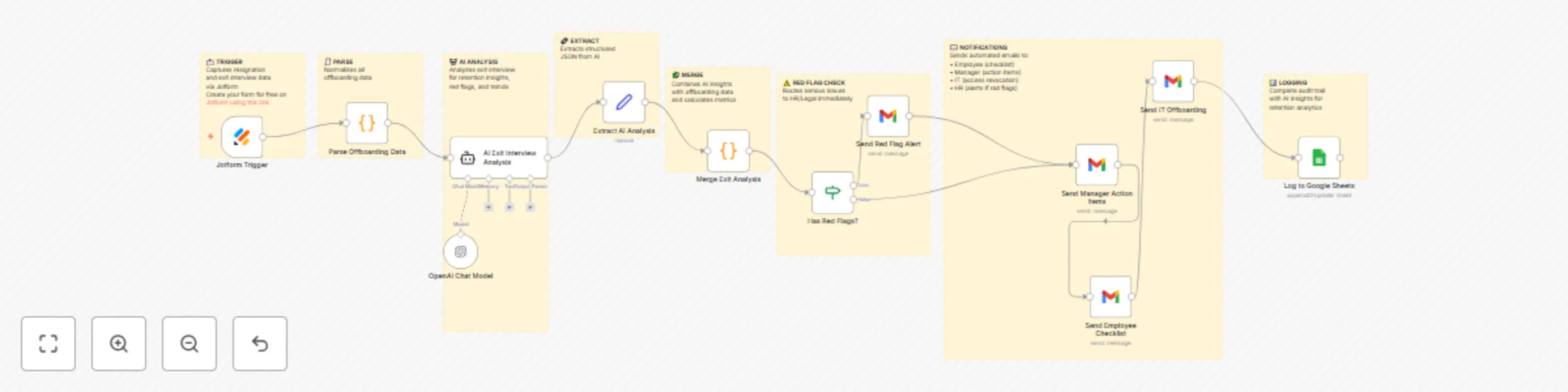
πŸ“ Exit Interview Capture - Jotform collects resignation details, ratings, feedback, and equipment inventory πŸ€– AI Sentiment Analysis - Advanced AI analyzes exit interviews for retention insights, red flags, and patterns ⚠️ Red Flag Detection - Automatically identifies serious issues (harassment, discrimination, ethics) for immediate escalation πŸ‘€ Manager Intelligence - Flags management issues and provides coaching recommendations πŸ” Access Revocation - Schedules automatic system access removal on last working day πŸ“¦ Equipment Tracking - Generates personalized equipment return checklist for each employee πŸ“š Knowledge Transfer - Assesses knowledge transfer risk and creates handover plan πŸ’° Retention Analytics - Identifies preventable departures and competitive intelligence πŸ“§ Automated Notifications - Sends checklists to employees, action items to managers, IT requests πŸ“Š Boomerang Prediction - Calculates likelihood of rehire and maintains alumni relationships

Key Features

  1. AI Exit Interview Analysis: GPT-4 provides 2+ analytical dimensions including sentiment, preventability, and red flags
  2. Preventability Scoring: AI calculates 0-100% score on whether departure was preventable
  3. Red Flag Escalation: Automatic detection of harassment, discrimination, ethics, or legal concerns
  4. Manager Performance Insights: Identifies management issues requiring coaching or intervention
  5. Sentiment Analysis: Analyzes tone, emotions, and overall sentiment from qualitative feedback
  6. Competitive Intelligence: Tracks where employees go and what competitors offer Knowledge Transfer Risk Assessment: Evaluates complexity and criticality of knowledge handover
  7. Boomerang Probability: Predicts likelihood (0-100%) of employee returning in future
  8. Department Trend Analysis: Identifies systemic issues in specific teams or departments
  9. Compensation Benchmarking: Flags compensation competitiveness issues Retention Recommendations: AI-generated actionable improvements prioritized by impact
  10. Equipment Tracking: Automatic inventory of laptops, phones, cards, and other company property

Perfect For

  1. Growing Companies: 50-5,000 employees with monthly turnover requiring structured offboarding
  2. Tech Companies: Protecting IP and system access with departing engineers and developers
  3. Healthcare Organizations: Compliance-critical offboarding with HIPAA and patient data access
  4. Financial Services: Regulated industries requiring audit trails and secure access revocation
  5. Professional Services: Knowledge-intensive businesses where brain drain is costly
  6. Retail & Hospitality: High-turnover environments needing efficient, consistent offboarding
  7. Remote-First Companies: Distributed teams requiring coordinated equipment recovery

What You'll Need

Required Integrations

  1. Jotform - Exit interview and resignation form (free tier works) Create your form for free on Jotform using this link

  2. OpenAI API - GPT-4 for AI exit interview analysis (~$0.20-0.50 per exit interview)

  3. Gmail - Automated notifications to employees, managers, IT, and HR

  4. Google Sheets - Exit interview database and retention analytics

Quick Start

  1. Import Template - Copy JSON and import into n8n
  2. Add OpenAI Credentials - Set up OpenAI API key (GPT-4 for best insights)
  3. Create Jotform Exit Interview - Build comprehensive form with these sections:
  4. Configure Gmail - Add Gmail OAuth2 credentials
  5. Setup Google Sheets: Create spreadsheet with "Exit_Interviews" sheet Replace YOUR_GOOGLE_SHEET_ID in workflow Columns will auto-populate on first submission

Customization Options

  1. AI Prompt Refinement: Tailor analysis for your industry, company culture, and specific concerns
  2. Red Flag Categories: Customize what constitutes a red flag for your organization Equipment Types: Add specialized equipment (tools, uniforms, parking passes)
  3. Access Systems: Integrate with your specific IT systems for automated revocation Knowledge Transfer Templates: Create role-specific handover checklists
  4. Manager Notifications: Add more details based on department or seniority
  5. Exit Interview Questions: Add industry-specific or company-specific questions
  6. Retention Focus Areas: Adjust AI to focus on specific retention priorities
  7. Rehire Workflows: Add automatic alumni network invitations for boomerang candidates
  8. Severance Processing: Add nodes for severance agreement generation and tracking
  9. Reference Check Process: Include reference policy notifications
  10. Benefits COBRA: Automate COBRA benefits notification workflows

Expected Results

  1. Zero security breaches from lingering access - automated revocation on last day
  2. 100% equipment recovery - automated tracking and follow-up
  3. 3x faster offboarding - 30 minutes vs 2 hours of manual coordination
  4. 85% actionable insights from exit interviews vs 20% with manual reviews
  5. 60% improvement in identifying preventable turnover
  6. 90% manager compliance with knowledge transfer (vs 40% manual)
  7. 50% reduction in repeat management issues through coaching identification
  8. 40% increase in boomerang rehires through positive offboarding experience
  9. Complete audit trail for legal compliance and investigations
  10. Department-level insights identifying systemic retention issues

Use Cases

  1. Tech Startup (100 Employees, High Growth) Engineer resigns to join competitor. AI detects compensation issue (40% below market), flags manager micromanagement concerns, and identifies preventable departure (preventability: 85%). HR immediately initiates compensation review for engineering team, schedules manager coaching, and retains 3 other engineers considering leaving. Access to codebase revoked automatically on last day. Boomerang probability: 70% - maintains relationship for future recruiting.
  2. Healthcare System (500 Nurses) Nurse leaves citing burnout. AI identifies systemic staffing issues in ER department affecting 15% of departures. Flags potential HIPAA violation concern requiring investigation. Automatically revokes EHR access on final day. Equipment recovery (badge, pager, scrubs) tracked with 100% success. Exit insights lead to ER staffing model changes, reducing nurse turnover by 30%.
  3. Financial Services Firm Compliance officer departs. AI red flags potential ethics concern requiring immediate investigation. Legal team notified within minutes. Knowledge transfer flagged as "critical risk" due to regulatory expertise. Detailed 30-day handover plan auto-generated. All system access revoked immediately. Complete audit trail maintained for regulatory review. Investigation reveals process gap, not ethical issue, preventing regulatory exposure.
  4. Retail Chain (2,000 Employees) Store manager exits. AI aggregates insights across 50 recent retail departures, identifying district manager as common thread (manager rating consistently 2/5). Regional HR intervenes with district manager coaching. Equipment return (keys, registers codes, uniforms) automated via checklist. 95% equipment recovery vs previous 60%. Sentiment trends show seasonal staff prefer flexible scheduling - policy updated chain-wide. Remote Software Company
  5. Developer in different timezone resigns. Automated offboarding coordinates across 3 time zones: access revoked at EOD local time, equipment return label emailed internationally, knowledge transfer scheduled with overlap hours. AI detects "career growth" as preventable issue - company implements career ladder framework, reducing senior developer attrition by 45%.

Pro Tips

  1. Timing Matters: Send Jotform link 1 week before last day for honest feedback (not on exit day)
  2. Anonymity Option: Consider anonymous feedback for more candid responses (separate form)
  3. Benchmark Scoring: After 50+ exits, calculate your company's average preventability score
  4. Manager Patterns: Track exits by manager to identify coaching needs early
  5. Department Trends: Monthly reviews of AI insights by department for systemic issues
  6. Compensation Data: Cross-reference "compensation issue" flags with market data
  7. Boomerang Program: Create formal alumni network for high-probability boomerang candidates
  8. Equipment Deposits: Consider requiring deposits for easier equipment recovery
  9. Exit Interview Training: Train managers on how to act on AI insights constructively
  10. Legal Review: Have legal team review red flag escalation categories quarterly
  11. Continuous Improvement: Use AI recommendations to create quarterly retention action plans
  12. Stay Interviews: Use exit interview insights to inform "stay interview" questions for current employees

Learning Resources

This workflow demonstrates advanced n8n automation patterns:

  1. AI Agents with complex structured output for multi-dimensional analysis, Sentiment analysis and natural language processing
  2. Conditional escalation based on severity and red flags
  3. Multi-stakeholder notifications with role-specific messaging
  4. Risk assessment algorithms for knowledge transfer and preventability
  5. Pattern recognition across qualitative feedback
  6. Equipment inventory management with dynamic list generation
  7. Compliance automation for access revocation scheduling
  8. Predictive analytics for boomerang probability

Perfect for learning AI-powered HR automation and organizational analytics! πŸ“Š Workflow Architecture πŸ“ Jotform Exit Interview Submission ↓ 🧾 Parse Offboarding Data ↓ πŸ€– AI Exit Interview Analysis (GPT-4) β”‚ β”œβ”€ Retention analysis (preventability scoring) β”‚ β”œβ”€ Sentiment analysis (tone, emotions) β”‚ β”œβ”€ Manager performance evaluation β”‚ β”œβ”€ Department insights β”‚ β”œβ”€ Compensation benchmarking β”‚ β”œβ”€ Knowledge transfer risk assessment β”‚ β”œβ”€ Competitor intelligence β”‚ β”œβ”€ Red flag detection β”‚ β”œβ”€ Boomerang probability β”‚ └─ Action item generation ↓ πŸ”— Extract AI Analysis (JSON) ↓ 🧩 Merge Exit Analysis with Data β”‚ β”œβ”€ Calculate days until last day β”‚ β”œβ”€ Build equipment checklist β”‚ └─ Assess urgency levels ↓ ⚠️ Has Red Flags? β”œβ”€ TRUE β†’ 🚨 Send Red Flag Alert (HR Director/Legal) β”‚ ↓ └─ FALSE β†’ πŸ“§ Send Manager Action Items ↓ βœ‰οΈ Send Employee Checklist ↓ πŸ” Send IT Offboarding Request ↓ πŸ“Š Log to Google Sheets

Ready to transform employee offboarding? Import this template and turn departures into retention insights while maintaining security and professionalism. Every exit becomes a learning opportunity! πŸšͺ✨ Questions or customization needs? The workflow includes detailed sticky notes explaining each AI analysis component and routing decision.

1.2 Logical Blocks

This catalog entry is organized from the workflow JSON. The node-level section below shows the executable blocks available for review before importing the template.

2. Block-by-Block Analysis

Block 1 - Parse Offboarding Data

Type / Role
n8n-nodes-base.code - code
Config choices
Version 2

Block 2 - AI Exit Interview Analysis

Type / Role
@n8n/n8n-nodes-langchain.agent - agent
Config choices
Version 1.6

Block 3 - Extract AI Analysis

Type / Role
n8n-nodes-base.set - set
Config choices
Version 3.3

Block 4 - Merge Exit Analysis

Type / Role
n8n-nodes-base.code - code
Config choices
Version 2

Block 5 - Has Red Flags?

Type / Role
n8n-nodes-base.if - if
Config choices
Version 2

Block 6 - Send Red Flag Alert

Type / Role
n8n-nodes-base.gmail - gmail
Config choices
Version 2.1

Block 7 - Send Employee Checklist

Type / Role
n8n-nodes-base.gmail - gmail
Config choices
Version 2.1

Block 8 - Send Manager Action Items

Type / Role
n8n-nodes-base.gmail - gmail
Config choices
Version 2.1

Block 9 - Send IT Offboarding

Type / Role
n8n-nodes-base.gmail - gmail
Config choices
Version 2.1

Block 10 - Log to Google Sheets

Type / Role
n8n-nodes-base.googleSheets - googleSheets
Config choices
Version 4.4

Block 11 - Sticky Note

Type / Role
n8n-nodes-base.stickyNote - stickyNote
Config choices
Version 1

Block 12 - Sticky Note1

Type / Role
n8n-nodes-base.stickyNote - stickyNote
Config choices
Version 1

Block 13 - Sticky Note2

Type / Role
n8n-nodes-base.stickyNote - stickyNote
Config choices
Version 1

Block 14 - Sticky Note3

Type / Role
n8n-nodes-base.stickyNote - stickyNote
Config choices
Version 1

Block 15 - Sticky Note4

Type / Role
n8n-nodes-base.stickyNote - stickyNote
Config choices
Version 1

Block 16 - Sticky Note5

Type / Role
n8n-nodes-base.stickyNote - stickyNote
Config choices
Version 1

Block 17 - Sticky Note6

Type / Role
n8n-nodes-base.stickyNote - stickyNote
Config choices
Version 1

Block 18 - Sticky Note7

Type / Role
n8n-nodes-base.stickyNote - stickyNote
Config choices
Version 1

Block 19 - OpenAI Chat Model

Type / Role
@n8n/n8n-nodes-langchain.lmChatOpenAi - lmChatOpenAi
Config choices
Version 1.2

Block 20 - Jotform Trigger

Type / Role
n8n-nodes-base.jotFormTrigger - jotFormTrigger
Config choices
Version 1

3. Summary Table

Workflow Automate employee offboarding with GPT-4 analysis & Jotform exit interviews
Complexity advanced
Nodes 20
Categories HR, AI Summarization
Author Jitesh Dugar
Published 15 Oct 2025

4. Reproducing the Workflow from Scratch

  1. 1. Download the workflow JSON

    Use the JSON export at /data/workflows/9697/9697.json as the source template for this automation.

  2. 2. Import the template into n8n

    Open n8n, import the downloaded JSON, and review each node before activating the workflow.

  3. 3. Configure credentials and variables

    Replace placeholder credentials, API keys, webhook URLs, account IDs, and environment-specific values with your own settings.

  4. 4. Test with sample data

    Run the workflow manually or in a staging workspace, inspect node output, and confirm downstream systems receive the expected data.

  5. 5. Activate and monitor

    Enable the workflow only after testing, then monitor executions, errors, and rate limits during the first production runs.

5. General Notes & Resources

Review imported nodes carefully before activation. This catalog entry is intended to help you inspect the workflow structure, understand required services, and find related templates faster.

Node names, credentials, schedules, webhook paths, and external service limits may need adjustment for your workspace.

Frequently asked questions

What does Automate employee offboarding with GPT-4 analysis & Jotform exit interviews do?

Transform chaotic employee departures into secure, insightful offboarding experiences achieving zero security breaches, 100% equipment recovery, and actionable retention insights from every exit in...

What do I need before importing this workflow?

Review the workflow JSON, configure any required credentials in n8n, and test the automation in a safe workspace before using it in production.

Can I customize this workflow?

Yes. Use the block-by-block analysis and the downloadable JSON to inspect each node, then adjust credentials, prompts, schedules, filters, or destinations for your HR, AI Summarization use case.