Automate employee leave approvals with GPT, Gmail & Calendar integration
Workflow preview

$20/month : Unlimited workflows
2500 executions/month

THE #1 IN WEB SCRAPING
Scrape any website without limits
HOSTINGER  Early Deal
DISCOUNT 20% Try free
Early DealDISCOUNT 20%
Self-hosted n8n
Unlimited workflows - from $4.99/mo

#1 hub for scraping, AI & automation
6000+ actors - $5 credits/mo
Important notice
This workflow is provided as-is. Please review and test before using in production.
Overview
How it works
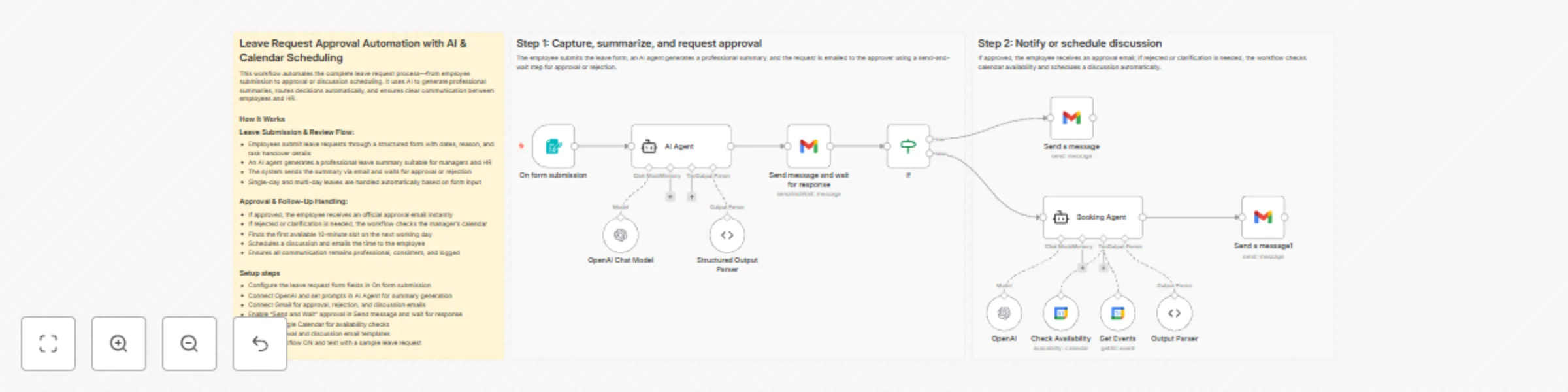
This workflow automates the complete employee leave approval process from submission to final resolution. Employees submit leave requests through a form, which are summarized professionally using AI and sent for approval via email. The workflow waits for the approver’s response and then either sends an approval confirmation or schedules a clarification discussion automatically. All communication is handled consistently with no manual follow-ups required.
Step-by-step
Step 1: Capture leave request, generate summary, and request approval
- On form submission – Captures employee details, leave dates, reason, and task handover information.
- AI Agent – Generates a professional, manager-ready summary of the leave request.
- OpenAI Chat Model – Provides the language model used to generate the summary.
- Structured Output Parser – Extracts the email subject and HTML body from the AI response.
- Send message and wait for response – Emails the summary to the approver and pauses the workflow until approval or rejection.
- If – Routes the workflow based on the approval decision.
Step 2: Notify employee or schedule discussion automatically
- Approved path
- Send a message – Sends an official leave approval email to the employee.
- Clarification or rejection path
- Booking Agent – Determines the next business day and finds the first available 10-minute slot.
- OpenAI – Applies scheduling logic to select the earliest valid slot.
- Get Events – Fetches existing calendar events to avoid conflicts.
- Check Availability – Confirms free time within working hours.
- Output Parser – Extracts the final meeting start time.
- Send a message1 – Emails the employee with the scheduled discussion details.
- Booking Agent – Determines the next business day and finds the first available 10-minute slot.
- Approved path
Why use this?
- Eliminate manual approval follow-ups and email back-and-forth
- Ensure consistent, professional communication for every leave request
- Automatically handle both approvals and clarification scenarios
- Reduce manager effort with AI-generated summaries
- Schedule discussions without manual calendar coordination