Automate employee birthdays & work anniversaries with Google Gemini and Slack

Workflow preview

Workflow preview
100%
Automate employee birthdays & work anniversaries with Google Gemini and Slack preview
Open on n8n.io

Important notice

This workflow is provided as-is. Please review and test before using in production.

1. Workflow Overview

Replace BillyBot: Free Slack Employee Birthday & Anniversary Automation Who's it for HR teams, team leaders, and operations managers looking to automate employee celebrations without expensive thir...

Best for

  • HR automation workflows
  • Multimodal AI automation workflows
  • intermediate n8n builders looking for reusable templates

Tools used

@n8n/n8n-nodes-langchain.lmchatgooglegemini, n8n-nodes-base.stickynote, n8n-nodes-base.scheduletrigger, n8n-nodes-base.googlesheets, n8n-nodes-base.if, n8n-nodes-base.aggregate, @n8n/n8n-nodes-langchain.agent, n8n-nodes-base.slack

Source and attribution

This workflow is cataloged by N8N Workflows and links back to its original n8n.io source page by Roshan Ramani.

Original n8n.io source

1.1 Workflow description

Title
Automate employee birthdays & work anniversaries with Google Gemini and Slack
Workflow name
Automate employee birthdays & work anniversaries with Google Gemini and Slack

Replace BillyBot: Free Slack Employee Birthday & Anniversary Automation

Who's it for

HR teams, team leaders, and operations managers looking to automate employee celebrations without expensive third-party tools like BillyBot. Perfect for startups to enterprise teams wanting to save $600-2,400+ annually while maintaining personalized, engaging employee recognition.

What it does

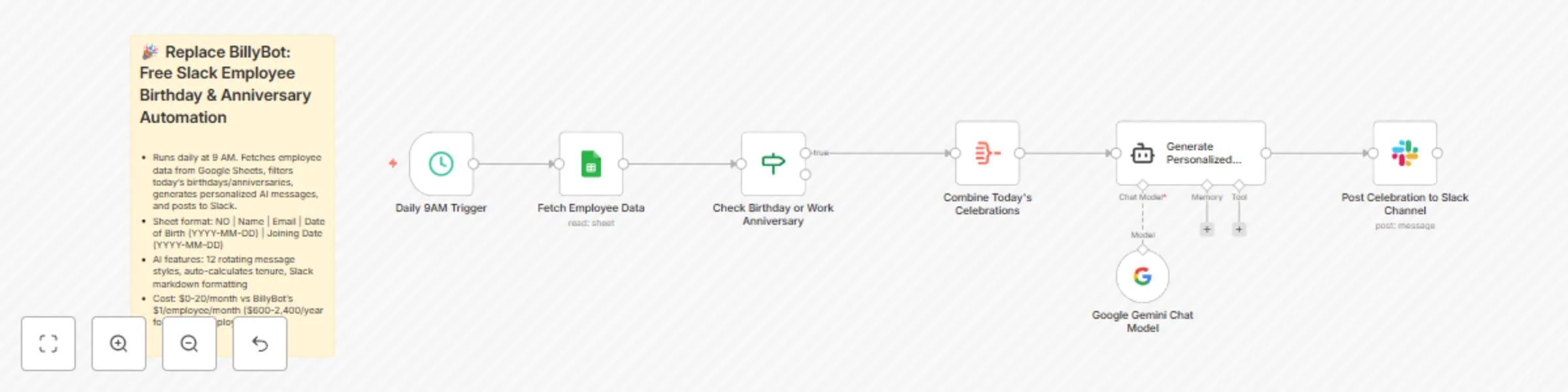
This workflow automatically monitors your employee database daily and posts AI-generated, unique celebration messages to Slack for birthdays and work anniversaries. Unlike generic bots, it creates personalized messages that never repeat, rotating through 12 different styles and tones to keep celebrations fresh and authentic.

How it works

  1. Daily Check: Runs every morning at 9 AM to scan your employee Google Sheet
  2. Smart Filtering: Matches today's date against employee birthdays and joining dates
  3. Data Aggregation: Collects all celebrating employees into a single payload
  4. AI Generation: Google Gemini creates unique, heartfelt messages with proper Slack formatting
  5. Auto-Post: Sends personalized celebrations directly to your chosen Slack channel

The AI ensures no two messages feel templated, calculating years of service for anniversaries and adapting tone based on tenure length.

Requirements

  • Google Sheets with employee data (columns: NO, Name, Email, Date of Birth, Joining Date in YYYY-MM-DD format)
  • Slack workspace with bot permissions to post messages
  • Google Gemini API key (free tier included)
  • n8n Cloud ($20/month) or self-hosted n8n (free)

Cost comparison: Save $600-2,400+ per year

BillyBot pricing: $1 per employee/month

  • 50 employees = $600/year
  • 100 employees = $1,200/year
  • 200 employees = $2,400/year

This solution: $0-20/month (unlimited employees)

  • Google Gemini API: FREE
  • Google Sheets API: FREE
  • Slack API: FREE
  • n8n: $20/month (Cloud) or $0 (self-hosted)

Your savings: 95-100% cost reduction regardless of team size.

Setup instructions

  1. Create Google Sheet: Add columns: NO, Name, Email, Date of Birth, Joining Date (ensure dates are YYYY-MM-DD format)
  2. Connect Google Sheets: Authenticate your Google account in the "Get row(s) in sheet" node
  3. Set up Slack: Create a Slack bot with chat:write permission and add to your celebration channel
  4. Configure Gemini: Add your Google Gemini API key to the "Google Gemini Chat Model" node
  5. Adjust Schedule: Change trigger time in "Schedule Trigger" node (default: 9 AM daily)
  6. Select Channel: Update Slack channel in "Send a message" node to your desired celebration channel
  7. Test: Run workflow manually to verify messages post correctly

Customization options

  • Change celebration time: Modify the Schedule Trigger to any hour (e.g., 8 AM for morning celebrations)
  • Adjust message tone: Edit the AI Agent system prompt to match your company culture (formal, casual, playful)
  • Multi-channel posting: Duplicate the Slack node to post to multiple channels (e.g., company-wide + team-specific)
  • Add upcoming reminders: Modify the IF node to check for celebrations within 7 days
  • Include photos: Extend the workflow to pull employee photos from your HR system
  • Custom emoji styles: Update the AI prompt to use your organization's custom Slack emojis

Key features

  • 12 rotating message styles prevent repetition
  • Automatic tenure calculation for work anniversaries
  • Culturally inclusive and professional tone
  • Mobile-optimized message length (1-3 lines)
  • Slack markdown formatting for visual appeal
  • Scales infinitely without additional cost

Note: Ensure your Google Sheet date formats are consistent (YYYY-MM-DD) for accurate date matching. The workflow processes dates in MM-DD format to match across years automatically.

1.2 Logical Blocks

This catalog entry is organized from the workflow JSON. The node-level section below shows the executable blocks available for review before importing the template.

2. Block-by-Block Analysis

Block 1 - Google Gemini Chat Model

Type / Role
@n8n/n8n-nodes-langchain.lmChatGoogleGemini - lmChatGoogleGemini
Config choices
Version 1

Block 2 - Sticky Note

Type / Role
n8n-nodes-base.stickyNote - stickyNote
Config choices
Version 1

Block 3 - Daily 9AM Trigger

Type / Role
n8n-nodes-base.scheduleTrigger - scheduleTrigger
Config choices
Version 1.2

Block 4 - Fetch Employee Data

Type / Role
n8n-nodes-base.googleSheets - googleSheets
Config choices
Version 4.7

Block 5 - Check Birthday or Work Anniversary

Type / Role
n8n-nodes-base.if - if
Config choices
Version 2.2

Block 6 - Combine Today's Celebrations

Type / Role
n8n-nodes-base.aggregate - aggregate
Config choices
Version 1

Block 7 - Generate Personalized Slack Message

Type / Role
@n8n/n8n-nodes-langchain.agent - agent
Config choices
Version 2

Block 8 - Post Celebration to Slack Channel

Type / Role
n8n-nodes-base.slack - slack
Config choices
Version 2.3

3. Summary Table

Workflow Automate employee birthdays & work anniversaries with Google Gemini and Slack
Complexity intermediate
Nodes 8
Categories HR, Multimodal AI
Author Roshan Ramani
Published 02 Nov 2025

4. Reproducing the Workflow from Scratch

  1. 1. Download the workflow JSON

    Use the JSON export at /data/workflows/10430/10430.json as the source template for this automation.

  2. 2. Import the template into n8n

    Open n8n, import the downloaded JSON, and review each node before activating the workflow.

  3. 3. Configure credentials and variables

    Replace placeholder credentials, API keys, webhook URLs, account IDs, and environment-specific values with your own settings.

  4. 4. Test with sample data

    Run the workflow manually or in a staging workspace, inspect node output, and confirm downstream systems receive the expected data.

  5. 5. Activate and monitor

    Enable the workflow only after testing, then monitor executions, errors, and rate limits during the first production runs.

5. General Notes & Resources

Review imported nodes carefully before activation. This catalog entry is intended to help you inspect the workflow structure, understand required services, and find related templates faster.

Node names, credentials, schedules, webhook paths, and external service limits may need adjustment for your workspace.

Frequently asked questions

What does Automate employee birthdays & work anniversaries with Google Gemini and Slack do?

Replace BillyBot: Free Slack Employee Birthday & Anniversary Automation Who's it for HR teams, team leaders, and operations managers looking to automate employee celebrations without expensive thir...

What do I need before importing this workflow?

Review the workflow JSON, configure any required credentials in n8n, and test the automation in a safe workspace before using it in production.

Can I customize this workflow?

Yes. Use the block-by-block analysis and the downloadable JSON to inspect each node, then adjust credentials, prompts, schedules, filters, or destinations for your HR, Multimodal AI use case.