Automate customer feedback classification with AI, Google Sheets, and Slack alerts

Workflow preview

Workflow preview
100%
Automate customer feedback classification with AI, Google Sheets, and Slack alerts preview
Open on n8n.io

Important notice

This workflow is provided as-is. Please review and test before using in production.

1. Workflow Overview

Customer Feedback Loop Analyzer (n8n Automated Workflow) This workflow automates the process of collecting customer feedback from forms and emails, analyzes it using AI, classifies it by category a...

Best for

  • Market Research automation workflows
  • AI Summarization automation workflows
  • intermediate n8n builders looking for reusable templates

Tools used

n8n-nodes-base.formtrigger, @n8n/n8n-nodes-langchain.lmchatgooglegemini, n8n-nodes-base.gmail, n8n-nodes-base.slack, n8n-nodes-base.gmailtrigger, n8n-nodes-base.code, @n8n/n8n-nodes-langchain.informationextractor, n8n-nodes-base.googlesheets

Source and attribution

This workflow is cataloged by N8N Workflows and links back to its original n8n.io source page by WeblineIndia.

Original n8n.io source

1.1 Workflow description

Title
Automate customer feedback classification with AI, Google Sheets, and Slack alerts
Workflow name
Automate customer feedback classification with AI, Google Sheets, and Slack alerts

Customer Feedback Loop Analyzer (n8n Automated Workflow)

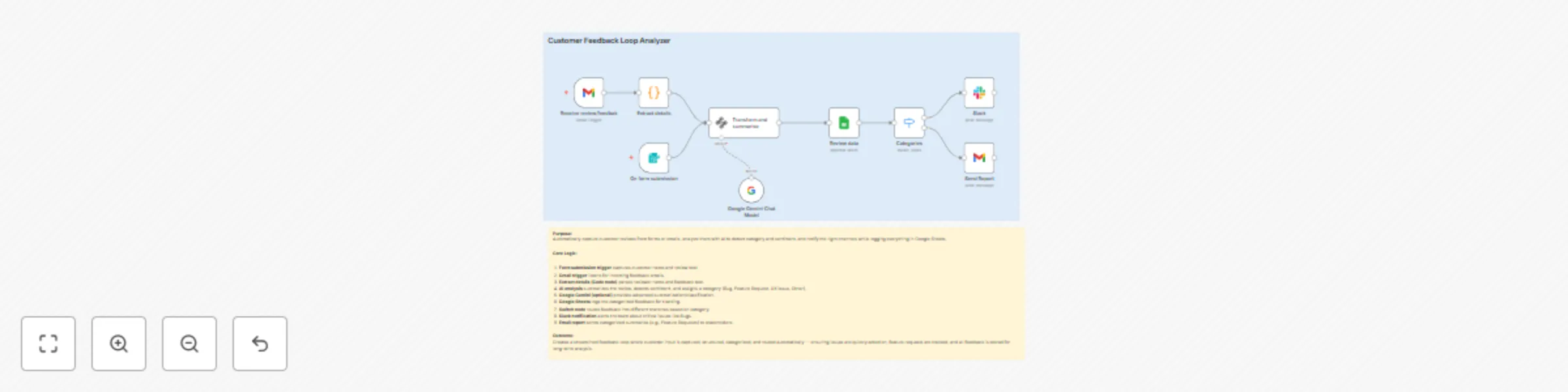
This workflow automates the process of collecting customer feedback from forms and emails, analyzes it using AI, classifies it by category and sentiment, logs it into Google Sheets, and routes it to the right communication channels like Slack or email. It closes the feedback loop efficiently by ensuring every review is categorized, tracked, and acted upon.

Who’s it for

  • Product managers wanting structured customer insights
  • Customer support teams needing fast issue routing
  • Engineering teams who want to be alerted to bugs quickly
  • Growth & UX teams tracking feature requests and usability feedback
  • Any business managing customer feedback at scale

How it works

  1. Form submission trigger captures reviews submitted via customer review forms.
  2. Gmail trigger listens for new feedback emails.
  3. Extract details (Code node) parses sender details and extracts the actual review text.
  4. AI node (LLM) summarizes the feedback, determines sentiment, and classifies it (Bug, Feature Request, UX Issue, Other).
  5. Google Gemini (optional) provides advanced classification/summarization.
  6. Google Sheets node logs all structured feedback for historical tracking.
  7. Switch node routes feedback into separate flows by category.
  8. Slack node instantly notifies the team of critical feedback (e.g., Bugs).
  9. Email node sends reports to relevant stakeholders (e.g., Feature Requests to product managers).

How to set up

  1. Import the workflow JSON into your n8n instance.
  2. Connect credentials for:
    • Gmail (for receiving/sending feedback)
    • Google Sheets (for logging reviews)
    • Slack (for real-time team alerts)
  3. Configure your Google Sheet (columns for Date, Reviewer, Sentiment, Category, Feedback).
  4. Adjust the AI node prompt to reflect your team’s preferred categories.
  5. Set Slack channels and email recipients for notifications.
  6. Activate workflow.

Requirements

  • n8n (cloud or self-hosted)
  • Gmail API access (OAuth2 connected in n8n)
  • Google Sheets API access
  • Slack webhook or OAuth connection
  • (Optional) Google Gemini or another LLM integration

How to customize

  • Modify the AI prompt to classify into different categories (e.g., “Support Issue”, “Billing Problem”).
  • Extend the Google Sheet schema to include product version, tags, or priority scores.
  • Add a translation step if feedback is multilingual.
  • Replace Slack notifications with Teams/Discord if needed.
  • Connect to Jira or Trello to auto-create tasks for certain categories.

Add-ons

  • Sentiment-based alerts: Trigger Slack notifications only if sentiment is negative.
  • Monthly report generator: Compile all feedback into a PDF and email it automatically.
  • CRM integration: Sync categorized feedback into HubSpot or Salesforce.
  • Auto-response emails: Acknowledge receipt of customer feedback via Gmail.

Use Case Examples

  • SaaS product team routes all Bug feedback directly to engineering Slack channel.
  • UX team receives only “UX Issue” categorized feedback for design improvements.
  • Marketing team logs Feature Requests into Google Sheets for roadmap prioritization.
  • Customer support automatically responds with a thank-you email for all submissions.

Common Troubleshooting

Issue Possible Cause Solution
Workflow doesn’t trigger Gmail/Form node not authenticated Reconnect Gmail / check webhook form integration
No data extracted Code node parsing wrong field Update regex/parsing logic to match email format
AI classification fails Invalid LLM credentials or quota exceeded Reconnect LLM node / check usage limits
Feedback not logged Wrong Google Sheet ID or missing sharing Verify Sheet ID and grant access to connected account
Slack messages not sent Invalid webhook or channel not found Reconfigure Slack node with valid channel/webhook
Email reports fail Gmail OAuth token expired Refresh Gmail credentials in n8n

Need Help?

Our n8n automation experts at WeblineIndia can help you:

  • Fine-tune the AI prompts for better categorization accuracy
  • Build custom dashboards from your Google Sheet data
  • Add multilingual feedback handling
  • Connect to your ticketing system (Jira, Trello, Asana) for seamless issue tracking

1.2 Logical Blocks

This catalog entry is organized from the workflow JSON. The node-level section below shows the executable blocks available for review before importing the template.

2. Block-by-Block Analysis

Block 1 - On form submission

Type / Role
n8n-nodes-base.formTrigger - formTrigger
Config choices
Version 2.2

Block 2 - Google Gemini Chat Model

Type / Role
@n8n/n8n-nodes-langchain.lmChatGoogleGemini - lmChatGoogleGemini
Config choices
Version 1

Block 3 - Send Report

Type / Role
n8n-nodes-base.gmail - gmail
Config choices
Version 2.1

Block 4 - Slack

Type / Role
n8n-nodes-base.slack - slack
Config choices
Version 2.3

Block 5 - Receive review/feedbak

Type / Role
n8n-nodes-base.gmailTrigger - gmailTrigger
Config choices
Version 1.2

Block 6 - Extract details

Type / Role
n8n-nodes-base.code - code
Config choices
Version 2

Block 7 - Transform and summarise

Type / Role
@n8n/n8n-nodes-langchain.informationExtractor - informationExtractor
Config choices
Version 1.1

Block 8 - Review data

Type / Role
n8n-nodes-base.googleSheets - googleSheets
Config choices
Version 4.6

Block 9 - Categories

Type / Role
n8n-nodes-base.switch - switch
Config choices
Version 3.2

Block 10 - Sticky Note

Type / Role
n8n-nodes-base.stickyNote - stickyNote
Config choices
Version 1

Block 11 - Sticky Note1

Type / Role
n8n-nodes-base.stickyNote - stickyNote
Config choices
Version 1

3. Summary Table

Workflow Automate customer feedback classification with AI, Google Sheets, and Slack alerts
Complexity intermediate
Nodes 11
Categories Market Research, AI Summarization
Author WeblineIndia
Published 08 Sept 2025

4. Reproducing the Workflow from Scratch

  1. 1. Download the workflow JSON

    Use the JSON export at /data/workflows/8392/8392.json as the source template for this automation.

  2. 2. Import the template into n8n

    Open n8n, import the downloaded JSON, and review each node before activating the workflow.

  3. 3. Configure credentials and variables

    Replace placeholder credentials, API keys, webhook URLs, account IDs, and environment-specific values with your own settings.

  4. 4. Test with sample data

    Run the workflow manually or in a staging workspace, inspect node output, and confirm downstream systems receive the expected data.

  5. 5. Activate and monitor

    Enable the workflow only after testing, then monitor executions, errors, and rate limits during the first production runs.

5. General Notes & Resources

Review imported nodes carefully before activation. This catalog entry is intended to help you inspect the workflow structure, understand required services, and find related templates faster.

Node names, credentials, schedules, webhook paths, and external service limits may need adjustment for your workspace.

Frequently asked questions

What does Automate customer feedback classification with AI, Google Sheets, and Slack alerts do?

Customer Feedback Loop Analyzer (n8n Automated Workflow) This workflow automates the process of collecting customer feedback from forms and emails, analyzes it using AI, classifies it by category a...

What do I need before importing this workflow?

Review the workflow JSON, configure any required credentials in n8n, and test the automation in a safe workspace before using it in production.

Can I customize this workflow?

Yes. Use the block-by-block analysis and the downloadable JSON to inspect each node, then adjust credentials, prompts, schedules, filters, or destinations for your Market Research, AI Summarization use case.