Automate content publishing to TikTok, YouTube, Instagram, Facebook via Blotato
Workflow preview

$20/month : Unlimited workflows
2500 executions/month

THE #1 IN WEB SCRAPING
Scrape any website without limits
HOSTINGER  Early Deal
DISCOUNT 20% Try free
Early DealDISCOUNT 20%
Self-hosted n8n
Unlimited workflows - from $4.99/mo

#1 hub for scraping, AI & automation
6000+ actors - $5 credits/mo
Important notice
This workflow is provided as-is. Please review and test before using in production.
Overview
This workflow contains community nodes that are only compatible with the self-hosted version of n8n.
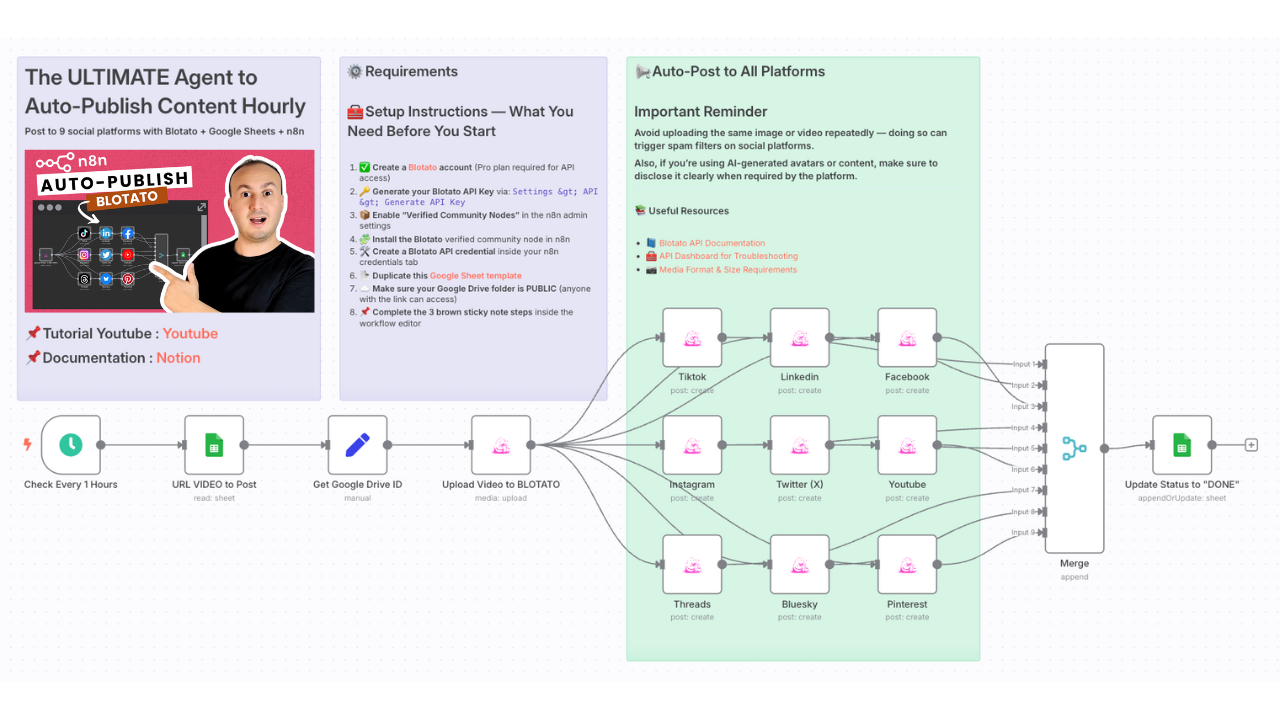
Automate Content Publishing to TikTok, YouTube, Instagram, Facebook via Blotato
🎯 Who is this for?
This workflow is perfect for:
- Content creators who post daily to multiple platforms
- Marketing teams managing brand presence across channels
- Solo entrepreneurs and social media managers looking to scale their output
- Anyone tired of uploading content manually across apps
💡 What problem is this solving?
Managing content across platforms is time-consuming.
You need to:
- Track posts per platform
- Upload videos manually
- Adapt captions and posting time
- Avoid repetitive mistakes
This workflow solves all of that by centralizing everything in one place (Google Sheets) and automating it via Blotato.
⚙️ What this workflow does
Every hour, this workflow will:
- Check your Google Sheet for any post marked as
"TO GO" - Select one item at a time (avoids spam and overposting)
- Extract media from a shared Google Drive link
- Upload the media to Blotato
- Publish it automatically to:
- TikTok
- YouTube Shorts
- Update the post status in your Sheet to
"Posted"
🧰 Setup
Before running this template, make sure you have:
- ✅ A Blotato account (Pro plan required for API key)
- 🔑 Generated your Blotato API key (
Settings > API > Generate) - 📦 Enabled Verified Community Nodes in n8n Admin Panel
- 🧩 Installed the Blotato node via the community nodes list
- 🛠 Created a Blotato credential in n8n using your API key
- ☁️ Made sure your media folder in Google Drive is set to Anyone with the link can view
- 📌 Followed the 3 setup steps in the brown sticky notes inside the workflow
🛠 How to customize this workflow
- Add new platform nodes (LinkedIn, Threads, Pinterest, etc.) using Blotato
- Adjust the scheduling frequency from hourly to daily or weekly
- Add an approval layer (Slack/Telegram) before publishing
- Customize your captions dynamically using GPT or formulas in Sheets
- Use tags, categories, or campaign tracking for analytics
📄 Documentation: Notion Guide